
Keep query behavior and authorization evidence separate
Preserve a baseline request, one controlled change and the application outcome in your authorized disposable lab. An error or different redirect can have several causes; use reliable application or query evidence before attributing it to SQL interpretation. Verify the resulting account and permitted resource access independently. Remediation should use appropriate parameterized queries and authorization checks rather than relying on a blacklist. Source and scope.
Kioptrix Level 4 SQLi: Clean Baselines & Causality
If you’re working through a Kioptrix Level 4 SQL Injection login bypass walkthrough (no Metasploit), the hard part isn’t typing something magical—it’s keeping your test signal clean when the UI looks identical on success and failure, proxies get noisy, and your browser starts lying for free.
Keep guessing and you lose the only thing that matters in a lab: causality. And without causality, you don’t have a finding—you have a story.
Check whether untrusted input changes query meaning or authentication state using measurable deltas: status, response length, redirect chain, and Set-Cookie behavior.
A non-destructive rhythm using Burp or OWASP ZAP. Repeat from a fresh session and confirm with a follow-up request to verify the “leak of truth.”
Don’t chase “vulnerabilities” that are just messy state. Compare, don’t vibe. Slow down and label everything to filter out the noise.
Understand the remediation: parameterized queries, least-privilege DB users, safer error handling, and robust logging.
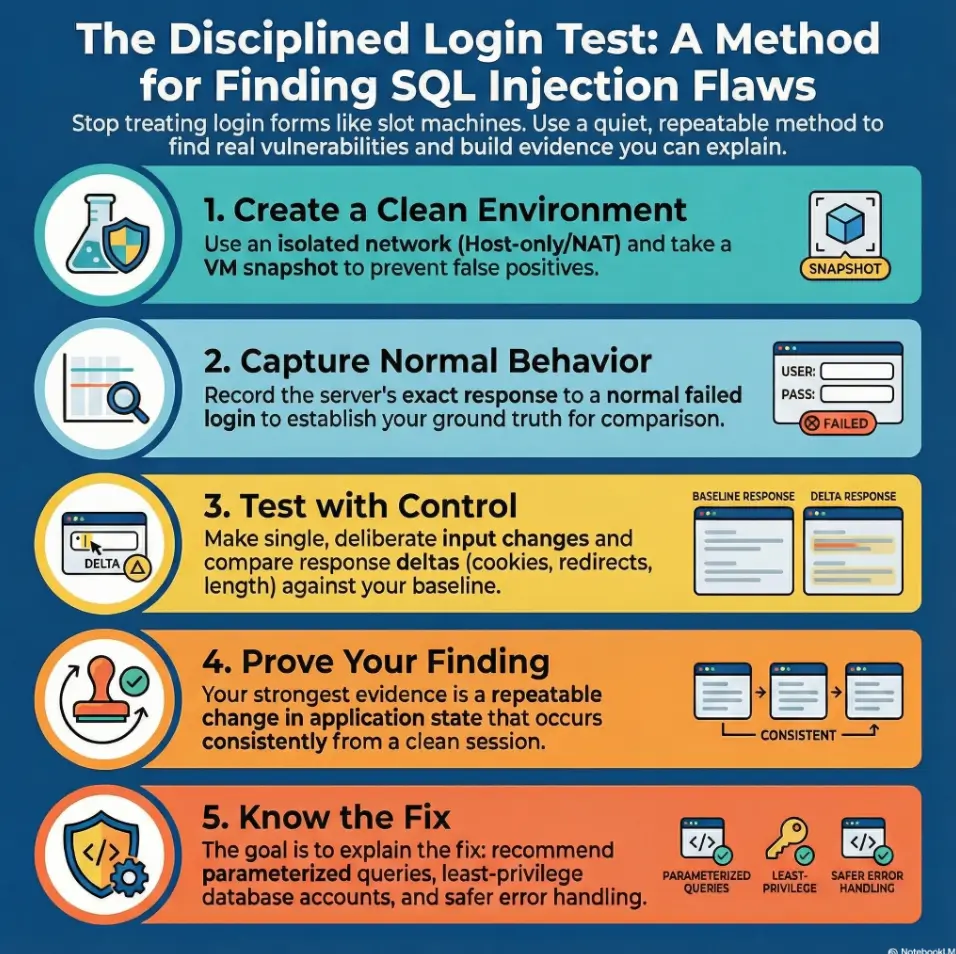
To approach a Kioptrix Level 4 SQL injection login bypass without Metasploit, treat the login form as a data pipeline, not a guessing game: isolate the VM, capture baseline requests, look for response behaviors that suggest unsafe query building, validate with non-destructive tests, and document evidence (request/response diffs + state changes). Then pivot into remediation: parameterized queries, least-privilege DB users, safer errors, and logging.
Educational guidance for authorized testing in a private lab/CTF environment only. Do not use on real systems you don’t own or explicitly have permission to test. This article avoids providing copy-paste login bypass payloads; it focuses on recognition, validation, evidence, and fixes.
Table of Contents
1) Lab-first guardrails: what “authorized” actually means
Before we touch a login form, we lock the world down. Not because it’s dramatic—because it’s professional. “Authorized” means you can explain, in one breath, where the target lives, who owns it, and what you’re allowed to do. In a Kioptrix Level 4 VM, that’s easy. In real life, it’s the part that keeps people employed.
- Isolation: run the VM in Host-only or a private NAT network so nothing leaks.
- Scope: one VM, one web app, and your own attacking machine (Kali or equivalent).
- Intent: learn the vulnerability pattern and how to document it—not “win” by being noisy.
Small lived-experience moment: the first time I rushed a lab, I spent 40 minutes “debugging SQLi” that was actually my VM on the wrong network. Humbling. Cheap lesson. Take the cheap lesson.
- Keep the target isolated.
- Record what you change.
- Prefer quiet proof over loud success.
Apply in 60 seconds: Take a snapshot and write down the target IP + login URL in a single note.
Isolated network setup (Host-only/NAT) so nothing leaks
Pick the simplest networking mode that still lets your attacking VM reach the target. If you use bridged networking, you’re inviting unnecessary variables (and accidental exposure). A safe, closed lab setup keeps the room sealed and your learning signal clean.
Snapshots you’ll thank yourself for later
Snapshots aren’t just “undo.” They’re psychological safety. You’ll test more carefully when you know you can rewind without shame. And you’ll stop turning every small mistake into a full rebuild. If you’re building a repeatable environment long-term, lab infrastructure mastery habits pay for themselves fast.
Evidence discipline: notes, timestamps, and reproducible steps
From the first login request you capture, log: time, what changed, and what you observed. Not paragraphs—just facts. A clean timeline is how you turn “I think it’s vulnerable” into “I can demonstrate it.” If your notes keep collapsing into chaos, steal a system: note-taking systems for pentesting are boring until they save you.
2) Who this is for / not for
This guide is designed for people who want to learn the method, not memorize a magic phrase. If your goal is to understand how login SQL injection shows itself—and how defenders fix it—you’re in the right place.
For: CTF learners, pentest students, defensive-minded engineers
- You’re practicing in a local lab (Kioptrix Level 4 VM).
- You want a workflow you can reuse on other training apps.
- You care about evidence quality and remediation, not just “got in.”
Not for: “I found a login page online” curiosity (stop here)
If this is about a real website or a system you don’t own: stop. There’s no romantic “but I was just curious” exception. If you want to learn, use legal training targets and sandbox labs. Your future self deserves a clean record.
If you’re on a real engagement: rules of engagement checklist
On a paid/authorized test, you get written scope, testing windows, and explicit permission for techniques. If you don’t have that, you don’t have authorization—no matter how confident you feel.
- Yes/No: Is the target a local VM you control?
- Yes/No: Is your network mode isolated (Host-only/NAT)?
- Yes/No: Do you have a snapshot you can revert to?
- Yes/No: Are you logging changes (even in a simple note)?
Next step: If any answer is “No,” fix that first—your testing signal will improve immediately.
3) Environment setup that prevents false positives
Most “SQL injection success” stories are secretly stories about bad baselines. A login app has state: cookies, redirects, CSRF tokens, caching, and tiny behaviors that matter. If you don’t control for those, you’ll interpret normal app quirks as vulnerability signals.
Confirm target IP, routes, and name resolution (the boring stuff that saves hours)
Proxy + capture workflow (Burp/ZAP) without tool-dependence
Use a proxy to observe the exact request shape. Burp Suite (PortSwigger) and OWASP ZAP both work. The point isn’t brand loyalty—it’s seeing parameters, headers, cookies, and redirects with clarity. If Burp setup keeps derailing you, use a reliable baseline like Burp external browser setup in Kali so the tooling disappears and the HTTP becomes the lesson.
- You want polished request editing.
- You care about clean history and comparisons.
- You prefer open-source workflow.
- You want a solid baseline proxy fast.
- You’re learning HTTP fundamentals.
- You only need request visibility.
Next step: Pick one tool and stick with it for the whole session—consistency beats cleverness.
Baseline requests: “known good” vs “known bad” credentials
Create two baselines:
- Known bad: a clearly invalid username/password combo.
- Known good (if the lab provides it): a valid credential pair.
If you don’t have known-good credentials, you can still baseline the failure path—just be honest about it in your notes. Evidence is allowed to be incomplete; it’s not allowed to be vague. For a repeatable lab log style, borrow the structure from Kali Linux lab logging and keep your artifacts tidy.
Show me the nerdy details
Baselining matters because login flows often respond with the same HTML while changing subtle indicators: Set-Cookie values, redirect chains, response length, or the presence/absence of a CSRF token. When you compare later tests, you want to know what “normal failure” looks like.
4) Login surface mapping: what the form really submits
Login pages are rarely “just username and password.” They also carry hidden fields, tokens, and sometimes alternative endpoints (AJAX, JSON APIs, or legacy routes). Your job is to map the surface so you’re testing the real path, not a decoy. If you want a mental model for why apps hide so much behind “simple” UIs, read vulnerable web app structure (what’s really behind a login).
Identify endpoints, methods, parameters, and hidden fields
Capture a login attempt and list:
- Endpoint path (where the request goes)
- HTTP method (GET/POST)
- Parameters (including hidden fields)
- Headers that change (especially Content-Type)
Cookie/session behavior: what changes between attempts?
Observe whether the app sets or updates cookies after a failed login. Some apps mint a new session per attempt; others keep one session across failures. Either way, state changes can be a signal—but only if you understand the baseline.
Let’s be honest—most “login issues” are just state issues
If your results are inconsistent, don’t instantly assume “WAF” or “weird SQL.” Start with the boring suspects: cookies, caching, redirects, and stale tokens. The fastest path to competence is building the habit of checking the mundane first.
I was working a training VM late at night, convinced I’d found a login flaw because the app sometimes redirected differently after tiny input changes. I felt clever. I started drafting a write-up in my head. Then I noticed my proxy history looked like a messy diary: old requests, mixed cookies, and a couple of “replay” attempts with different sessions.
The app wasn’t changing its behavior—I was. I cleared the session, re-ran two baselines, and the “vulnerability” vanished. What remained was more valuable than the ego-hit: a repeatable workflow. Since then, I’ve treated login testing like a science lab. Same setup, same variables, same notes. It’s less glamorous, but it turns “maybe” into “yes/no.”
5) SQLi “tells” and safe validation (no payload strings)
SQL injection isn’t a magic spell—it’s a mismatch between how input is handled and how a query is built. OWASP has long described SQL injection as a common class of web weakness when apps concatenate untrusted input into database queries. The key: you can often detect risk without turning your test into an attack.
Response fingerprints: status code, content length, redirects, timing
When you run a controlled variation, compare against baseline:
- Status code: does it stay stable on failure?
- Redirect chain: does it suddenly add/remove steps?
- Content length: does it change in consistent, repeatable ways?
- Timing: do delays correlate with specific input patterns (repeatably)?
Error handling posture: verbose vs silent failures
Some training apps leak database errors; others fail silently. In either case, your proof shouldn’t rely on “I saw a scary error once.” Proof is repeatable behavior: same input change, same observable outcome, across fresh sessions.
The one place the app leaks truth (and it’s not where you think)
Here’s the open secret: login pages often look identical on success and failure—but the state changes don’t. Cookies, redirect destinations, or server-side behavior can reveal which branch of the logic executed. That “leak” is often your strongest evidence because it’s measurable without being destructive. If you like verifying state changes beyond the browser, Wireshark traffic analysis in Kioptrix labs can make the “invisible” visible.
Validation without vandalism: change one thing at a time
Use a strict rhythm:
- Start from a clean session.
- Run baseline failure once.
- Run one controlled variation.
- Compare only the deltas you can observe.
Show me the nerdy details
Good validation avoids “string lore” and focuses on observable system behavior. You’re looking for evidence that input is influencing control flow or query construction in a way it shouldn’t. In a lab, you may also correlate with server logs if you have them—but you can still build strong proof from client-visible signals alone.
- Reset session state often.
- Compare redirects/cookies, not vibes.
- Prefer repeatable behavior over one-off errors.
Apply in 60 seconds: Re-run your baseline failure after every 2–3 tests to keep yourself honest.
6) Where the bypass actually happens: auth logic vs query logic
To stay precise (and ethical), we separate two ideas:
- Query logic: how the app asks the database about a user.
- Auth logic: how the app decides you’re authenticated and what session it issues.
A login “bypass” might be true SQL injection, or it might be an application logic flaw that looks similar from the outside. In labs, both teach you something. In real work, confusing them wastes days.
Authentication flow model: lookup user → validate password → create session
Most login flows have a predictable shape: fetch user record, compare credentials, then create a session token or cookie. Your evidence should aim to show which step is being influenced by input in an unsafe way. If you want a broader framing of where login flaws sit in the chain, web exploitation essentials is a useful “map of the territory.”
Injection impact map: where user input can alter meaning
If untrusted input is used to build a database query, it can change how the database interprets the request. This is why modern secure coding guidance (including NIST-aligned development practices) emphasizes safer construction patterns, input handling, and verification steps. You don’t need dramatic payloads to understand the risk: you need a clean model of where input flows.
Why the “wrong password” message matters more than the password
That message (and the behavior around it) tells you what the application thinks happened. Did it find a user but reject the password? Did it reject the user lookup? Did it short-circuit? Even when the UI text is generic, differences in state and redirects can reveal the branch taken.
Cosmetic error messages only.
Minor info leak, no auth change.
Repeatable control-flow change.
Session issued improperly.
Privilege/role impact confirmed.
Next step: Classify what you observed before you chase “admin access.”
7) Lab walkthrough path: proof without copy-paste bypass strings
This is the heart of the method: you’re building a small, clean experiment. Not a fireworks show. The output you want is a short narrative another person can reproduce: “baseline looked like X, controlled variation looked like Y, here is what changed, and here is why it indicates risk.”
Step A: Capture and label the baseline login request
Capture one baseline failure request and label it clearly (date/time + “baseline-fail”). If you have known-good credentials in the lab, capture a success path too. Keep them separate. This is your ground truth.
Step B: Run controlled variations and compare response diffs (length/redirect/session)
Controlled means: one variable changes, everything else stays stable. After each attempt, compare:
- Set-Cookie headers (new vs unchanged)
- Redirect destination and count
- Response body length and structure
- Whether a post-login page element appears consistently
Step C: Correlate behavior to state changes (cookies, sessions, and role hints)
Instead of chasing “got in,” ask: did the app issue a session token? Did it set a different cookie? Did it treat me as authenticated on the next request? Those are objective signals—especially in training apps where UI can be misleading.
Here’s what no one tells you—the cleanest proof is boring
If you can explain your evidence without saying “trust me,” you’re doing it right. The best reports read like a calm lab notebook. It’s not glamorous. It’s credible.
The smallest change that flips the outcome (your “aha” moment)
In many vulnerable training apps, there’s a tiny, repeatable change in behavior when input affects backend interpretation. Your job is not to weaponize it here—it’s to identify the exact observable flip (redirect, cookie, or state) and document it.
Show me the nerdy details
A strong “proof package” usually includes: (1) baseline request/response summary, (2) variation request/response summary, (3) a diff of key indicators (status, redirect, cookie), and (4) a verification request showing the session behaves differently afterward. You’re not relying on a single screenshot; you’re demonstrating a change in application state.
Estimate how long a clean login test session will take when you stay disciplined:
- Input 1: Number of parameters you’re observing (usually 2–6)
- Input 2: Number of controlled variations you plan (start with 6–10)
- Input 3: Session resets (plan 2–4)
Output: A calm session is often (variations × 2 minutes) + (resets × 3 minutes). Keep it small on purpose.
Next step: Set a timer and stop when it rings—fresh eyes beat “one more test.”
8) Common mistakes + don’t-do-this moves that weaken your evidence
This section is basically future-you yelling kindly at present-you. I’ve done most of these. Not proud. Very educational.
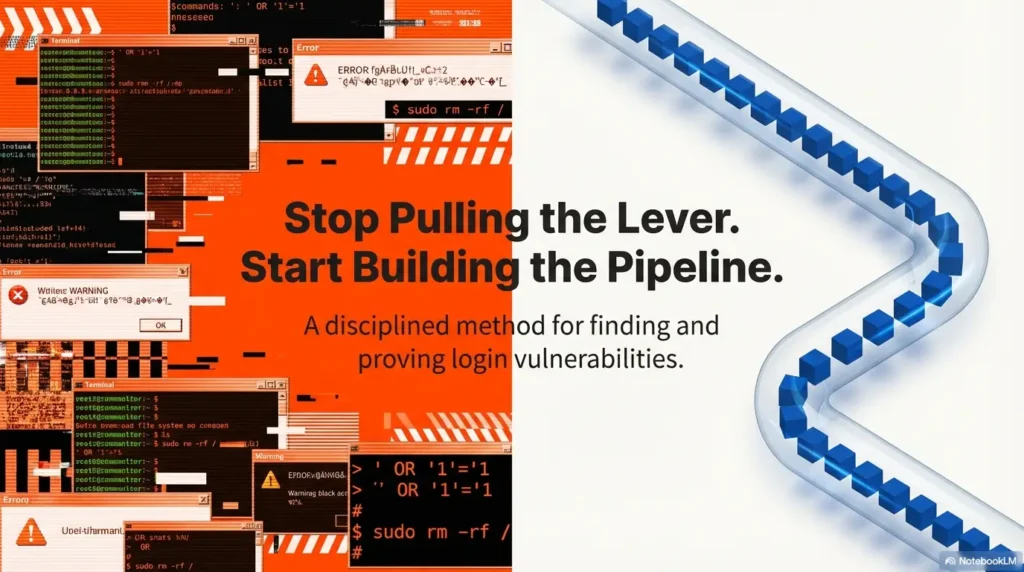
Mistake #1: Treating SQLi like a slot machine (random input, random results)
Randomness feels productive because you’re busy. But it destroys causality. If you can’t explain which variable caused the change, you don’t have evidence—you have a vibe.
Mistake #2: Ignoring session state (cookies, tokens, cached responses)
Login flows are stateful by design. If you don’t reset or track state, you’ll misread normal security behavior as vulnerability behavior. My personal rule: if results look “too exciting,” I reset the session and repeat the baseline.
Mistake #3: Confusing “logged in” with “authorized” (role checks still matter)
A session token might be issued, but what you can access matters. In real apps, authorization checks can block you even if authentication is confused. In a lab, this distinction trains your eye for real-world assessment.
Mistake #4: Over-tooling too early (tools don’t fix unclear hypotheses)
Tools amplify clarity. They also amplify confusion. If you can’t describe your hypothesis in one sentence, add fewer tools—not more. A simple, repeatable fast enumeration routine for any VM can be more valuable than another shiny plugin.
Don’t do this: brute forcing and noisy behavior (it ruins signal)
Noisy testing creates unpredictable application behavior: rate limits, lockouts, defensive middleware, and logs full of chaos. In a lab, it also makes it harder to learn the real mechanics because you’re constantly tripping alarms you don’t need.
Don’t do this: “one screenshot = proof” (you need a repeatable narrative)
Screenshots are helpful, but they’re not proof by themselves. Proof is repeatability: run it again with clean state and get the same outcome.
- Random input kills causality.
- State issues mimic vulnerabilities.
- Repeatability is your credibility.
Apply in 60 seconds: Write a one-line hypothesis before your next test: “I expect X to change because Y.”
9) Remediation lens: how to fix the class of bug
Even in a lab, practice the habit that makes you valuable: knowing what the fix looks like. OWASP’s prevention guidance emphasizes safe query construction (like parameterized queries) and defensive validation. NIST-aligned secure development frameworks emphasize building security into the software lifecycle—meaning this isn’t a “one patch” problem; it’s a habit problem.
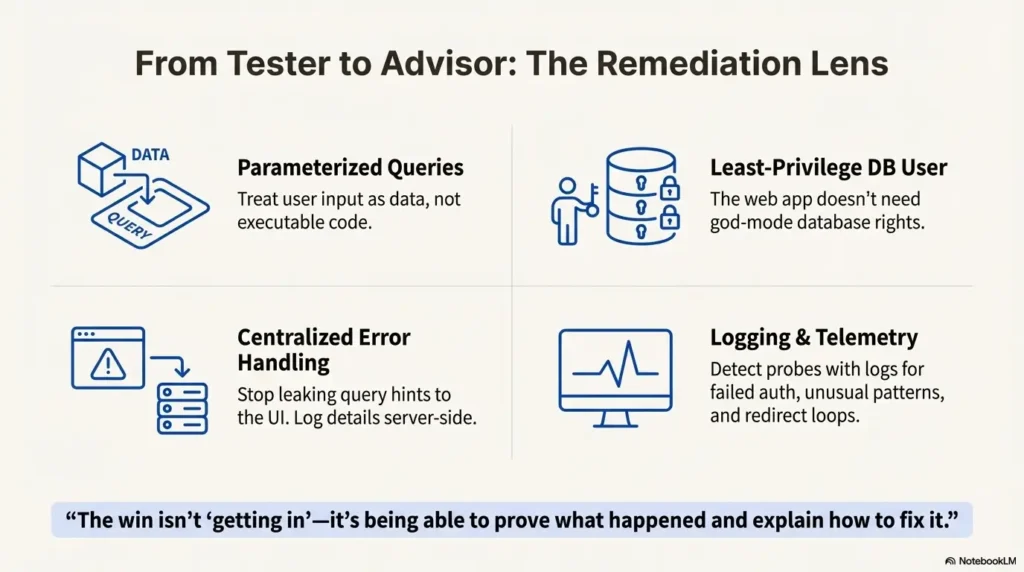
Parameterized queries and strict input handling (what devs actually implement)
Modern frameworks support parameterized queries so user input is treated as data, not executable query structure. In real teams, this also pairs with centralized validation and robust encoding rules at the boundaries.
Least-privilege DB account for the web app
Even if a vulnerability exists, least privilege can reduce impact. Your web app doesn’t need god-mode database rights. Training labs often skip this for simplicity; production should not.
Centralized error handling: stop leaking query hints
Verbose database errors are a gift to attackers and a liability to defenders. Use safe error responses and log details server-side for developers. Your UI should not be a debugging console for strangers.
Logging that helps: failed auth telemetry + anomaly detection
Log failed logins, unusual parameter patterns, repeated state resets, and abnormal redirect loops. Not to spy—just to detect when your app is being probed. This is where many teams quietly win: visibility. If you want a lightweight, repeatable way to capture what matters, lab logging in Kali keeps the evidence clean without turning your workflow into paperwork.
10) Next step: one concrete action
If you do one thing after reading this, do this: build a 1-page Login SQLi Test Card you can reuse across labs. This is the “portable skill” part.
Build a 1-page “Login SQLi Test Card” (baseline → controlled variations → evidence checklist)
- Scope: Local VM only. Network isolated. Snapshot taken.
- Baselines: Failure captured (and success captured if available).
- State controls: Track cookies/tokens. Reset session every 2–3 tests.
- Variations: One variable at a time. Record what changed.
- Evidence package: Status/redirect/cookie/body-length deltas + repeatability.
- Remediation notes: Parameterized queries, least privilege, safer errors, logging.
Neutral action: Run the card once end-to-end before you add any new tool.
Small lived-experience moment: once I started using a test card, my “lab time” got shorter by roughly half—not because I got smarter overnight, but because I stopped wandering. The card kept me honest. If you want the same “portable structure” in write-up form, keep a report scaffold handy like a Kali pentest report template.
Host-only/NAT, snapshot, scope note.
Capture normal failure (and success if known).
One change at a time, clean state, log deltas.
Repeatability + state change confirmation.
Parameterize, least privilege, safe errors, logging.
FAQ
Is Kioptrix Level 4 legal to practice on?
Yes—when you’re using it as intended: a local, intentionally vulnerable training VM you control. The legality and ethics hinge on authorization. If it’s yours (or you have explicit permission), you’re good. If it’s not, don’t touch it.
What tools can I use if I’m not using Metasploit?
A web proxy for visibility (Burp Suite or OWASP ZAP), a browser, and disciplined notes are enough for learning the method. Tools help you observe and compare requests; they don’t replace clear baselines.
How do I tell SQL injection apart from a broken login workflow?
Look for repeatable, controlled behavior changes tied to input, and separate query logic from authentication state changes. If the “weirdness” disappears when you reset session state and repeat the baseline, it’s likely a workflow/state issue, not injection.
What counts as “evidence” of SQL injection in a lab report?
Evidence must connect the input to altered SQL query meaning, not just a repeated redirect or cookie change. Preserve control/test requests and responses, explain competing causes, and verify protected-resource access separately before claiming authentication bypass.
Why does changing a single input sometimes change redirects or cookies?
Because login flows branch: different validation outcomes can trigger different session logic, redirect targets, or error handling paths. Those state differences can be legitimate—or they can indicate unsafe backend interpretation. Your job is to control variables and prove repeatability.
Should I use automated scanners on a login form?
In a learning lab, you can experiment later—but start manual. Automated scanning can create noise (lockouts, rate limits, unpredictable state). Manual baselines teach you the “why,” which makes tools useful instead of confusing.
What’s the safest way to test without breaking the VM?
Keep it quiet: isolate networking, take snapshots, reset sessions often, and avoid noisy, repeated attempts. Treat the lab like a scientific experiment, not a stress test.
How do developers prevent SQLi in login forms?
Use parameterized queries, validate and normalize input at boundaries, avoid verbose database errors in responses, and run the app with least-privilege database permissions. OWASP’s prevention guidance is the standard starting point for teams.
Does a login bypass always mean I have admin access?
No. Authentication and authorization are different. Even if authentication is confused, authorization checks can still block privileged actions. In labs, it’s common to see “logged in” without meaningful permissions.
What should I write in a pentest finding for login-related SQLi?
Keep it structured: affected endpoint, observed behavior deltas, steps to reproduce (lab-only), risk explanation, and concrete remediation steps. Good findings are calm, specific, and repeatable—never sensational. If you want a ready-to-use structure, start from a pentest report template for Kali workflows and adapt it to your lab notes.
Wrap-up: close the loop (and leave the lab smarter)
Remember the open loop from earlier—“the one place the app leaks truth”? Here’s the answer: it’s usually not the page text. It’s the state—the redirect chain, the cookie behavior, the session token lifecycle, the subtle branching that shows what the backend actually decided. When you compare those signals against a clean baseline, you stop needing drama to feel confident.
If you’re time-poor, here’s the honest priority order: isolate the lab, capture baselines, run controlled variations, and document deltas. Then immediately practice the defender habit: write down the remediation you’d recommend—parameterized queries, least privilege, safer errors, logging. That’s how you turn a training VM into real professional muscle. If you want one more “keep me honest” lever, run a quick connectivity and endpoint sanity check with Nmap in Kali for Kioptrix labs and keep your baseline boring on purpose.
- State changes are often the cleanest signal.
- Repeatability beats screenshots.
- Remediation makes you employable.
Apply in 60 seconds: Build your 1-page test card and run it once on a fresh snapshot.
Original review: 2026-01.
A response delta is a clue, not SQL injection proof. Changed cookies, redirects, lengths, or delays can come from normal validation, CSRF checks, caching, or session management. Confirm that the changed input alters SQL query semantics using controlled, reproducible comparisons or authorized source/log inspection; otherwise report suspected injection or an authentication flaw. A new session cookie alone does not prove login: a follow-up request must show access to a protected resource that the clean failure session cannot access. The tier list above is an informal triage aid, not a CVSS rating. See OWASP’s SQL injection testing guide.
Technical guidance updated: 2026-10-13. Separated response clues from SQL injection proof, added protected-resource verification, and clarified the informal severity tiers.