
Beyond the Lobby: Tactical HTTP Enumeration
Kioptrix Level HTTP enumeration usually looks simple right up until a nearly blank page starts leaking clues through headers, redirects, source code, and path behavior. That is why beginners often miss the real story on port 80: they look at the homepage, not the evidence orbiting around it.
The friction is rarely lack of tools. It is lack of sequence. One quick glance at a plain page, one oversized directory run, and suddenly your notes turn into digital confetti instead of a usable map. Keep guessing, and you lose time, context, and the one thing recon is supposed to give you: direction.
This guide helps you read a Kioptrix web service like a layered system, not a single screen. You will learn how HTTP headers, error responses, relative paths, and server clues can sharpen your next checks without drowning you in noise.
- ✔ No theatrical scanning
- ✔ No tab avalanche
- ✔ No mistaking movement for progress
The method here is grounded, lab-safe, and evidence-first. Because on Kioptrix, the homepage is rarely the whole story. It is only the lobby, and the interesting parts usually begin where most beginners stop looking.
Table of Contents
Start With the Web Clues: Why HTTP Enumeration Matters Early
Why the web service often tells a bigger story than the banner alone
When beginners first see port 80 open, the temptation is theatrical. Open browser. Squint at homepage. Feel disappointed. Declare the site “boring.” But old lab systems, especially legacy-flavored ones like Kioptrix, often whisper through behavior rather than design. A plain page can still reveal server choices, naming habits, file layout, authentication posture, and the age of the stack.
That matters because HTTP sits in a useful middle zone. It is concrete enough to inspect directly, but rich enough to reflect what lives behind it. A service banner may hint at a web server family, yet the actual responses, redirects, source code, and path behavior often tell you how that server is being used. In other words, the banner is the cover. The website is the margin notes.
I learned this the slow way, which is to say I once stared at a plain lab homepage for ten minutes and felt vaguely betrayed by its lack of drama. Only later did I check the headers, source, and a handful of likely directories. Suddenly the scene changed. Nothing had “exploded open.” The site had simply stopped being mute.
How headers, paths, and responses can narrow your next move faster than blind scanning
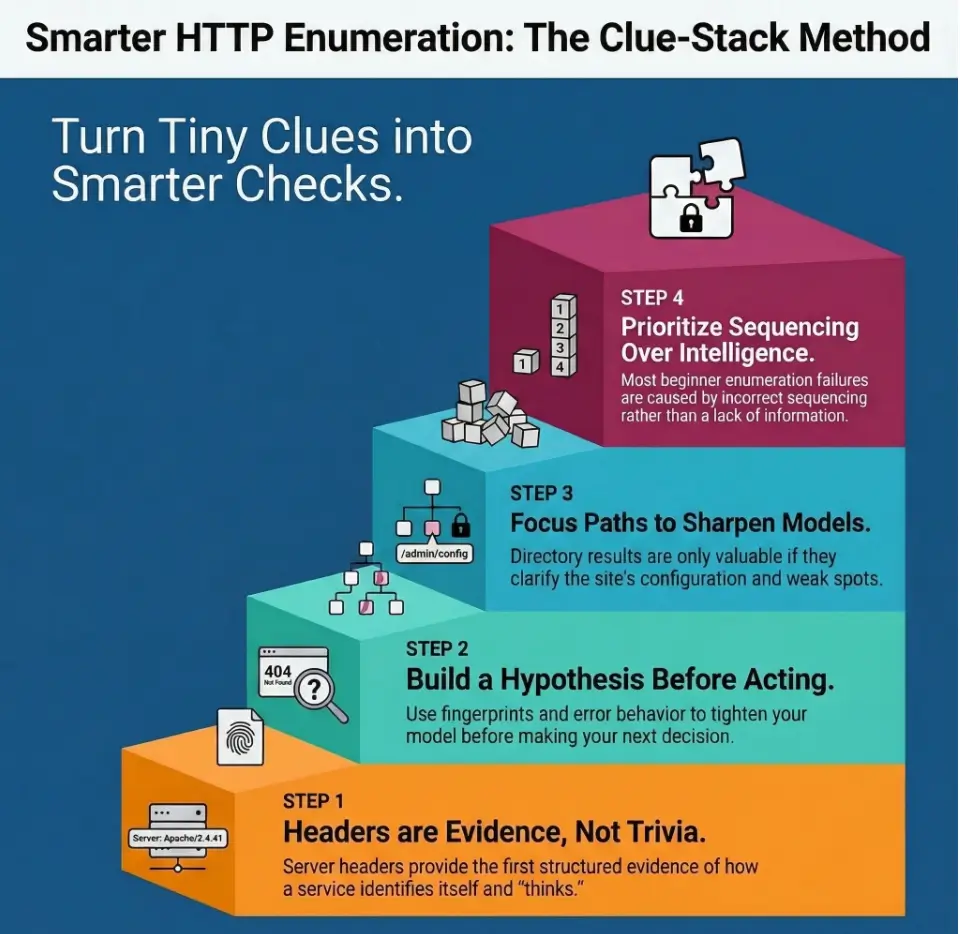
Good enumeration is not about collecting the most objects. It is about reducing uncertainty. If the headers suggest an older Apache habit, the page source shows simple relative links, and a redirect pattern exposes a naming convention, your next checks become narrower and calmer. You do not need a thousand guesses. You need three plausible ones.
OWASP’s Web Security Testing Guide treats information gathering as a real phase, not as a ceremonial prelude before the “interesting part.” That framing is useful for beginners because it reminds you that webserver fingerprinting, content review, entry point identification, and application mapping are not side quests. They are the map-making itself. If you want that same calm sequence applied across the whole box, the Kioptrix recon routine pairs naturally with the workflow in this article.
The hidden win: fewer wasted guesses, more evidence you can actually use
There is a subtle difference between movement and progress. Massive wordlists create movement. Careful interpretation creates progress. In a lab, your notes should answer a very simple question: What changed my hypothesis? If a clue does not change your thinking, it may still be interesting, but it does not yet deserve front-row seating.
- Read behavior, not just the homepage text
- Prefer hypothesis-building over tool noise
- Ask what changed your next move
Apply in 60 seconds: Open the homepage, record the status code, capture the headers, and write one sentence describing what the site might be running before you touch any broader discovery.
Who This Is For / Not For
This is for beginners practicing on Kioptrix Level in a legal lab or training setup
This article is for learners who can open a browser, inspect a response, and take notes, but who are not yet confident about what counts as a clue. If port 80 feels like an invitation written in very small print, you are in the right room.
This is for learners who see port 80 open but do not know what to inspect next
Maybe you know the names of the common tools already. Maybe you do not. Either way, the bigger problem is usually sequence. Many beginners do not need more options. They need a sane order of operations. The goal here is to help you avoid the beginner’s trap of collecting everything and understanding nothing.
This is not for live targets, unauthorized testing, or production systems
This workflow belongs in an authorized lab, classroom, home training VM, or similarly legal environment. Keep the frame strict. Keep the method calm. The skill is observation and evidence-driven analysis, not reckless poking at systems you do not own or have permission to test.
- Yes: You are working in a legal training environment
- Yes: Your goal is to learn how web clues guide recon
- No: You want instructions for unauthorized testing
- No: You plan to use this against live systems without permission
Neutral next action: if you cannot clearly state why your environment is authorized, stop there and fix the context before doing anything else.
Read the Headers First: What the Server Reveals Before You Touch a Directory List
Which HTTP response headers deserve attention first
Headers are the quiet upstairs neighbors of web enumeration. You do not always notice them, but they know a lot about the building. Start with what comes back on a simple request. The fields that deserve your first glance are usually the ones that tell you how the server identifies itself, how it talks about content, and how consistently it responds.
In practical beginner terms, that means looking closely at things like Server, Date, content-related headers, and anything unusual or absent. RFC 9110 defines HTTP semantics at the protocol level, and that matters here because headers are not ornamental. They carry meaning about the response and sometimes about the implementation habits behind it. Meanwhile, Apache’s own documentation explains that directives such as ServerTokens and ServerSignature influence how much identification leaks through response headers and server-generated pages. That is gold for interpretation, because both presence and restraint can tell you something.
How Server, Date, ETag, and related headers can hint at software age and configuration style
A verbose Server header is an observed product/version string, not confirmation of the installed OS or patch status. A minimal one does not prove deliberate hardening: defaults and proxy behavior can also explain it. Record the returned value and corroborate any cause you infer.
Date can help you sanity-check whether responses are normal and consistent. ETag is not a magical vulnerability detector, but it can tell you something about how content is being served and cached. Content headers, redirects, and cookie-related details can also reveal whether the site behaves like a hand-built static structure, a rough admin interface, or something with application logic behind it. If you are practicing a browser-light workflow, a curl-only recon approach for Kioptrix is a good companion piece here.
I still remember the first time a tiny header difference saved me from an hour of pointless wandering. Two pages looked nearly identical in the browser. Their headers did not. One revealed a pattern. The other was a decoy with better manners.
Why “minimal headers” can still be a clue, not a dead end
Beginners often assume that if a server says very little, they have learned very little. That is not quite right. Silence is a kind of accent. Minimal headers can suggest hardened defaults, reverse proxying, stripped disclosures, or simply a plain configuration style. The key is not to romanticize them. It is to compare them against everything else you observe.
Let’s be honest… most beginners look at the page body and ignore the quieter evidence upstairs
The body is vivid. Headers feel bureaucratic. The body gets the applause. Headers do the accounting. In enumeration, the accounting often wins.
Show me the nerdy details
Apache documents that ServerTokens controls the information returned in the Server response header, while ServerSignature affects server-generated documents such as error pages. That means disclosure can vary between normal content and generated responses. If you compare a homepage and an error page and notice different levels of detail, that contrast itself may be meaningful.
- Check what is present
- Check what is absent
- Compare normal pages with error-generated pages
Apply in 60 seconds: Capture the homepage headers and one intentional error-page header set, then compare them side by side before moving on.
Fingerprint the Stack, Not Just the Homepage
How to infer Apache, PHP, Linux-era habits, and legacy defaults from small signs
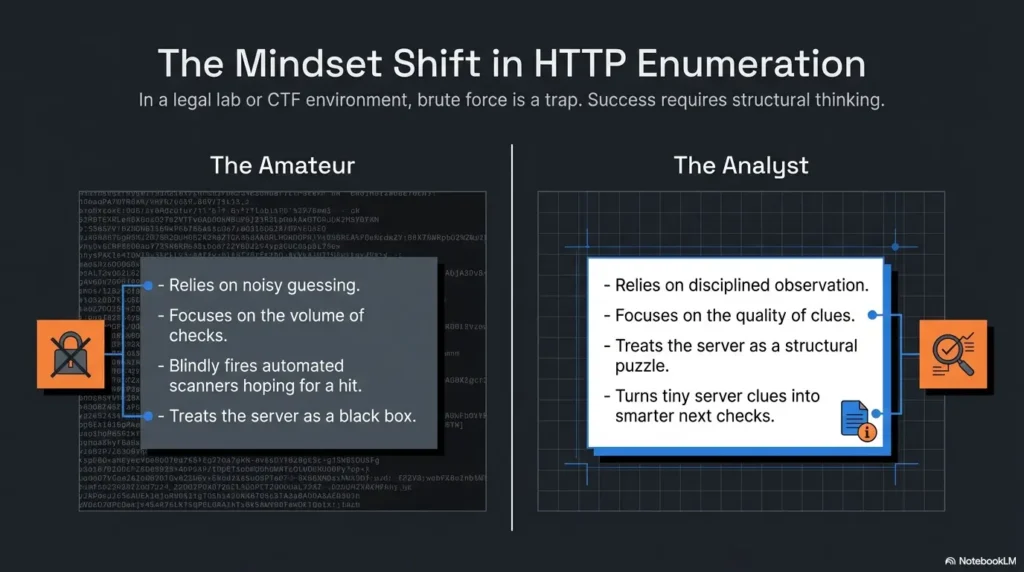
Fingerprinting is where beginners sometimes become either too shy or too dramatic. Too shy, and they underread the evidence. Too dramatic, and they turn one small clue into a fan-fiction timeline of the entire stack. The sane middle is to build a stack hypothesis from multiple aligned hints.
A server header that suggests Apache is not the end of the story. Does the page structure look hand-built? Do file paths and relative links feel old-school? Are there traces that hint at PHP-era naming conventions or a modestly organized document root? Legacy systems often reveal habits through simplicity. They are not trying to impress you with frameworks. They are trying to keep working.
What a plain-looking page can still suggest about the backend
A plain page can imply static content, but it can also sit on top of an application with interesting edges. Look for forms, query parameters, link formats, image and script locations, and whether the site treats paths predictably. A simple index page may still belong to a larger structure with administrative leftovers, backup artifacts, or secondary directories that were never meant to feel important.
I have seen beginners dismiss a homepage because it looked like it came from the age of beige desktop towers and shared family printers. That is exactly the point. In older lab environments, plainness is not emptiness. It is often a sign that the clues will be structural instead of flashy.
When version leakage matters and when it becomes a distraction
Version leakage matters when it helps you rank next checks. It becomes a distraction when it turns into trivia collecting. If you see indications that point toward a legacy stack, the useful question is not “Can I memorize the version string?” It is “What does this make more plausible?” Perhaps default locations become more plausible. Perhaps older documentation paths do. Perhaps a certain error-page style becomes less surprising. If your earlier scan data still feels slippery, it helps to compare web clues against a grounded view of Kioptrix Level open ports before promoting any stack theory too quickly.
A: A single clue suggests an old stack.
B: Multiple clues align around an old stack.
Choose A-style caution when only one signal exists. Keep the note tentative and keep looking.
Choose B-style confidence when headers, page structure, and error behavior point the same way.
Neutral next action: promote a clue from “interesting” to “actionable” only after you have at least two supporting signals.
Follow the Paths With Discipline: Which Directories Earn Your Attention First
Why default paths, admin paths, docs paths, and test paths are not equally valuable
Path discovery is one of those tasks that looks productive from ten feet away. The terminal scrolls. The heartbeat of progress seems steady. Yet discovered paths do not all deserve equal attention. Some are routine clutter. Some expose only decorative content. A few actually change your understanding of the application.
In beginner-friendly terms, higher-value paths are usually the ones that suggest administration, documentation, backups, forgotten tooling, alternate application entry points, or internal organization habits. Lower-value paths are often those that exist but say very little. A directory that only confirms the site has images is less useful than a path that implies documentation, testing, or an interface boundary.
How to prioritize likely human mistakes over endless brute curiosity
People leave traces more predictably than servers do. Human naming habits produce surprisingly durable clues: old admin panels, documentation directories, sample content, test folders, backup names, and slightly lazy file organization. Following likely human mistakes is often smarter than running an enormous list just because it exists and is making satisfying computer noises. That is also why ffuf wordlist tuning matters more than beginners often think. Smarter lists beat louder lists.
One of the best small habits I ever adopted was ranking paths by what they imply about human behavior. “This exists” is a start. “This suggests a forgotten function” is where the good stuff begins.
What “interesting but not useful” looks like during HTTP enumeration
Interesting but not useful usually has one of these personalities: it is decorative, repetitive, empty of structure, or disconnected from your broader hypothesis. It may still deserve a note, but not a starring role. Think of it like finding an old concert flyer in a drawer. Charming. Atmospheric. Not the spare key.
Here’s what no one tells you… the best path is often the one that changes your hypothesis, not the longest list
A single path that reframes what the site might be is worth more than thirty that merely prove the server can return content. Your goal is not to become the curator of a museum of folders. Your goal is to identify the paths that sharpen the next move. If you prefer a page-saving, evidence-preserving approach before broader enumeration, wget mirroring for recon can help you examine structure without immediately turning the session into tab weather.
Read identity, behavior, and response shape.
What stack or habits seem plausible?
Check likely high-value locations first.
Promote only clues that change direction.
Error Pages Are Talking: 403s, 404s, Redirects, and Weird Responses
What different status codes can reveal about access control and server behavior
A 403 means the server refuses this request; a generic rule, proxy, or WAF can return it for nonexistent paths too. A 404 can mean no current representation or deliberate concealment. Compare response bodies, lengths, headers, and redirects against a known-missing path before using status codes as existence evidence.
OWASP’s testing guidance explicitly treats error handling, application mapping, and entry-point discovery as meaningful work. That is exactly why beginners should pay attention here. The point is not to worship status codes like numerology. The point is to observe what each one implies about structure and control.
How custom error pages expose structure, naming habits, or technology clues
Custom error pages sometimes expose breadcrumbs: stylesheet paths, image locations, directory hints, framework signatures, or server-generated footers. Apache documentation notes that server-generated documents can be influenced by configuration choices such as ServerSignature. In practice, that means a generated error response may reveal slightly different information than a regular page. Compare them. Small differences can matter.
Why redirects can quietly map the site’s internal logic
Redirects are small pieces of choreography. They reveal what the application expects. Does it force a slash? Does it send you from one path style to another? Does it imply an alias, host assumption, or default landing behavior? Each redirect is a little window into how the site wants to be addressed.
I once ignored a redirect because it felt too polite to be useful. That was a mistake. The redirect was not just being polite. It was explaining the site’s internal grammar. Since then, I have treated redirects like a receptionist who knows too much.
Show me the nerdy details
Generated error content can differ from application content in body structure, path leakage, and server identification. That is why comparing a normal 200 response with a deliberate 403 or 404 can be more revealing than checking either one alone. Think comparison, not isolated admiration.
- Tier 1: Homepage only
- Tier 2: Homepage + headers + source
- Tier 3: Add a few focused paths
- Tier 4: Compare 200, 403, 404, and redirect behavior
- Tier 5: Cross-check web clues against broader recon notes
Neutral next action: move up one tier only when the previous tier produced actual notes, not just screen time.
Don’t Chase Every Folder: How to Separate Signal From Directory Noise
Why large wordlists can create false confidence
Large wordlists are seductive because they feel like seriousness. But scale can easily masquerade as thought. If your process is weak, a huge directory sweep often returns a pile of objects that create more confusion than clarity. You end up with ten tabs, eight maybe-interesting paths, and a note file that looks like it was assembled during mild turbulence.
That false confidence is dangerous for beginners because it creates the feeling of completeness. You found many things, therefore you must know much. Not necessarily. Enumeration is not a sticker collection. The real metric is whether the results increased confidence in your model of the target. For a calmer contrast, a Gobuster walkthrough in Kali is useful as a reminder that directory work should stay purposeful, not theatrical.
How to rank discovered paths by probable value, not by novelty
Novelty is flashy but unreliable. Probable value is quieter. Rank paths by their likely relation to administration, documentation, application flow, configuration habits, or hidden functionality. If a path changes how you understand authentication, file layout, or the likely software family, it deserves more attention than a path that is merely unusual.
The difference between a collectible clue and an actionable clue
A collectible clue is something you could show a friend and say, “Huh, neat.” An actionable clue is something that alters the next check. A redirect that suggests an application root? Actionable. A decorative directory that confirms the site has images? Collectible. Nice to know. Rarely decisive.
The more advanced I get, the less I trust my own excitement. That may sound unromantic, but it saves time. Excitement is a weather pattern. Evidence is architecture.
- Do not rank by surprise alone
- Prefer paths tied to function or control
- Promote clues that affect the next test
Apply in 60 seconds: Take your last five discovered paths and label each one collectible or actionable. Keep only the actionable ones in your main hypothesis notes.
Source Code and Page Artifacts: Small Fragments, Big Hints
What to inspect in HTML comments, forms, links, scripts, and image paths
Page source is where many beginners finally discover that the website has been talking behind its own back. Comments may expose forgotten notes. Forms can reveal endpoints, parameter names, or application flow. Links show what the site considers important. Scripts and image paths reveal directory structure, file organization, and sometimes neglected remnants of older designs.
OWASP’s guidance on reviewing page content for information leakage is a useful anchor here. Even in a simple site, source-level artifacts can expose application entry points and naming habits without any dramatic behavior at all. Sometimes the page is not hiding a secret. It is merely being casual in public.
How relative paths can expose directory structure
Relative paths tell you how the page thinks about where it lives. A path like images/logo.gif versus /assets/images/logo.gif may not seem thrilling, yet it helps you reason about document root assumptions, subdirectory organization, and how the application is stitched together. These details accumulate. One by one, they are pebbles. Together, they become a trail.
Why old-school web pages often leak more through simplicity than modern apps do through complexity
Modern applications can be noisy with JavaScript and still reveal surprisingly little. Older pages are often the opposite. Their simplicity makes structure easier to infer. Fewer abstraction layers. Fewer build pipelines. More direct clues. In a legacy lab, the site may feel plain, but plainness can be an ally. It means fewer curtains between you and the room itself.
I have a soft spot for old source code because it tends to be honest in a slightly chaotic way. It is like opening a drawer and finding rubber bands, receipts, one useful key, and a takeout menu from 2009. Disorder, yes. But informative disorder.
Short Story: On one practice session, I nearly skipped the source because the homepage looked static and forgettable. The visible page showed almost nothing beyond a title and a simple layout. But the source had a few relative references that felt oddly specific, plus a form action that quietly suggested the page was part of a larger structure. That changed everything. I
nstead of treating the site like a dead-end brochure, I started treating it like a small building with a side entrance. The next checks became narrower, faster, and much less random. The lesson stayed with me because it was embarrassingly simple: I had mistaken plainness for silence. The page was not silent. I was just listening only to the furniture. A similar note-taking advantage shows up when you use an OSCP-style enumeration template in Obsidian to preserve tiny clues before they evaporate.
- One copy of homepage headers
- One copy of source or key page artifacts
- Three path observations with status behavior
- A short note on likely stack or application style
Neutral next action: do not compare theories until you can summarize the evidence in four lines or fewer.
Pair HTTP With the Bigger Recon Picture
How web clues should be compared against port scan results and service banners
HTTP clues become more valuable when they stop standing alone. A web hint that aligns with a service banner, naming convention, or open port pattern becomes stronger. The broader recon picture helps you decide whether the web service is central, decorative, or one piece of a larger puzzle. Alignment matters more than quantity.
If the page structure suggests a legacy application style and the broader service picture also looks legacy, your confidence rises. If the web layer looks simple but the surrounding services suggest additional interfaces or older habits, the site may be a small front porch attached to a more interesting house. You do not need certainty yet. You need ranked plausibility. That is exactly where a fast enumeration routine for any VM can keep your thinking from splitting into separate little islands.
When HTTP findings should push you toward authentication checks, CMS research, or legacy app hypotheses
Some web findings suggest the next checks should stay within the HTTP world: login forms, admin-like paths, documentation directories, test pages, or application entry points. Others suggest you should widen the lens and compare them against the rest of your notes. The trick is not to force every HTTP clue to become a web-only story. Sometimes the web layer is your translator for the rest of the box.
Why isolated clues are weak, but aligned clues become direction
A single clue is a rumor. Three aligned clues are a working theory. That is why note-taking matters so much. You are not just recording facts. You are watching them begin to agree with one another. When headers, redirects, source artifacts, and broader recon point in the same direction, you no longer have random trivia. You have momentum with a spine.
Show me the nerdy details
OWASP’s testing structure separates information gathering into tasks like fingerprinting the web server, reviewing web content, identifying entry points, and mapping architecture. Those categories are useful because they encourage cross-checking. A good recon note is rarely “I found X.” It is “X, Y, and Z line up, so the next check should be A.”
Common Mistakes
Mistake: treating the page title as the whole story
A page title is one sentence in a much longer conversation. It may describe the purpose of the page, or it may merely sit there like a polite label on a drawer. Either way, it should not be allowed to dominate your interpretation.
Mistake: running huge path lists before reading headers and source
This is one of the most common beginner detours. It feels energetic and technically flavored, which gives it an unfair advantage over quieter tasks. Yet headers and source often provide the very context that makes path discovery useful in the first place.
Mistake: confusing “found something” with “found something useful”
You can find twenty things and still be directionless. Utility is measured by whether the clue sharpens the next check. If it does not, do not let it occupy premium shelf space in your notes.
Mistake: skipping notes and then forgetting which response changed your thinking
This is the digital equivalent of standing up from the tatami floor too quickly and wondering why the room went sideways. Notes steady you. They let you compare responses instead of relying on vague memory and browser tab archaeology. That is why even a compact note-taking system for pentesting pays for itself faster than another flashy tool.
Don’t do this: assume every 200 OK page matters equally
Some 200 responses are meaningful. Some are decorative furniture. A success code only tells you the server returned something. It does not promise the thing is useful.
Don’t do this: jump from one odd clue to a full exploit theory without evidence
A strange header or path is not a prophecy. Stay grounded. Build hypotheses with modesty. That is not less skilled. It is more disciplined.
- Read before you spray
- Rank usefulness, not novelty
- Write down what changed your mind
Apply in 60 seconds: Before your next session, create a tiny note template with four fields: headers, source clues, high-value paths, and changed hypothesis.
Build a Repeatable HTTP Enumeration Routine for Kioptrix Level
Step 1: capture headers and first responses cleanly
Start small. Record the homepage status, key headers, and whether anything unusual appears in normal versus generated responses. Keep this first pass neat. If your initial notes are messy, the rest of the session often turns into a rescue mission.
Step 2: inspect source, links, comments, and forms
Open the source and look for structure. Comments. Relative paths. Form actions. Asset locations. Link patterns. The goal is not to stare at every line like it contains buried treasure. The goal is to identify anything that suggests architecture, entry points, or naming habits.
Step 3: test focused high-value paths before broad discovery
Use what you already observed to choose a short list of promising locations. Admin-style paths. Documentation-style paths. Testing or sample-content hints. Alternate page names. Be deliberate. Broad discovery is stronger after focused checks, not before them.
Step 4: compare web clues with the rest of your recon notes
Now zoom out. Does the web picture align with broader observations? Are you seeing a legacy pattern that echoes elsewhere? Or is the web service merely one surface attached to a bigger structure? This is where fragments start becoming a map.
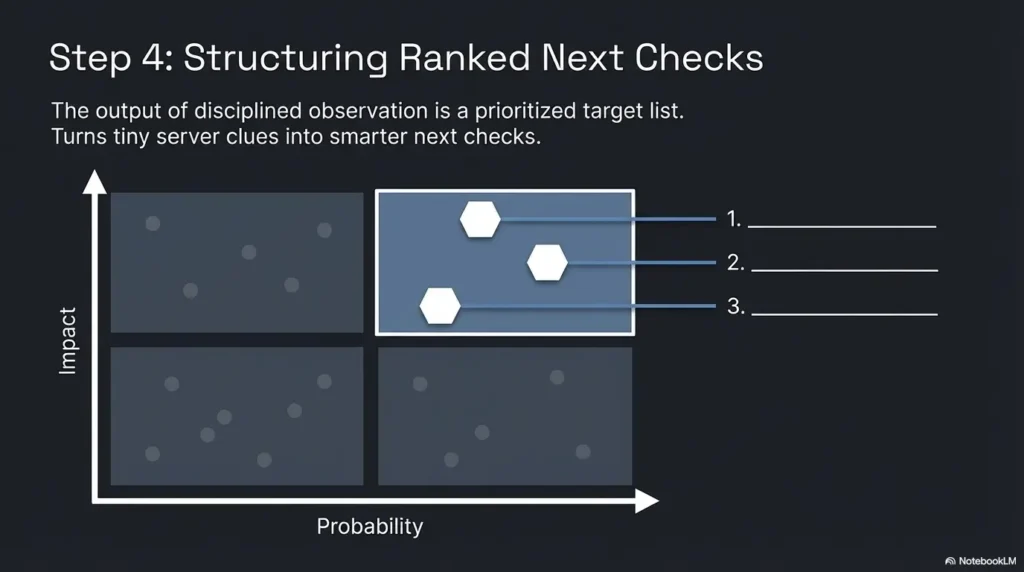
Step 5: rank the most plausible next checks instead of opening ten tabs at once
End the routine by ranking, not wandering. Choose the next one to three checks that are best supported by current evidence. When you do this well, the session feels almost suspiciously calm. That is a good sign. Calm is often what disciplined work looks like before people mistake it for lack of excitement. If you want a broader beginner-friendly scaffold, Kioptrix Level 1 without Metasploit keeps that same evidence-first spirit intact.
| Routine Step | Time Range | What You Capture | Why It Matters |
|---|---|---|---|
| Headers and first response | 2 to 5 minutes | Status, key headers, initial behavior | Build a starting hypothesis |
| Source inspection | 3 to 7 minutes | Comments, links, paths, forms, assets | Reveal structure and entry points |
| Focused path checks | 5 to 10 minutes | High-value directories or files | Test likely human mistakes first |
| Cross-check with broader recon | 3 to 5 minutes | Aligned or conflicting signals | Rank the next checks sensibly |
Inputs: number of useful clues from headers, source, and paths.
If you have fewer than 3 aligned clues, keep enumerating carefully. If you have 3 or more aligned clues, stop collecting and rank your next checks.
Neutral next action: once the clues align, switch from discovery mode to decision mode.
FAQ
What should I check first when Kioptrix Level shows port 80 open?
Start with the initial HTTP response and headers, then inspect the page source. That order gives you context before you begin path discovery. Beginners often reverse it and end up with more results but less understanding.
Which HTTP headers matter most for beginner enumeration?
The most useful starting fields are usually the ones that reveal server identity, content behavior, and differences between normal and generated responses. The exact set varies, but you are looking for clues about disclosure style, consistency, and response shape rather than memorizing every header in existence.
Can a blank or simple homepage still reveal useful clues?
Yes. Very often. Simplicity can expose structure more clearly than a modern, heavily layered app. Headers, source, asset paths, form actions, and error behavior may reveal far more than the visible body text.
How do I know whether a directory is worth more attention?
Ask whether it changes your hypothesis. A path tied to administration, documentation, testing, alternate entry points, or clear application behavior usually deserves more attention than a path that merely proves content exists.
Are 403 and 404 responses useful in a training lab?
Absolutely. They can reveal access-control posture, custom error behavior, path assumptions, server-generated details, and structural hints. Compare them with ordinary 200 responses instead of viewing them in isolation.
Should I prioritize headers or directory discovery first?
Headers first, then source, then focused path checks. That sequence gives you the context needed to keep directory work disciplined instead of noisy.
What page source clues do beginners usually miss?
Relative asset paths, hidden comments, quiet form actions, secondary links, and patterns in how files are organized. These details are easy to skip because they are not dramatic, but they often have the best signal-to-noise ratio.
How do I connect HTTP clues to the rest of my recon?
Look for alignment. If web observations support what service behavior or broader scan notes already suggest, your confidence increases. A clue becomes meaningful when it agrees with other clues, not merely because it exists.
When should I stop enumerating the web service and move on?
Stop when you have enough aligned evidence to rank the next one to three checks with confidence. If you are still gathering new clues but none of them change your direction, you are probably drifting into collection mode instead of analysis mode.
Is this kind of HTTP enumeration only appropriate in legal labs?
Yes. Keep this work strictly inside environments where you have permission. The value here is in learning disciplined observation and method, not in aiming that method at real systems without authorization.
Next Step
The quiet loop from the introduction closes here: the homepage was never the whole story. It was only the lobby. Once you begin reading headers, error behavior, source artifacts, and a few disciplined paths together, Kioptrix Level HTTP enumeration stops feeling like random rummaging and starts feeling like structured listening.
Your best next step is wonderfully unglamorous. Pick one Kioptrix Level session, capture the response headers, inspect the page source, and write down three server clues before running any broad path discovery. Do that once with discipline and the whole workflow becomes steadier. Do it twice and you will begin to notice the difference between data and direction. That difference is where beginners stop drowning in tabs and start thinking like operators.
For official background, the HTTP standard explains what response semantics actually mean, Apache documents how disclosure-related directives shape what a server reveals, and OWASP’s Web Security Testing Guide organizes information gathering into practical categories like server fingerprinting, content review, and application mapping. Those are good anchor points when you want the method beneath the method. If you are building toward a wider skill stack after this article, web exploitation essentials is the logical next branch once your enumeration habits are steady.
Original review: 2026-03.
Technical guidance updated: 2026-10-13. Clarified 403/404 interpretation and the limits of inferring hardening from minimal headers.