
Sources, review date and section shortcuts
Reviewed: October 19, 2026. Review application inputs and state transitions without assuming a PHP implementation or a vulnerability from appearance.
Primary documentation · Related practical guide
Go straight to: Decision check · Main workflow · Further detail
Open the Application state-transition record for this guide’s task-specific fields and next action.
Keep the request and state transition together
Record method, path, parameters, cookies, role, redirects and response changes. Cookie names and file extensions can be customized and do not establish session security or implementation details. Login submissions and even apparently simple requests can change state. Use a known synthetic account and permitted request budget, and distinguish an input clue from demonstrated authorization or injection impact. Reference and scope.
Slow Down the Scene:
Precision Recon for PHP Apps
Review application inputs and state transitions without assuming a PHP implementation or a vulnerability from appearance.
The real win is not “finding something” quickly; it is understanding what the PHP app is already revealing.
Table of Contents
Fast Answer: Kioptrix Level PHP application recon for beginner pentesters is about mapping what the app reveals before you test anything aggressive. In an authorized lab, the best first pass usually comes from pages, parameters, forms, cookies, headers, redirects, and error behavior. Older PHP applications often leak structure through naming habits and uneven handling. The beginner win is simple: observe slowly, write clean notes, and turn those notes into hypotheses instead of guesses.
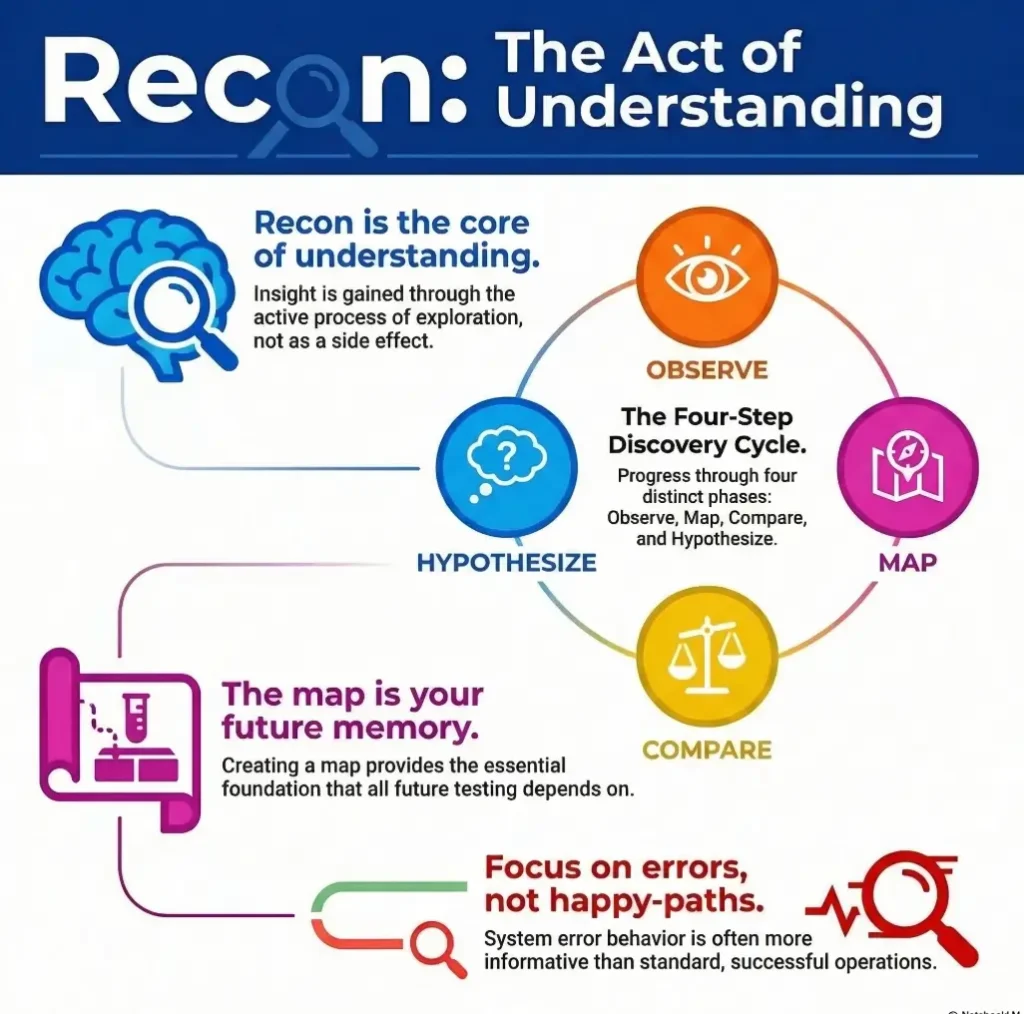
Start with the room, not the lock: what PHP recon is actually trying to reveal
Why beginner recon is a visibility exercise, not a race to “get in”
Beginners often imagine recon as the warm-up before the “real” work. In practice, recon is the work that makes everything else honest. If you do not understand what the application exposes, how it talks, and where it changes state, you are not testing the application. You are poking a wall in the dark and hoping the wall writes back.
In Kioptrix-style training boxes, that mistake is common because the environment feels safely artificial. The box is old, the interface looks thin, and the temptation is to assume the shortest path must be the smartest one. It rarely is. Old PHP apps can look simple while hiding a surprisingly revealing workflow under the surface: direct file names, obvious parameters, inconsistent validation, and pages that behave differently depending on tiny request changes.
What a PHP application quietly exposes through routes, forms, parameters, and error behavior
OWASP’s testing guidance treats entry points and execution paths as things you deliberately identify, not accidental discoveries. That matters here. A PHP application exposes clues through:
- Direct file naming like
login.php,admin.php, orview.php?id= - Forms that reveal expected field names and workflow assumptions
- Redirects that show what happens before and after authentication
- Errors, warnings, or differences in validation tone
- Headers and cookies that suggest stack habits and session flow
How Kioptrix-style labs teach pattern recognition better than memorized tool output
These labs are good teachers because they strip away some modern app fog. There is less frontend theater. Less JavaScript confetti. More visible server-side logic. That makes them excellent for learning what web recon actually feels like: not heroic, not cinematic, just steadily clarifying. If you want that broader rhythm in a more repeatable format, a Kioptrix recon routine can help you keep the process steady instead of reactive.
- Map entry points before touching edge cases
- Watch behavior changes, not just page content
- Write down what you know versus what you suspect
Apply in 60 seconds: Open the app homepage and write three columns: visible page, hidden assumption, next safe observation.
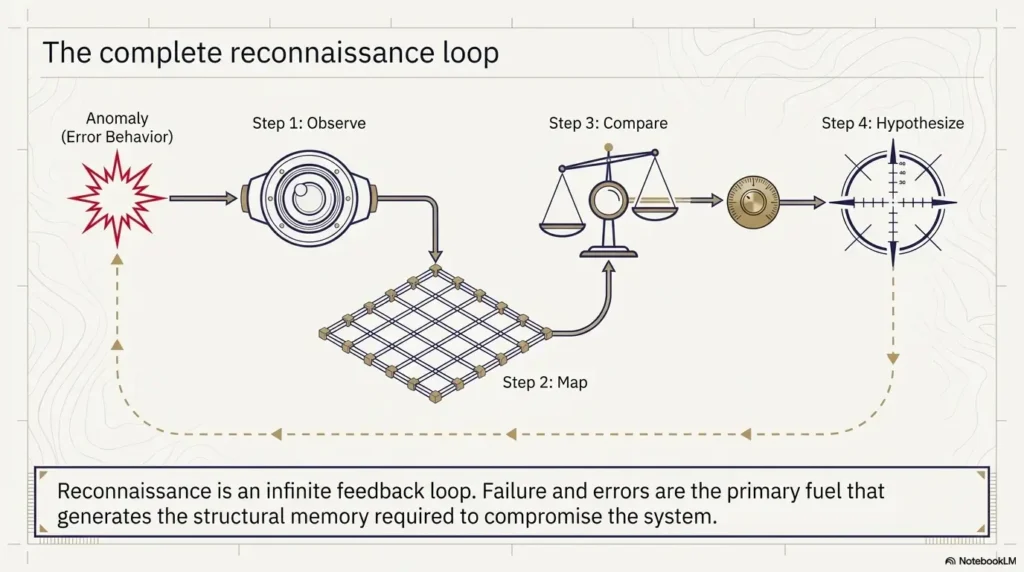
Infographic: The beginner-safe PHP recon loop
Homepage, links, forms, source hints, page titles, status codes.
Pages, parameters, directories, authentication flow, repeated field names.
What changes when input, method, or navigation path changes slightly?
Turn observations into careful theories, not instant exploitation claims.
Who this is for / not for
This is for beginner pentesters practicing in authorized labs who want a cleaner recon process
If you are working in a legal training environment and keep feeling that you “miss the obvious,” this article is for you. Not because you need more cleverness, but because you probably need more structure. The first real skill in web recon is not brilliance. It is orderly attention.
This is for readers who understand HTTP basics but still feel lost when a PHP app looks “too simple”
Simple-looking applications can be strangely disorienting. A modern app often announces its complexity with frameworks, APIs, and visible moving parts. Older PHP sometimes whispers. You get a few forms, a couple of blunt URLs, maybe a dead link or two, and the whole thing looks almost insultingly plain. Then five small details line up and you suddenly realize the app has been introducing itself all along.
This is not for unauthorized testing, real-world intrusion, or shortcut-driven exploit hunting
Everything here assumes an authorized lab box, training VM, or similarly legal practice environment. We are staying on the side of observation, application modeling, and disciplined note-taking. Not because caution is boring, but because good testing without authorization is still bad testing. The fence matters. That same boundary is worth keeping in mind whenever you build a security testing strategy or write a vulnerability disclosure policy.
This is not for advanced operators looking for post-exploitation tradecraft
If you already think in deep chains and edge-case pivots, this article will feel intentionally basic. That is by design. A strong beginner workflow is a humble instrument, like a clean notebook or a tuned metronome. Not glamorous, oddly powerful.
Eligibility checklist
- Yes: You have explicit permission to assess the lab target.
- Yes: You are practicing observation and documentation, not real-world intrusion.
- Yes: You can distinguish “I observed this” from “I think this may mean…”
- No: You are looking for a shortcut guide to attack random public sites.
Next step: If the first three are true, start with a slow manual page map before any automation.
First clues first: what the homepage, login box, and dead ends are already telling you
What page titles, footers, source code hints, and navigation gaps can reveal
The homepage is not just a front door. It is often a résumé with coffee stains. Titles, footer text, comments, asset paths, linked CSS or JS filenames, and uneven navigation can expose the age and shape of the application. Beginners sometimes skim this because the page looks sparse. Sparse pages are often the easiest to read.
Look for missing polish. A footer naming a product or developer. A logo image path that suggests a directory habit. Source comments that imply copied templates or abandoned sections. In older PHP apps, tiny fragments often survive migration and tell you where the rest of the app might live.
How login forms leak workflow clues even when credentials fail
A failed login is not a failed observation. It can tell you field names, required parameter order, response style, redirect logic, timing differences, session creation behavior, and whether the app treats malformed requests differently from merely wrong credentials. That is valuable. OWASP’s authentication guidance emphasizes understanding how authentication behaves under different conditions, and even your earliest low-impact observations can help you sketch that behavior. Login submissions are active authentication tests, so keep them bounded and authorized.
Why “404,” “403,” redirects, and blank pages are not wasted clicks
When a page returns nothing useful, beginners often write it off as dead. Resist that. A 404 reveals naming expectations. A 403 records refusal, not proof that the requested resource exists. A redirect can show canonical paths or session checks. A blank page can still have a response length, a status code, headers, and timing behavior that matter.
Dead ends are often not dead. They are just quiet. Quiet things deserve a notebook, not contempt.
Field note: “Nothing happened” is not a finding. “302 to login.php after request to /admin/, with a new cookie and shorter response body” is a finding.
Map the surface area: pages, directories, and parameters beginners skip too fast
How to build a manual page map before trusting automation
Before you let a tool sing its metallic song, build a hand-made map. It can be ugly. In fact, ugly maps are often excellent because they record what your eye actually noticed. Start with the homepage and every visible link. Then add discovered routes, repeated page patterns, and notable directories. Your goal is not artistic beauty. Your goal is coverage.
A basic map might include:
- Page path
- Link source or navigation path
- Parameters
- Auth required or not
- Interesting behavior on load
NIST’s technical guidance on security testing has long stressed planning and disciplined assessment methods. That sounds grand, but in beginner practice it often translates to one simple truth: the more organized your collection is, the less likely you are to confuse noise with signal. If you want a practical companion to this stage, a guide on Kioptrix HTTP enumeration fits naturally after the first manual pass.
Which URL patterns often matter in older PHP apps
Older PHP apps often lean into direct file relationships. That means page names can reveal workflow almost embarrassingly well. If you see a cluster like index.php, login.php, members.php, admin.php, view.php?id=, you are not just seeing filenames. You are seeing the app’s own filing cabinet labels hanging out in the hallway.
Notice when names imply sequence, role, or record access. Notice when plural and singular naming is inconsistent. Notice when one page uses a clean pattern and another uses a more improvised one. Those mismatches often hint at layered development or neglected paths.
Why repeated parameter names can matter more than the page design
Beginners can get distracted by visuals. The app may look primitive, busy, or almost comical. Ignore the wallpaper. Parameter names often tell you more than layout ever will. Repeated names across multiple pages may indicate shared code habits, repeated assumptions about data handling, or connected workflows.
Let’s be honest… the boring sitemap notes often become the breakthrough later
There is a specific kind of boredom that means you are finally doing recon correctly. You are writing page names. Noting redirects. Recording which path accepts a query string and which ignores it. It can feel slow enough to annoy your ego. Good. Your ego is not doing the assessment.
- List every route you can verify
- Record repeated parameters as possible workflow clues
- Separate visual design from backend structure
Apply in 60 seconds: Create a spreadsheet or four-column note with page, link source, parameter, and observed response.
Show me the nerdy details
OWASP’s testing structure for web applications explicitly treats information gathering, web server fingerprinting, application entry-point identification, and execution-path mapping as discrete testing concerns. That framework is useful for beginner recon because it stops you from flattening everything into “I ran a tool and got output.” In older PHP apps, naming patterns and entry points often remain visible enough that your manual map becomes a real testing artifact rather than a warm-up exercise.
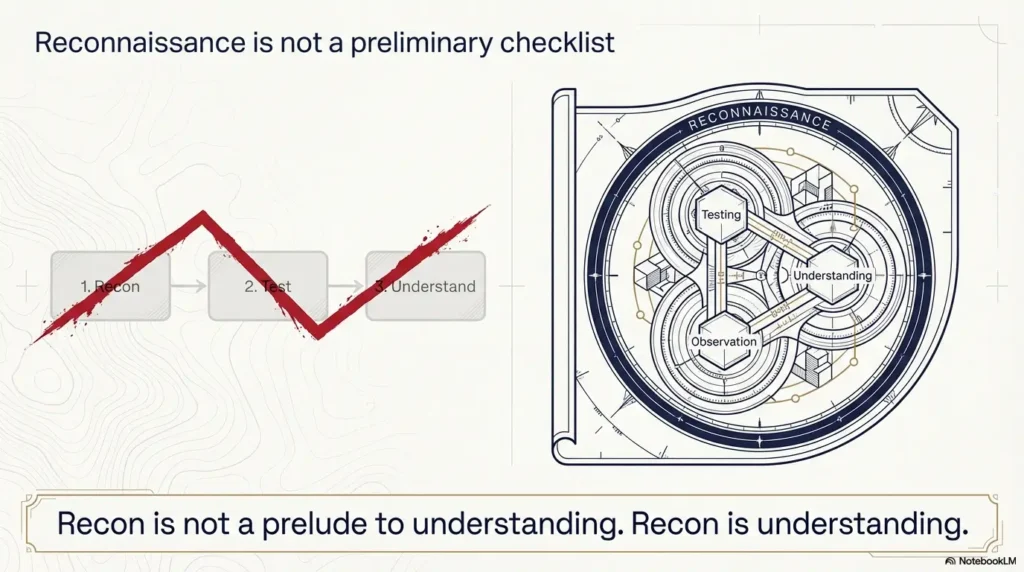
Read the application’s accent: headers, cookies, and server behavior that narrow your theory
What response headers can suggest about stack age and configuration
Headers are not gossip, but they can be very talkative. Server banners, cache behavior, content types, redirects, and other header-level details can narrow your understanding of what you are looking at. OWASP’s guidance includes web server fingerprinting for a reason. You are trying to reduce ambiguity.
Do not over-romanticize every header though. A single hint is rarely a verdict. Think of headers as accent marks, not sworn testimony. One clue may suggest a stack habit. Several aligned clues can justify a working theory. When those clues start pointing toward the web server itself, a focused pass on Kioptrix Apache enumeration can sharpen the picture without derailing the workflow.
How session cookies hint at authentication flow without touching credentials
The PHP manual reminds developers that cookies are sent as HTTP headers and that setcookie() must be called before output. For you as a learner, the practical lesson is simpler: cookies are part of the conversation. They can tell you whether the application establishes state before authentication, after a redirect, or only under specific conditions.
That does not mean you should get reckless. It means you should observe carefully. Note cookie names, timing, creation conditions, and whether the app treats different page transitions differently. A session cookie appearing after one request path and not another can be more instructive than a dozen dramatic page errors.
Why inconsistent status codes often point to uneven input handling
If the same general action yields different status code patterns depending on request shape, method, or path, you may be seeing uneven server-side handling. In older apps, this is common. Some paths were built carefully. Some were taped together on a Friday afternoon and then left to fossilize. The fossil records are still there.
Decision card: When header/cookie clues matter most
Sparse app, few pages, old PHP naming, inconsistent redirects, visible auth gating.
Single isolated header clue, lab noise, proxy-added behavior, or one-off responses you cannot reproduce.
Neutral action: Record headers and cookies only when they change your working model of the app.
Input tells a story: forms, query strings, and request patterns worth documenting
Which form fields deserve special attention in PHP recon notes
Some fields are obvious attention magnets: username, password, search, comment, record ID. But beginners often forget supporting fields such as hidden inputs, return URLs, submit button names, or weirdly specific field labels. In older PHP apps, these can reveal how server-side scripts expect the request to be shaped.
Record field names exactly. Not approximately. Exact names matter because they reveal developer assumptions. They also help you later distinguish between a page that looks similar and a page that is actually part of a different workflow.
How GET and POST behavior can reveal hidden assumptions in the app
You are not just collecting fields. You are collecting request logic. Does the app expose the same function through both query strings and forms? Does one method redirect and the other render in place? Does one preserve values after failure? These are not glamorous questions, but they get you closer to the app’s real habits.
A beginner mistake is to interpret “the form didn’t work” as the end of the note. Try instead: What did the app expect? What changed? What remained stable? A calm comparison beats a frustrated shrug every time. That same discipline becomes even more useful if you later branch into curl-only recon on Kioptrix, where the request shape becomes impossible to ignore.
Why search boxes, comment fields, and login forms deserve different kinds of observation
These inputs look like cousins. They are not. Login forms tend to reveal authentication flow and validation posture. Search inputs often reveal query handling habits and result rendering patterns. Comment or message fields may reveal output behavior and context. Treat each like a different instrument in the same orchestra. Similar shape, different music.
Here’s what no one tells you… tiny parameter changes can teach architecture, even when nothing “breaks”
Sometimes you alter a parameter and nothing dramatic happens. That is still useful. If the page ignores the change, perhaps the parameter is decorative, validated elsewhere, or not part of the workflow you thought. If the page reacts subtly, that subtlety may teach you more than a crash would. Quiet behavior changes are often architecture peeking through a curtain.
Later, when we mapped the surrounding pages, that tiny difference became the hinge. It showed that one route handled the parameter directly while another merely passed it along. Suddenly the application was no longer a blur of similar pages. It had shape. The point was not that a secret exploit had appeared like treasure in a cereal box. The point was gentler and more useful: careful notes preserve meaning your tired brain will not remember. In recon, memory is fragile. Writing is how you keep the thread from snapping.
Error messages are fingerprints: how PHP apps leak structure through failure
What warnings, notices, and verbose failures may suggest about file paths and code habits
Older PHP applications are famous for saying too much when something goes wrong. Sometimes they reveal file paths, include logic, variable naming habits, or other structural hints. You are not forcing the pace here. You are observing how the application fails, because failure often tells the truth more plainly than success does.
Be careful with your language in notes. Write what appeared, not what you wish it meant. “Notice references a missing variable on X page” is cleaner than “the app is definitely vulnerable because PHP is old.” Clean notes age better than excited ones.
Why generic error pages can still reveal timing, redirect, or validation differences
Even generic errors are not necessarily generic in behavior. The message may stay the same while the path to that message changes. Timing changes. Response size changes. Redirect behavior changes. Validation order changes. These differences matter because they help you model the application’s internal branching without pretending you can see the code.
How to record an error safely and usefully for later analysis
Take a screenshot. Record the exact page, method, parameter set, and timestamp. Save the raw response details you can responsibly capture. Then write one sentence on why the error matters. Not five guesses. One sentence.
It is astonishing how many write-ups become mud because the recon notes said things like “weird error lol.” The phrase belongs in a group chat, not in your assessment trail. A consistent naming habit for captures helps too, which is why some testers rely on a screenshot naming pattern for pentesting notes instead of dumping everything into one chaotic folder.
- Capture the exact trigger condition
- Record visible wording and response behavior separately
- Do not inflate one noisy error into a grand theory
Apply in 60 seconds: Add an “error notes” tab to your recon sheet with page, trigger, wording, status, and why it matters.
Don’t force the pace: beginner recon mistakes that create noise instead of clarity
Why running too many tools too early makes pattern recognition worse
Automation has its place. It also has a gift for flooding beginners with data before they know what matters. You end up with a festival of paths, responses, and maybe 40 tabs open like a browser-based panic attack. More output is not more understanding.
Use tools after your first manual pass, not instead of it. That order matters because it gives your brain a skeleton to hang the tool output on. Without that skeleton, everything looks equally important, which is just another way of saying nothing has been prioritized. This is one reason many people revisit their Kioptrix enumeration mistakes after a few labs and realize the issue was sequencing, not effort.
The trap of assuming every parameter is immediately exploitable
Not every parameter is a doorway. Some are wallpaper. Some are labels. Some are echoes of functionality handled elsewhere. The beginner temptation is to turn every discovered variable into a romance novel. Please do not marry the first clue that smiles at you.
Why skipping screenshots, timestamps, and response notes slows your write-up later
Future-you is not a mythic being. Future-you is a tired version of current-you with weaker memory and less patience. If you do not capture what you saw when you saw it, your report-friendly trail gets foggy fast. That fog is how weak claims sneak in.
PHP recon: status alone does not describe state change
Illustrative example — not a performed lab test.
- Observation
- A request returns HTTP 200, but the expected disposable record is unchanged afterward.
- Supported interpretation
- The transport-level response did not establish the intended application transition.
- Still unresolved
- Whether validation rejected the action, the session differs, the response is a template or the observed record is stale.
- Next authorized check
- Preserve method, endpoint, identity, body and before/after state. Check the application’s explicit result and a permitted fresh read before concluding that an update occurred. A PHP-looking route does not prove implementation or vulnerability.
Common mistakes
Treating recon like exploitation and missing the application’s logic
The biggest beginner error is conceptual. You think recon means “start finding the break.” Often it should mean “start finding the shape.” If you skip the shape, even valid findings can become messy because you cannot explain where they sit in the workflow.
Ignoring static files, backup-looking paths, and inconsistent naming conventions
Static assets and odd-looking paths sometimes look too plain to matter. They can matter a great deal because they reveal directory habits, naming age, and forgotten sections of the app. Again, not every path is treasure. But many tell you something about how the application grew.
Over-trusting automated output without verifying what was actually observed
Tool output is not scripture. Verify. Confirm. Revisit. A route a tool reports may behave differently than you assume, or the context may be less useful than the raw list implies. Good recon is not anti-tool. It is anti-laziness dressed as tooling.
Confusing “interesting” with “actionable” in beginner notes
This one stings because interesting things are more fun to write down. But a weird string in a comment is not automatically more important than a reproducible redirect difference tied to authentication flow. One is sparkly. One is useful. Choose useful first.
Old-school PHP tells on itself: framework absence, file naming, and structure clues to notice
What index.php, login.php, admin.php, and similarly direct naming can imply
Older PHP applications often reveal function through filename with startling honesty. That can make beginner recon feel almost suspiciously generous. If a page is called admin.php, it may indeed be about administration. The filename alone proves nothing, but paired with navigation behavior, redirects, and auth flow, it becomes a useful clue in your model.
Why older PHP apps often expose workflow through predictable page relationships
Direct relationships between pages can be visible in ways that modern routed apps hide. A login page leads to a member page. A view page takes a direct identifier. An edit page mirrors a display page. A logout endpoint behaves in a distinct way. The whole app can feel less like an abstract platform and more like a row of labeled filing cabinets. It is oddly refreshing. That is also why a short primer on vulnerable web app structure can be surprisingly helpful for beginners trying to name what they are seeing.
How mixed naming styles can hint at layered development or neglected code paths
If half the app uses one naming habit and half another, pay attention. Mixed styles may suggest multiple development phases, copied modules, or uneven maintenance. That does not automatically equal weakness. It does mean your mental model should include history. Applications are not just code. They are code plus all the decisions that survived the years.
The funny thing about old PHP is that its rough edges can be pedagogically kind. It is like learning piano on an instrument that slightly clicks under the keys. You hear the mechanism. That click teaches you where the action is.
Stop before the shiny object: how to separate signal from lab decoration
Why not every strange string, image path, or comment deserves equal attention
Labs often contain decorative oddities. Strange comments. Legacy assets. Cute naming. Fragments that seem promising because they feel secret. Beginners can drift toward these clues because they offer adrenaline. Meanwhile, the truly useful observations stay parked in boring places like redirects, repeated parameters, and predictable workflow differences.
How to rank findings by usefulness: authentication, input handling, session flow, and error leakage
A practical ranking system helps. Start with items that improve your model of:
- Authentication flow
- Input handling patterns
- Session establishment or transition
- Error behavior and disclosure
Then place decorative or context-light clues below them. Not because they never matter, but because triage matters. The best recon notebook is not the thickest. It is the one where the important pages do not drown under confetti.
When a dead end is still valuable because it sharpens your model of the app
A dead end can confirm a boundary. It can show you where auth gates live. It can reveal naming expectations or tell you which assumptions were wrong. That is still useful. In fact, some of the best beginner growth happens when you learn to harvest value from a dead end instead of calling it a waste. If rabbit holes keep stealing your time, the OSCP rabbit hole rule is relevant far beyond exam prep.
Useful mental filter: Ask, “Does this clue change my map of the application?” If not, it may be decoration for now.
Build the beginner recon notebook: what to capture so your future self says thank you
A simple structure for page maps, parameter lists, form behavior, and response anomalies
Your notebook does not need to be pretty. It needs to be legible, consistent, and humble. A beginner-safe structure might include:
- Page: exact path or route
- Parameter/Form: field names, methods, visible inputs, hidden inputs
- Response behavior: status, redirect, response length changes, visible wording
- Hypothesis: what this may suggest, clearly labeled as a hypothesis
What makes a recon note report-friendly instead of diary-like
Report-friendly notes are reproducible. They tell another person what you observed and under what condition. Diary-like notes capture your mood but not the evidence. “This page felt sketchy” is a mood. “POST to login.php returned 302 to members.php only when field X remained present” is evidence. One belongs in your chest. The other belongs in your notebook.
How to turn scattered observations into hypotheses without overstating certainty
Here is the rhythm that works: observe, record, compare, hypothesize. Do not swap the order. Your hypothesis should read like a lantern, not a verdict. “This may indicate shared handling across pages” is better than “this proves the whole auth model is broken.” Leave room for being wrong. Serious practitioners do not become trustworthy by sounding certain. They become trustworthy by handling uncertainty cleanly. For people building a more durable capture habit, even a simple system for note-taking in pentesting can make recon dramatically easier to reuse later.
Quote-prep list for your own recon review
- Exact paths visited
- Field names and methods
- Status code and redirect chain
- Cookie/session behavior when it changed
- Error wording or response anomalies
- One sentence on why the note matters
Neutral action: Use this list before you summarize the lab to yourself or a teammate.
FAQ
What is PHP application recon in a beginner pentesting lab?
It is the process of understanding what the application exposes before you attempt deeper testing. In a legal lab, that usually means mapping pages, forms, parameters, redirects, cookies, headers, and error behavior so you can build a defensible model of the app.
Is Kioptrix a good starting point for learning web recon?
Yes, especially for beginners who need to learn patient observation. Kioptrix-style environments tend to expose enough structure that you can practice pattern recognition without getting buried under modern frontend complexity. They are useful teachers because the clues often sit closer to the surface.
What should I look at first in a PHP login page?
Start with field names, visible and hidden inputs, method, redirect behavior after failure, session cookie changes, and any variation in response wording or status codes. You are trying to understand workflow, not force a result.
Do beginners need automated tools for web recon right away?
No. A manual first pass is often better because it teaches you what the application looks like when interpreted by a human rather than a scanner. Automation becomes much more useful after you already have a page map and a working theory. Once you reach that point, thoughtful options like FFUF wordlist tuning or Nuclei template tuning make more sense than blasting defaults at the target from minute one.
Why do error messages matter so much in older PHP apps?
Because older PHP applications may reveal structural clues through warnings, notices, validation differences, or inconsistent failure handling. Even generic errors can teach you something if response behavior changes in meaningful ways.
How do I know whether a finding is just noise?
Ask whether it changes your mental model of authentication, input handling, session flow, or error behavior. If it cannot be reproduced, does not affect the app’s logic, and adds no clarity, it may be noise for now.
What should I document during web application recon?
Document exact pages, parameters, form fields, methods, response behavior, redirects, cookies when they matter, error messages, timestamps, screenshots, and one careful hypothesis for each meaningful observation.
Is it okay to test every parameter I find?
In an authorized lab, you still want discipline. Not every parameter deserves the same attention. Start with the ones tied to authentication, record access, state changes, form processing, and error handling. Prioritize understanding over brute curiosity.
Next step
Open one Kioptrix-style lab page and create a four-column recon sheet: page, parameter/form, response behavior, and hypothesis
If you do only one useful thing in the next 15 minutes, do this. No scanner orchestra. No tab avalanche. Just one page and a four-column sheet. The point is to make the application legible.
Do one slow pass manually before using any automation, and compare what you noticed versus what the tool noticed
This closes the curiosity loop from the beginning. The thing worth looking for before you touch anything is not a magic endpoint. It is the application’s own pattern of self-disclosure. Once you see that clearly, later testing becomes less frantic and more honest.
Your pilot step: choose one login page or one record-view page in the lab, spend 10 minutes observing only, and write exactly five evidence-based notes. If you cannot explain each note in one sentence, slow down another notch. That is not weakness. That is the skill arriving.
Original review: 2026-03.
Technical guidance updated: 2026-10-13. Clarified that a 403 does not prove resource existence and login submissions are active tests.
Application state-transition record
Use this record for the specific question in this guide. Complete it with the actual scope, conditions, evidence and assistance used in your own work.
Use the editable record below to retain the task context and unresolved questions.
Edit here, then select and copy the text to your own notes before leaving. This field has no submission or storage function; reloading resets it. Do not enter passwords, tokens or private client information. The 12,000-character limit applies to this working note.
Next action: Review whether the proposed request changes state before choosing the next check. Keep the supporting evidence and its conditions beside the decision.
Related task: Use Legacy PHP Clues: Implementation and Session Context for that separate part of the workflow.
Worksheet change record — October 20, 2026
Added four task-specific fields, a next action and a related guide. This is a blank editorial working aid, not a completed test or validated assessment. Existing source-review dates retain their own scope; this addition is not a new verification of every statement.
Practice-aid update: October 20, 2026. Added the illustrative decision case and editable note. No new VM execution or full-article revalidation is claimed.