

The Operator’s Playbook: Beyond the Hour 19 Wall
At hour 19, the exam doesn’t beat you with a “hard box.” It beats you with a folder named
final-final2,
one missing screenshot, and the quiet lie that you’ll “remember it later.”
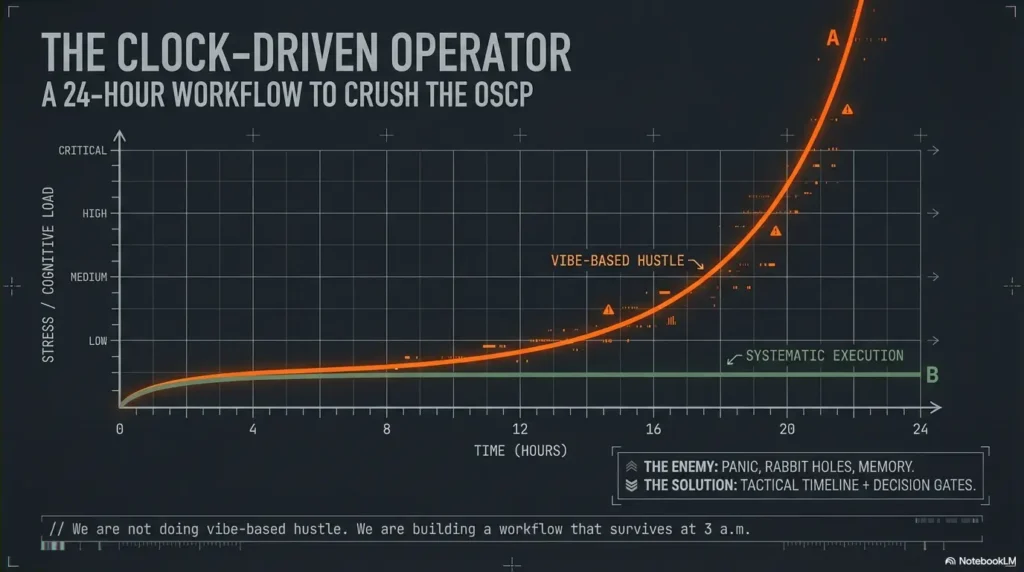
This is what OSCP pressure actually looks like: you have signals everywhere—ports, banners, half-working creds—but your time disappears into sentimental rabbit holes and tool noise that never turns into points. Keep guessing and you don’t just lose minutes. You lose reproducibility, and that’s how “almost root” becomes zero.
An OSCP time management plan is a clock-driven workflow that turns recon into decisions, exploits into repeatable steps, and progress into report-ready proof—using timeboxes, pivot rules, and an attack + admin rhythm that survives fatigue.
The Core Principles
- • No vibes.
- • No loyalty to one target.
- • No “I’ll document later.”
The Action Plan
- • Start with first-blood triage.
- • Run 20/90/180-minute blocks.
- • Track a credential ledger like currency.
- • Bank screenshots and proof as you go.
Built like an operator’s playbook: hard gates, clean artifacts, and a report flow that won’t implode at 3 a.m.—because the only progress that counts is the progress you can prove.
A strong OSCP time plan is less about hustle and more about decision gates. Start with quick wins (service recon → obvious exploits), lock proof early, then run timed deep dives with hard pivot rules (switch targets when signals go cold). Use two tracks: attack (exploit) and admin (notes, screenshots, report artifacts). The schedule below is hour-by-hour with pivot triggers and salvage moves.
Table of Contents
Who this is for / not for (read this before you copy the schedule)
This plan is designed for US-intent OSCP candidates who want a repeatable, exam-realistic way to buy back time under stress. I’m assuming you’ve already done at least one full-day sim and you know the basics of recon, exploitation, and privesc.
For
- Test-takers who want a clock-driven workflow, not vibes
- People who stall on “one box” and need exit criteria (start with the OSCP rabbit-hole rule)
- Anyone who wants a clean attack + admin rhythm (proof doesn’t happen “later”)
Not for
- First-time lab learners who haven’t practiced a full 24-hour sim yet
- Anyone relying on memorized exploits without understanding proof + stability
- People who refuse to pivot (you’ll lose to your own loyalty)
- Yes/No: Have you completed at least one 12–24 hour mock under a timer?
- Yes/No: Can you reproduce a foothold twice without improvising?
- Yes/No: Do you have a notes + screenshots habit that survives stress?
Apply in 60 seconds: If any answer is “no,” run a 6-hour mini-sim first and practice “proof as you go.”
Tiny confession: my first long sim wasn’t ruined by a hard exploit. It was ruined by a dumb, human thing—tabs. I had the right idea in my head, but the evidence was scattered across terminal scrollback, a half-saved screenshot, and a note titled “final-final2.” That’s why this plan treats admin like a second attack path, not a chore.
Setup before Hour 0: your “zero-friction” exam kit
Your goal is zero friction—no “where do I save this,” no “what did that command do,” no “I’ll screenshot later.” The OSCP exam is run by Offensive Security; their exam guide is the authority on what counts as valid proof and what actions are prohibited. Your workflow should assume you’ll be tired and still need to be correct.
Notes system that survives panic (folder + template + timestamp habit)
- One folder per target + one “00-index” page (ports, creds, URLs, status) using an Obsidian OSCP host template.
- Timestamp every pivot (e.g., “07:40 switched to Target B due to no new signal”).
- Keep a credential ledger in one place (host → user → pass/hash → where found → last verified).
Screenshot rule: capture proof as you go, not “later”
“Later” is a fantasy. Take a screenshot at every milestone: initial access, privilege escalation, flag capture, and any command output that proves the step. Name files predictably: target_step_YYYYMMDD_HHMM.png. If you want it dead-simple, steal the ShareX screenshot naming pattern and stop thinking about it forever.
Command hygiene: paste-safe snippets + one place for credentials
- Store “known-good” recon and enum commands in a paste-safe note (no smart quotes, no weird dashes).
- When you find creds, immediately paste them into the ledger and validate once (re-entry matters).
- Keep terminal output readable: tee logs for key scans so you can cite exact outputs later (see Kali Linux lab logging if your logs are chaos).
Micro-H3 (pattern interrupt): Let’s be honest… your biggest enemy is tab chaos
Under pressure, your brain starts “saving time” by skipping structure. That’s the trap. Structure is what creates speed when you’re tired. I once lost 25 minutes re-finding a single URL parameter because I didn’t write it down the first time. Never again.
Your two-track rule (non-negotiable)
- Attack track: recon → exploit → stabilize → privesc
- Admin track: notes → screenshots → reproducibility steps → report blocks
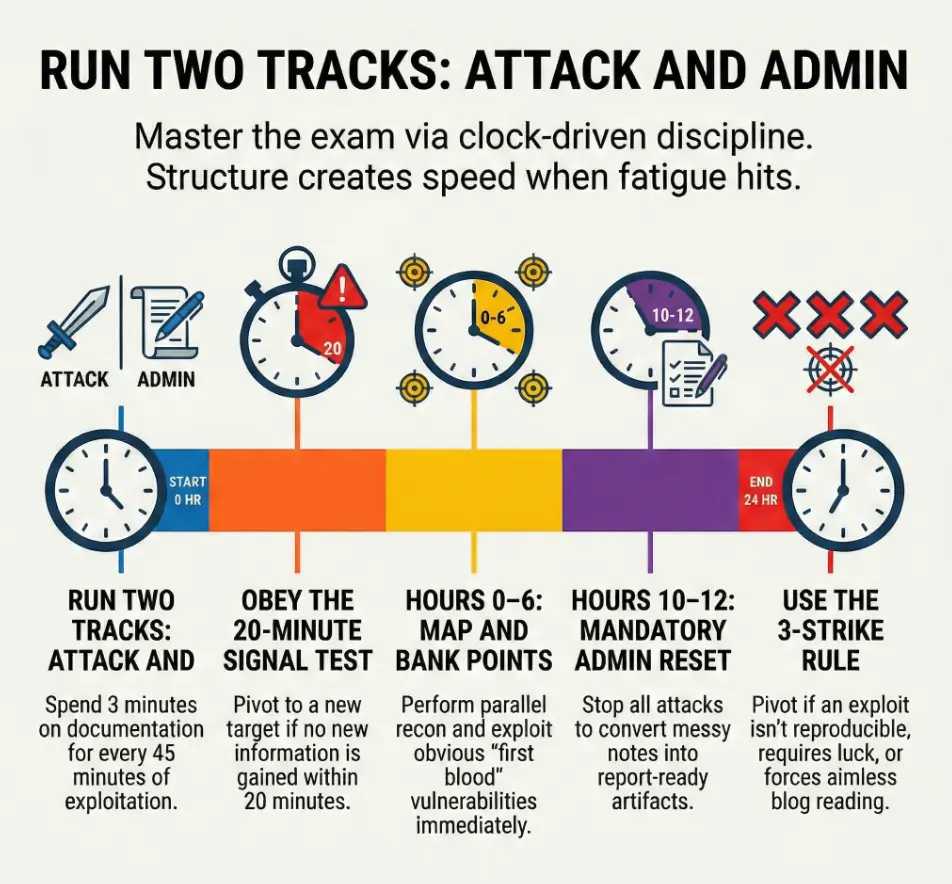
Rule of thumb: every 30–45 minutes, spend 3 minutes on admin. It’s the cheapest insurance you can buy.
Hours 0–2: Open fast—map the battlefield without falling in love
The first two hours are where people either win the exam… or volunteer to suffer. Your mission: build a clean map, then choose “first blood” targets based on signal—not ego. (Yes, your brain will try to romance the hardest box. No, you don’t get points for romance.)
| Time | Objective | Output you must produce |
|---|---|---|
| 0:00–0:20 | Read the exam sheet like a contract (targets, constraints, scoring) | A 6-line “rules + scoring” note + a blank report skeleton |
| 0:20–1:20 | Parallel recon: nmap strategy + quick service fingerprints | Ports table per target + 2–3 “possible paths” bullets |
| 1:20–2:00 | Shortlist “first blood” targets (highest signal, lowest uncertainty) | Ranked list: Target A/B/C with one-line rationale |
Here’s the uncomfortable truth: if you start scanning “everything forever,” you’re not being thorough—you’re delaying commitment. I like to run a fast pass first, then deepen only where the outputs change decisions. (If your host discovery is flaky, fix the baseline with Nmap -Pn vs -sn before you waste an hour “debugging ghosts.”)
Curiosity gap: The first 10 minutes decide your next 10 hours—why?
Because those 10 minutes set your “default behavior.” If your default becomes “I’ll just keep looking,” you’ll keep looking even when you already have enough to act. The plan below forces action early, so you can earn points while your brain is still crisp.
Show me the nerdy details
Use recon outputs to reduce uncertainty, not to collect trivia. Your fastest loop is: identify reachable surfaces (ports/services) → test one concrete hypothesis per service → record outcomes. If a scan result doesn’t change the next test you’ll run, it’s likely not worth expanding yet. This is how you avoid “tool noise” turning into a personality. If version detection is lying to you, read the fixes for Nmap -sV false positives.
Hours 2–6: Quick wins sprint (scoreboard first, ego last)
This block is your points foundation. You’re hunting for obvious footholds: default creds, known vulns with confirmed versions, misconfigurations, weak file permissions, exposed admin panels. You’re not trying to prove you’re clever. You’re trying to bank certainty.
2:00–3:30 — exploit the obvious (default creds, known vulns, misconfigs)
- Pick the target with the cleanest signal and start an end-to-end attempt (ground it with an OSCP initial access checklist so you don’t improvise under stress).
- Confirm versions before you commit to an exploit path.
- When you hit a login page, test low-friction ideas first (but avoid blind guessing spirals—timebox brute attempts with OSCP Hydra timeboxing).
3:30–4:30 — privilege escalation “low-hanging” checks (enum + config scans)
Once you have a foothold, do the fast privesc sweep: permissions, running services, scheduled tasks/cron jobs, config files, history, and credentials in predictable locations. Tools can help, but you still need to validate manually because “almost root” is a mirage. If you see a clean path, don’t overthink it—especially for classic wins like sudo NOPASSWD privilege escalation or an unquoted service path vulnerability.
4:30–6:00 — lock proof + stabilize shells (repeatable access, clean artifacts)
Stabilize your access in a way you can reproduce and explain. Write re-entry steps while your hands remember them. I once had a shell that worked exactly once—like a magic trick. It felt amazing for 30 seconds, then it cost me an hour trying to recreate it. Don’t build castles on one-offs. If your shell workflow is messy, use a quick TTY upgrade checklist so “stability” stops being a vibe.
- Capture proof at initial access and privesc milestones (use the OSCP proof screenshot standard so your evidence is actually scorable)
- Write reproducibility steps while you can still feel the path
- Stabilize access before you chase “one more thing”
Apply in 60 seconds: Add a “Re-entry tested? (Y/N)” line to each target’s notes and fill it immediately.
Micro-H3 (pattern interrupt): Here’s what no one tells you… “almost root” is worth zero
Your nervous system will beg you to keep pushing because you’re “close.” Close is emotionally expensive. Your plan needs to be emotionally cheap: proof, repeatability, and clear pivots.
Pivot Rules v1: the 20-minute signal test (when to switch targets)
The 20-minute signal test is your “anti-rabbit-hole seatbelt.” You’re allowed to explore—just not indefinitely. Every 20 minutes, ask: Did uncertainty go down? If not, pivot. This is not quitting; it’s resource allocation (and yes, the pivoting tool choice matters when you’re trying to move fast without breaking your own setup).
Pivot if…
- No new info in 20 minutes (no new ports, files, creds, paths)
- Your exploit path depends on “guessing” a version you can’t confirm
- Tool output is noisy and you can’t reduce uncertainty fast
Stay if…
- You found creds (even partial), tokens, or reusable secrets
- You found writable paths, exposed scripts, or predictable enum leads
- You discovered an internal app surface you can test methodically
Decision Card: When to keep pushing vs switch
Keep pushing (20–90 minutes)
- You have a testable hypothesis (not a hunch)
- You can name the next 2 tests and what “success” looks like
- Evidence suggests a path is real (logs, errors, permissions, creds)
Switch now (pivot)
- You’re repeating the same test with different “hope”
- You can’t explain why the next idea is better than the last
- You’re “reading the internet” instead of interrogating the system
Neutral action: Write a one-line pivot reason before switching so you can return efficiently.
Hours 6–10: Deep dive block #1 (one hard box, but on a leash)
You get one “hard box” deep dive here—but it’s on a leash. The leash is time. You will run a hypothesis loop: state the idea, test it, record evidence, and decide. I know this sounds boring. Boring is good. Boring wins.
6:00–6:20 — re-recon the chosen target with “what matters” filters
- Re-check only the services that map to plausible exploit paths.
- Pull key pages, endpoints, banners, and error messages into notes.
- Reduce the target to two hypotheses max (use an Obsidian OSCP enumeration template if your notes sprawl).
6:20–8:30 — focused exploitation loop (hypothesis → test → evidence)
Run tests like an operator, not a gambler. If you can’t describe what output would confirm or falsify your idea, you’re not testing—you’re wishing. I’ve watched smart people lose two hours to “maybe it’s this,” repeated with different adjectives.
8:30–10:00 — privesc with checklists + manual validation
Use your privesc checklist, but validate each lead manually. Tools are assistants; you are the judge. This is where clean documentation helps: a privesc chain you can reproduce is a chain you can report.
Curiosity gap: Why “more enumeration” can be the wrong move at Hour 7
Because enumeration without decision gates becomes emotional avoidance. At hour 7, your brain wants certainty. Endless enum feels like certainty, but it’s just motion. The correct move is targeted tests that either open a path or close it.
Hours 10–12: Admin reset—convert progress into points
This is the part your future self will beg you for. You stop, you audit, you clean. Not because you’re “done,” but because memory is a liar at hour 22. Convert progress into report-ready artifacts while it’s still fresh.
- Evidence audit: Do you have required proof (flags, screenshots, commands) for each win?
- Notes cleanup: Turn messy logs into report blocks (what you did, why it worked, proof).
- Environment check: Confirm stability and re-entry steps you can legally explain (start from an OSCP VM lockdown checklist so your environment doesn’t sabotage you mid-exam).
Personal note: the first time I did a real “admin reset,” it felt like wasting 45 minutes. Then later, when fatigue hit, it felt like I had pre-paid for clarity. That’s the trade: you spend minutes now to save hours later.
Hours 12–16: Deep dive block #2 + “creds-first” sweep
This block is where many exams flip. Not because you suddenly become a wizard, but because you start treating credentials like currency. A single reused credential can unlock a new surface, shorten recon, or turn a “hard box” into a 30-minute path.
12:00–13:30 — credential hunting sweep across all targets (reuse wins)
- Re-check notes for any creds you didn’t validate.
- Try creds where they make sense (same org/app stack, shared services).
- When creds work, bank proof and document the access method.
13:30–16:00 — second hard target: repeat the same hypothesis loop
You’re reusing the same loop: hypothesis → test → evidence → decision. This is the whole point: you don’t “think harder,” you run the process. And yes, I know the temptation: “Maybe I should start over from scratch.” Don’t. Start over from your notes.
Curiosity gap: The “one credential” that flips the whole exam—where it hides
It often hides in plain places you’re too rushed to treat seriously: config files, service scripts, history, backup directories, or “temporary” notes left by a developer. The trick is not magic; it’s discipline—when you see a hint, you write it down and validate it once (especially the classics like bash/zsh history leaks).
- Use one credential ledger for the whole exam
- Validate each credential at least once
- Write “where found” so you can justify it in the report
Apply in 60 seconds: Add a “Last verified (HH:MM)” column to your credential ledger right now.
Pivot Rules v2: the 3-strike system (stop donating hours)
The 20-minute test protects you from drift. The 3-strike system protects you from obsession. It’s designed for the emotional moments—when you’re tired, “so close,” and convinced the answer is one more blog post away.
- Strike 1: You can’t reproduce an exploit twice → document what worked once, then move on.
- Strike 2: Privesc requires a miracle (roulette behaviors, blind brute force, pure luck) → pause and switch targets.
- Strike 3: You’re reading blogs, not systems → pivot immediately.
Salvage move: Bank partial access with clean proof and return later. A “partial” with a reproducible foothold is not a failure; it’s a future shortcut. I once came back after a break, tried the same creds on a different service, and the entire path unfolded in 12 minutes. That wasn’t genius. That was giving my brain a chance to reset.
Mini calculator: “points per uncertainty” in 30 seconds
Use this as a triage lens when you’re deciding where the next 90 minutes should go.
Input (estimate)
- Time bet: 90 minutes
- Signal strength: low / medium / high
- Reusability: does success create creds or access you can reuse? (yes/no)
Output (decision)
- High signal + reusable: take the bet now
- Medium signal: take the bet only with a clear hypothesis loop
- Low signal: pivot unless you’re missing just one confirmable step
Neutral action: Rank three targets “High/Med/Low signal” and pick one 90-minute bet.
Hours 16–20: Last scoring push (triage like an incident responder)
Now you stop acting like a treasure hunter and start acting like an incident responder. You triage. You choose the next action based on impact and likelihood, not attachment. This is where discipline turns into points.
Triage board: targets ranked by points per uncertainty
- List each target with status: no signal / foothold / privesc stuck / proven chain.
- Pick one “best 90-minute bet” and run it end-to-end.
- If you’re stuck, do a creds sweep before you start a new rabbit hole.
“One more box” trap avoidance: score math + time reality check
Your brain will whisper: “One more box and I’m safe.” Sometimes that’s true. Sometimes it’s how you lose the report. Be honest: if you can’t finish and document a brand-new chain with enough time to verify reproducibility, it’s not a bet—it’s a donation.
Don’t do this: Starting a brand-new rabbit hole at Hour 19
Hour 19 is for high-signal work and closing loops. I’ve seen candidates light 90 minutes on fire because they opened a new service “just to look.” If you “just look,” you usually just lose.
Hours 20–24: Report mode that doesn’t implode at 3 a.m.
The report is not a formality. It’s the container your points live in. Offensive Security’s reporting guidance exists for a reason: reproducibility and proof. Your endgame is simple: assemble, verify, polish. Not “remember.” Not “hope.” (If you want a structured starting point, use a Kali pentest report template mindset: clear steps, clean proof, reproducible commands.)
| Time | Objective | Non-negotiable checks |
|---|---|---|
| 20:00–21:30 | Assemble sections per target (steps, screenshots, commands) | Each step has a screenshot or output proof |
| 21:30–23:00 | Verify reproducibility (fresh shell → flag → screenshot) | Re-entry works; commands are complete; filenames match |
| 23:00–24:00 | Polish for clarity: headings, filenames, missing proof check | No missing steps; no “magic”; readable by a stranger |
One more confession: the worst feeling is believing you’ll remember a command later. You won’t. Your brain will feel like a shaken snow globe. Treat screenshots and notes like oxygen: not glamorous, but mandatory.
Don’t do this: Assuming you’ll remember commands without screenshots
If you can’t reproduce it from the report, it’s not real progress. The report is your “ground truth,” not your memory.
Common mistakes (and the exact fix for each)
- Mistake: “I’ll document later” → Fix: screenshot + note after each milestone
- Mistake: tunneling on one exploit → Fix: 20-minute signal test + pivot gate
- Mistake: running huge scans nonstop → Fix: targeted recon tied to hypotheses
- Mistake: copy/paste exploitation without validation → Fix: prove version + verify path
- Mistake: messy creds handling → Fix: single credential ledger + timestamps
A practical trick: when you catch yourself saying “just one more thing,” you’re usually not doing the next best step—you’re soothing anxiety. Replace that phrase with: “What would reduce uncertainty in 10 minutes?”
Tools & workflow guardrails (what’s allowed, what’s smart)
Keep it legal and within exam rules. Don’t rely on folklore. When in doubt, defer to Offensive Security’s guidance for what’s permitted. Tools like Nmap, Burp Suite, and your OSCP-typical enumeration helpers can be powerful—if you use them to shrink uncertainty, not to create noise.
Keep it legal: stay within exam rules; don’t attempt prohibited actions
Ethics isn’t a “nice-to-have” here—it’s part of being a professional. The exam environment has boundaries by design. Your job is to win within them, the same way you would on a real engagement.
Stability > speed: repeatable foothold beats fragile one-offs
Repeatability is what turns a shell into points. A fragile foothold that collapses when you touch it is like writing on water. If you’re choosing between “flashy” and “stable,” choose stable.
Timeboxes you can trust: 20/90/180-minute blocks and why they work
- 20 minutes: signal test (are you learning anything new?)
- 90 minutes: a full end-to-end bet (hypothesis → attempt → evidence → decision)
- 180 minutes: one deep dive block max before an admin reset
Operator mindset: You don’t “try harder” by staying longer. You try harder by choosing better tests, faster pivots, and cleaner proof.
Next step (one concrete action)
Run one full 24-hour mock this week using this schedule, then revise your pivot rules based on where you bled time. Write the top 3 pivot triggers you ignored. Then re-run a 6-hour slice to prove you can obey the gates when it gets uncomfortable.
Quote-prep list: what to gather before you compare approaches
- Your last mock timeline: where did you lose 60+ minutes?
- Your top 10 “repeatable” commands (recon, enum, privesc checks)
- Your report skeleton: sections per target + screenshot naming convention
- Your pivot reasons library: “no new signal,” “non-repro exploit,” “noise spiral”
Neutral action: Put these into one folder so you can start future mocks in under 3 minutes.
Short Story: The hour I “won,” then lost
I once hit a foothold and felt the room get brighter—like the exam itself leaned in and whispered, “Okay, you’re in.” I sprinted. I chased the next step. I skipped the screenshot because I was “on a roll.” Then the shell died. Not dramatically—just quietly, like a door closing without a slam. I told myself I’d recreate it fast. Fifteen minutes became forty. Forty became seventy.
Eventually, I got back in… and realized I couldn’t prove the path cleanly because I’d lost the exact output that mattered. That hour felt productive in the moment. In hindsight, it was pure emotion disguised as speed. After that, I started treating proof like a heartbeat: if it’s not recorded, it didn’t happen.
FAQ
How many hours should I spend on recon in the OSCP exam?
Use a fast pass early (roughly the first hour) to map services and rank targets, then do targeted recon only when it supports a hypothesis. Recon is “too much” when it doesn’t change your next action.
What’s a good OSCP pivot rule when I’m stuck on a box?
Use the 20-minute signal test: if you haven’t gained new, actionable information in 20 minutes, pivot. Then use the 3-strike system to stop donating hours when you’re tired and attached.
Should I write the report during the exam or after I finish exploiting?
Do “admin as you go,” then do a structured report block at hours 10–12 and 20–24. Waiting until the end increases the chance of missing proof and losing reproducibility when fatigue hits.
What if I have a shell but can’t escalate privileges—do I move on?
Yes, after a timebox. Run a fast privesc checklist, validate the best leads, then pivot if the remaining path looks like luck or roulette. Bank the foothold with clean proof so returning later is cheap.
How do I avoid wasting time on “tool noise” during OSCP?
Tie each tool run to a hypothesis. If you can’t say what output would change your next step, don’t run it. “More output” is not “more progress.” For web endpoints, tune your discovery instead of “spraying”—see ffuf wordlist tuning.
What’s the best way to manage screenshots for OSCP reporting?
Screenshot every milestone immediately, use consistent filenames, and store them per target. Assume you will not remember commands at hour 23. Your screenshots are your memory.
How do I decide which target to attempt first in OSCP?
Choose “first blood” by signal and uncertainty: clear services, confirmable versions, straightforward paths, and quick proof. Early points reduce emotional pressure and improve decisions later.
Is it worth continuing a hard box if I’ve already spent 4 hours?
Only if you can name the next two tests and why they reduce uncertainty. If you’re repeating ideas or hoping for luck, pivot. Sunk cost is not a strategy.
Conclusion
Remember the curiosity loop from the top—why the first 10 minutes decide your next 10 hours? Because they set your default behavior. This schedule makes your default action + proof + pivots. When you’re tired, you won’t rise to your motivation. You’ll fall to your process.
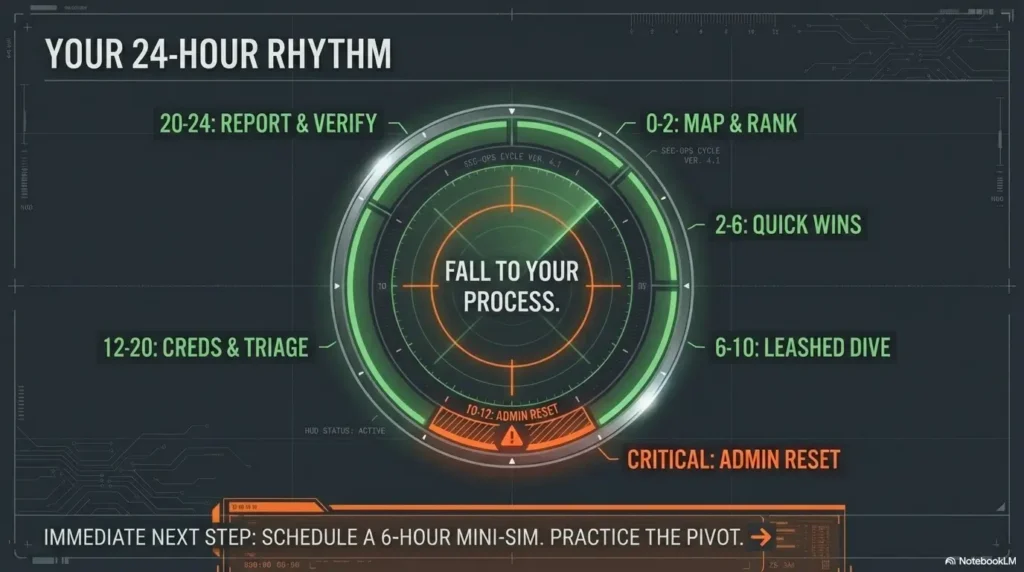
Infographic: the 24-hour rhythm (attack + admin)
0–2
Map + rank targets
Output: ports table + first blood list
2–6
Quick wins + stabilize
Output: proof + re-entry steps
6–10
Deep dive (leashed)
Output: hypothesis log + decisions
10–12
Admin reset
Output: report-ready blocks
12–20
Creds sweep + triage
Output: best 90-min bets
20–24
Report + verify
Output: reproducible steps
Your next step can be done in 15 minutes: create your folder template, start a credential ledger, and write your pivot reasons list (three lines). Then schedule a 6-hour mini-sim and practice obeying the gates—especially the pivots you hate.
Last reviewed: 2026-01-25.