Open the practical working record for the task-specific fields, next action and related guide.
Map practice to the assessment you intend to take
TCM describes PNPT with five testing days, two report days and a live fifteen-minute debrief. Its listed skills include OSINT and Active Directory work. A legacy single-machine Kioptrix exercise does not cover that complete scope and is not a prerequisite or a readiness test. Verify current terms and training before buying a voucher. Reference and scope.
Kioptrix: Your Cybersecurity Foundation
Use Kioptrix for selected fundamentals while checking the broader PNPT requirements directly with TCM Security.
The stakes are real. If you jump straight into PNPT-style prep without basic Linux comfort, port-to-service reasoning, evidence capture, and report writing, the exam path can feel like being handed a map in the rain with half the street names missing.
Good news: you do not need to become a wizard first.
You need a repeatable path.
You need legal boundaries.
You need notes that still make sense tomorrow.
- Use Kioptrix as an early lab bridge, not a certification substitute.
- Practice enumeration, research, evidence, and reporting before speed.
- Move toward PNPT prep only when your workflow becomes explainable.
The Beginner Bridge Snapshot
Kioptrix is optional supplementary practice. Review TCM Security’s current PNPT scope and training requirements directly; one completed lab and a personal checklist do not establish exam readiness.
Safety / Disclaimer Block
This guide is for ethical cybersecurity education only. Kioptrix-style labs should be run only in private, isolated environments you own or are explicitly authorized to test. Do not scan, exploit, brute-force, probe, or “just check something real quick” against public IPs, school networks, employer systems, cloud assets, neighbor Wi-Fi, or production services without written permission.
Penetration testing is not just tool use. It is authorized testing inside a defined scope. That scope usually includes targets, time windows, prohibited actions, communication rules, and cleanup expectations. CISA describes professional penetration testing as an activity governed by signed rules of engagement, which is a useful mental model even when your “client” is only a dusty VM on your laptop.
In plain English: keep the dragon in the terrarium.
- Use private lab networks only.
- Write down your scope before starting.
- Stop immediately if a target is not yours.
Apply in 60 seconds: Create a note titled “Scope” and list the exact VM name, IP range, and test date before running any scan.
Table of Contents
Why Kioptrix Still Matters Before PNPT
The beginner lab that teaches “slow looking”
Kioptrix still matters because beginners need a place where the goal is not novelty. It is rhythm. Scan. Read. Verify. Research. Test. Record. Repeat. That sequence sounds boring until you realize it is the skeleton under almost every serious security assessment.
PNPT preparation eventually expects you to work across a more realistic network, connect evidence to findings, and communicate risk. Kioptrix Level 1 is smaller and older, but that is not a weakness for beginners. It is a quieter room. You can hear your own mistakes echo.
What Kioptrix gives you that videos do not
Videos can show the path. A lab makes you walk it. That difference matters. Watching someone enumerate services is clean and warm, like seeing a chef dice onions at television speed. Doing it yourself is where the onion fights back.
Kioptrix gives you friction: uncertain service banners, confusing tool output, dead ends, old software clues, and the mild humiliation of realizing you forgot to save your notes. That is useful friction. It teaches attention.
For beginners building a repeatable process, pairing the box with a simple Kioptrix lab workflow can prevent the session from becoming a command-line tumbleweed.
What Kioptrix absolutely does not prepare you for
Kioptrix does not prepare you for everything PNPT can require. It will not give you modern enterprise sprawl, realistic Active Directory chains, client-style time pressure, or the full reporting weight of a professional engagement.
That is fine. A fire drill is not a burning building. It still teaches where the exits are.
Where Kioptrix Fits in the PNPT Learning Ladder
Stage 1: Linux comfort before exploitation
Before touching Kioptrix, you should be able to move around Linux without feeling like you are piloting a submarine with mittens. You do not need guru status. You should understand directories, permissions, simple shell commands, text files, network interfaces, and how to save outputs.
If you are constantly stuck on basic Kali issues, start with setup and routine first. A guide like a Kali setup checklist for Kioptrix is often more valuable than another exploit video.
Stage 2: Basic enumeration without panic-clicking
Enumeration is the practice of turning “something is open” into “what does this service do, what version might it be, what paths are visible, what assumptions can I test safely?”
Beginners often rush because tool output feels like a slot machine. Resist that glow. Use a consistent Kioptrix recon routine and write down what each result means before searching for an exploit.
Stage 3: Vulnerability research with restraint
Research is not pasting the first command from the internet. It is checking whether a vulnerability likely applies, whether the version and configuration match, whether the exploit is safe for your lab, and whether you understand the expected result.
This is where beginners begin to think like operators rather than tourists.
Stage 4: Reporting your path before chasing harder boxes
PNPT rewards the ability to communicate. A shell without a report is a campfire story. Maybe exciting, maybe smoky, not always useful.
After Kioptrix, write a one-page finding. Include scope, summary, evidence, impact, and remediation. Your first report may creak like an old staircase. Good. That sound means you are learning where to reinforce it.
- Do not start with exploitation as your first skill.
- Build repeatable enumeration habits.
- Practice reporting earlier than feels comfortable.
Apply in 60 seconds: Create four folders now: scope, recon, evidence, report.
Who This Is For, And Who Should Skip It
Good fit: learners who know basic networking but need hands-on rhythm
Kioptrix fits learners who understand IP addresses, ports, common services, basic Linux commands, and the idea of a private lab, but still freeze when a scan returns five open ports and no friendly arrow pointing at the answer.
It also fits help desk workers, IT generalists, career changers, and students who need a bridge between theory and practical lab confidence. For that audience, Kioptrix for beginners can be the first useful breadcrumb trail.
Not ideal: students who want Active Directory realism right away
If your immediate goal is enterprise Active Directory tradecraft, Kioptrix Level 1 is not the whole meal. It is more like learning knife safety before working the dinner rush.
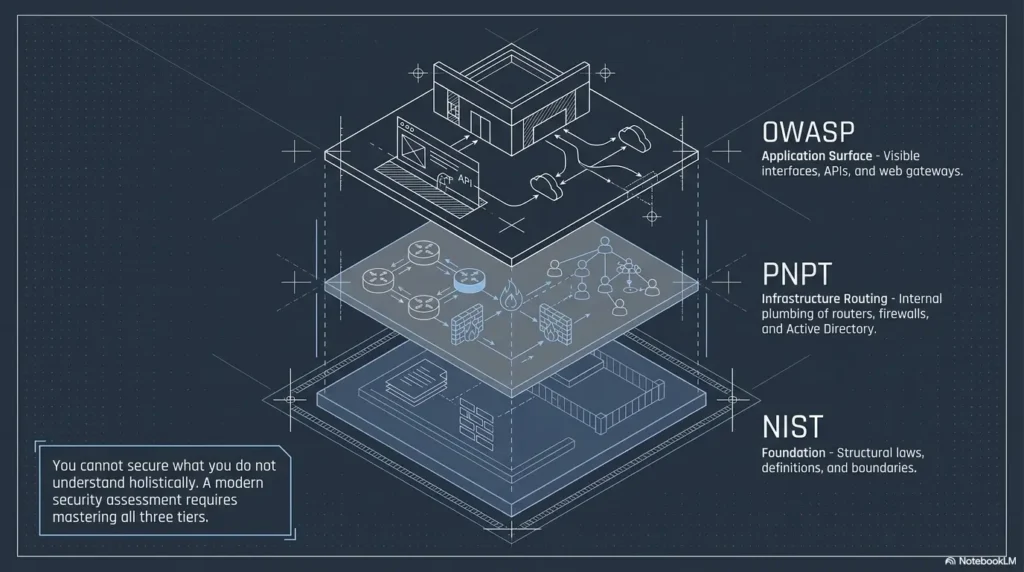
PNPT preparation should eventually include network movement, Windows concepts, credential handling, Active Directory basics, and professional reporting. Kioptrix helps with fundamentals, but it does not replace that broader training.
Let’s be honest: Kioptrix is not a magic résumé sticker
Listing “completed Kioptrix” without context is not impressive by itself. Explaining your methodology, evidence, decision points, and lessons learned is stronger.
Present the actual lab scope, your contribution, assistance used and a reviewed evidence example. Readers and employers differ in what they require. No measured hiring advantage or universal reviewer preference is established here; a home-lab artifact does not become client experience or a qualification by itself.
Decision Card: Should You Start Kioptrix This Week?
| Choose this path | When it fits | Neutral action |
|---|---|---|
| Start Kioptrix | You know basic Linux, ports, and lab isolation. | Schedule one 90-minute session. |
| Wait one week | You cannot explain common services or save command output. | Practice Linux and networking basics first. |
| Skip to broader labs | You already write clean reports and need AD/network realism. | Move into PNPT-aligned lab environments. |
Action line: Pick the row that describes your current behavior, not your ambition.
The Skill Gap Kioptrix Actually Fills
Turning scan results into questions
The beginner gap is not usually “I do not know enough commands.” It is “I do not know what question to ask next.” Kioptrix helps you practice turning scan output into a small research queue.
For example: What services are exposed? Are they old? Are they misconfigured? Does the web server reveal directories? Does SMB allow anonymous listing? Does a banner contradict another result?
Those questions matter more than keyboard speed.
Learning service-first thinking
Service-first thinking means you stop chasing exploits and start understanding the target. A web server, an SMB service, and an SSH service each imply different evidence, risks, and research paths.
Good service enumeration feels like checking doors in an old building. You do not kick every door. You read the labels, test the handle, listen for pipes, and avoid opening the one marked “definitely not bees.”
Beginners working through HTTP clues can strengthen their process with Kioptrix HTTP enumeration before they start searching exploit databases.
Building a repeatable note-taking habit
Notes are not decoration. Notes are your second brain, your report seed, and your future apology prevention system.
Write what you ran, why you ran it, what happened, what it means, and what you will try next. If you cannot explain your own notes 48 hours later, they were not notes. They were breadcrumbs eaten by terminal pigeons.
Practicing patience when the first path fails
Dead ends are part of the training. A failed path can teach false positives, version mismatch, bad assumptions, or missing enumeration. The important move is not to panic-copy ten more commands. It is to return to the map.
A dedicated Kioptrix dead ends review can turn frustration into a reusable troubleshooting habit.
Don’t Start Kioptrix Too Early
Mistake: opening the VM before understanding ports and services
If “port 80” only means “website thingy” and “port 139” looks like an airport gate, slow down. Kioptrix will be more useful when you can connect ports to services, services to behaviors, and behaviors to safe tests.
You do not need encyclopedic knowledge. You need enough vocabulary to avoid treating the scan like weather.
Mistake: copying walkthroughs before making your own map
Walkthroughs are useful after your first honest attempt. Used too early, they turn learning into choreography. You can finish the box and still not know how to begin the next one.
Try a timed rule: spend at least 60 to 90 minutes documenting your own observations before reading any walkthrough. Then compare your map to someone else’s path.
Mistake: treating root as the only learning outcome
Getting root is satisfying. So is pulling a perfect loaf of bread from the oven. But if you cannot repeat the recipe, you have a lucky kitchen, not a skill.
Measure your practice by the quality of your process: scope, enumeration, evidence, reasoning, report, and review.
Eligibility Checklist: Ready for Kioptrix Level 1?
- Yes/No: I can explain what an IP address and subnet are.
- Yes/No: I can identify common ports such as 22, 80, 139, and 445.
- Yes/No: I can run basic Linux commands and save output to files.
- Yes/No: I can keep a VM isolated from networks I do not own.
- Yes/No: I can write three sentences explaining what I tested and why.
Action line: If you cannot isolate the VM safely, fix the environment before any testing, regardless of the other answers. For the remaining learning prerequisites, two or more No answers suggest spending time on setup, Linux, and networking basics before starting.
A Beginner-Friendly Kioptrix Study Sequence
First pass: observe and document only
On the first pass, do not chase exploitation. Your mission is observation. Identify the target, list open services, record versions, capture basic web notes, and write questions.
This pass feels slow because it is supposed to. It is the lab equivalent of measuring twice before you cut into the expensive wood.
Second pass: research each exposed service
Now research what you found. For each exposed service, write a small paragraph: what it is, what version appears to be present, what risks are commonly associated with it, and what you can safely test inside your lab.
Keep a Kioptrix knowledge base for reusable notes. Your future self will arrive tired, caffeinated, and grateful.
Third pass: attempt exploitation inside the lab
Only after observation and research should you attempt exploitation. Keep it lab-only. Record your commands. Capture evidence. Note failures. Avoid running anything you cannot explain at a basic level.
If you use Metasploit, treat it as a learning instrument, not a vending machine. Compare automated behavior with manual reasoning when possible. A focused guide on Metasploit versus manual Kioptrix practice can help you avoid leaning on automation too early.
Final pass: write a short professional-style report
Your final pass is not technical fireworks. It is translation. Write what a client, manager, or evaluator would need to know: what was found, why it matters, what evidence supports it, and what should happen next.
PNPT includes dedicated report time, and TCM Security describes the exam as a professional-level network penetration test with five full testing days and two additional reporting days. That structure should tell beginners something important: reporting is not an afterthought. It is part of the work.
- Observe before touching exploits.
- Research each exposed service.
- Write a report even for a small lab.
Apply in 60 seconds: Rename your next lab note “Pass 1: Observe Only” before you begin.
The “PNPT-Relevant” Way to Use Kioptrix
Write findings like a consultant, not a trophy hunter
A trophy hunter writes, “Got root.” A consultant writes, “The host exposed vulnerable services that allowed unauthorized access under lab conditions; evidence and remediation are below.”
That difference is not cosmetic. It changes how you think. PNPT-style work asks you to connect action to impact. A professional report is not a diary of commands. It is a risk communication document.
Capture evidence without drowning in screenshots
Evidence should prove the finding, not bury it under a snowstorm of terminal windows. Capture the service, the vulnerability clue, the successful result, and the impact. Label screenshots clearly.
A clean Kioptrix screenshot organization habit can save you from the classic beginner tragedy: finding the right screenshot three days after you needed it.
Translate technical risk into business language
Even in a lab, practice writing impact plainly. Instead of “old service bad,” write what the weakness could allow in a real environment: unauthorized access, sensitive data exposure, service disruption, or lateral movement.
Do not exaggerate. Beginners sometimes inflate every finding into an asteroid. Clear, restrained language builds trust.
Here’s what no one tells you: your notes matter more than your shell
A shell proves you reached a point. Notes prove you understood the road. For PNPT prep, the road matters.
Use a note template with these fields:
- Target and scope
- Open services
- Evidence collected
- Hypothesis
- Test performed
- Result
- Risk statement
- Remediation idea
- Open questions
Show me the nerdy details
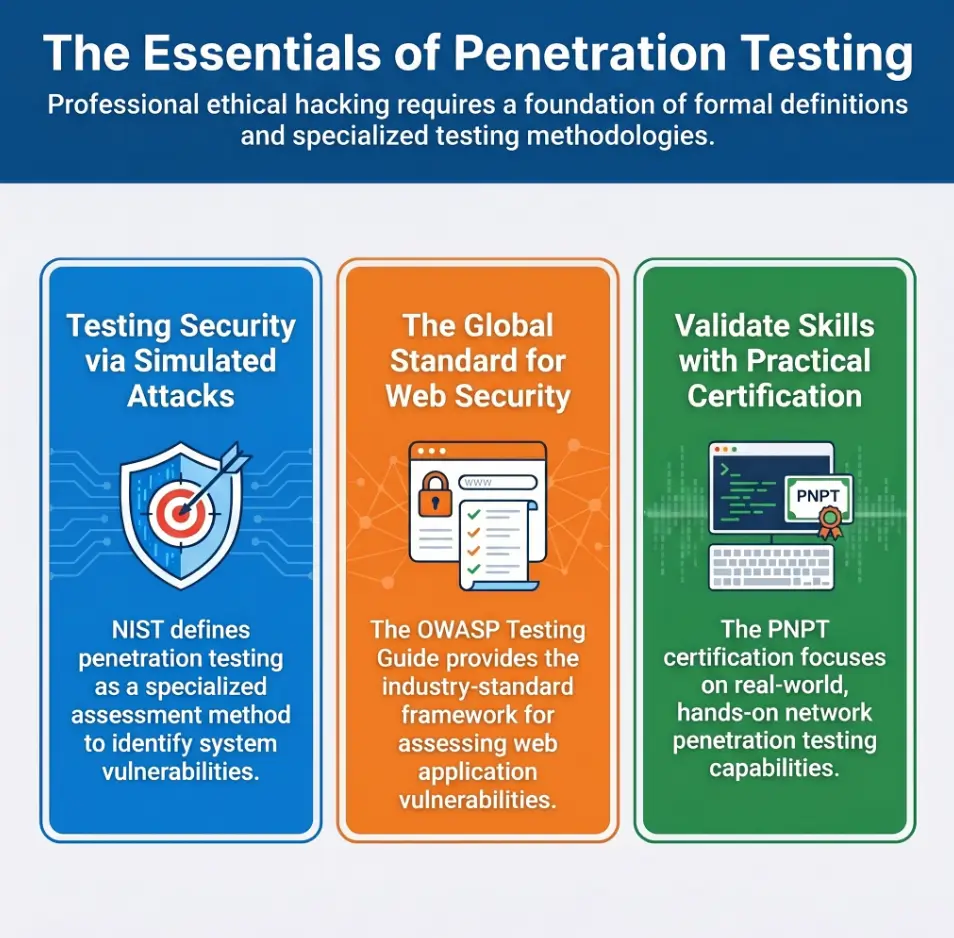
A useful beginner methodology separates data collection from interpretation. Raw output, such as port scans and service banners, belongs in evidence notes. Interpretation belongs in analysis notes, where you explain what the output may indicate and how confident you are. This prevents a common mistake: treating a tool result as a confirmed vulnerability. Professional testing guidance from organizations such as NIST and OWASP generally emphasizes planning, testing, analysis, and reporting as separate concerns. For Kioptrix practice, that means you should preserve raw evidence, write your assumptions separately, and confirm each assumption before calling it a finding.
Quote-Prep List: What to Gather Before Comparing PNPT Prep Options
- Your current Linux comfort level
- Number of beginner labs completed without walkthroughs
- One sample report or write-up
- Comfort with Active Directory basics
- Weekly study hours available for 30 days
- Budget for training, lab platforms, and exam fees
Action line: Gather these details before buying a course or switching platforms.
Common Mistakes That Waste Kioptrix Practice
Using Metasploit before understanding why it works
Metasploit can be a legitimate learning tool inside an authorized lab. It can also become a velvet couch where your curiosity falls asleep.
Before using a module, write down the vulnerability class, target service, expected behavior, and success condition. Then run the tool. Afterward, explain what happened in your own words.
Skipping service enumeration because “the exploit is famous”
Old labs often have famous paths. That is precisely why you should not rush. If you skip enumeration because you already know the trick, you train recognition, not reasoning.
Recognition is fragile. Reasoning travels.
Ignoring cleanup, scope, and lab isolation
Even in a lab, practice professional habits. Use snapshots. Keep your target isolated. Do not bridge your vulnerable VM to networks where it does not belong. Record what you changed.
If you are unsure about virtual networking, start with Kioptrix network setup or a plain-language comparison of VirtualBox NAT, host-only, and bridged modes.
Finishing once, then never repeating the box cold
One completion is exposure. A cold repeat is learning. Wait a week, hide your old notes, and try again. Can you rebuild the path from principles?
If not, that is not failure. That is the lab showing you exactly where the next brick belongs.
Private lab only
Define target
Ports, services
Questions first
Version clues
Safe tests
Lab-only attempts
Record results
Evidence, impact
Fix guidance
Broader labs
AD basics
Plain meaning: Kioptrix trains the first five habits. PNPT prep expands the environment and pressure.
How Kioptrix Compares With PNPT Prep Labs
Kioptrix teaches fundamentals; PNPT expects workflow
Kioptrix teaches you to notice. PNPT-style labs expect you to operate. That means planning, prioritizing, documenting, chaining findings, and staying useful when the first path dries up.
Do not confuse smaller with useless. A piano scale is smaller than a concerto. The scale still tells on your fingers.
Kioptrix is narrow; PNPT-style prep needs networks
Kioptrix Level 1 is a single-machine learning experience. PNPT-style preparation should move beyond that into networks, domain concepts, credential handling, pivoting concepts, and reporting under time constraints.
When you are ready to compare difficulty and next labs, a vulnerable machine difficulty map can help you avoid jumping from a puddle to the Pacific.
Kioptrix has an old-school texture, and that is the lesson
Some learners dismiss older labs because the software feels dated. But older labs teach important habits: banner skepticism, legacy web clues, SMB oddities, service enumeration, and the discipline to verify before declaring victory.
Modern security work often includes old systems. The enterprise basement is full of dusty machines that nobody wants to reboot because “Gary says payroll still depends on it.” Gary may be right. Gary may also be the reason you need a report.
Coverage Tier Map: From Kioptrix to PNPT Readiness
| Tier | Focus | Readiness signal |
|---|---|---|
| Tier 1 | Linux and networking basics | You can explain ports and services. |
| Tier 2 | Kioptrix Level 1 methodology | You can enumerate without a walkthrough. |
| Tier 3 | Reporting and evidence | You can write a clear finding. |
| Tier 4 | Broader labs and networks | You can prioritize multiple targets. |
| Tier 5 | PNPT-focused preparation | You can test, document, and debrief. |
Action line: Do not move tiers because you are bored; move because your evidence says you are ready.
The 30-Day Beginner Plan Before PNPT Prep
Week 1: networking, Linux, and note templates
Spend the first week preparing the floorboards. Review IP basics, common ports, Linux navigation, file permissions, and virtual networking. Build your note template before the lab begins.
Use a simple folder pattern from a Kioptrix folder naming system. It sounds tiny. It is not. Organized evidence is quiet power.
Week 2: Kioptrix Level 1 with no walkthrough
Run Kioptrix Level 1 without a walkthrough for your first serious attempt. Timebox sessions. Write what you know and what you do not know.
When stuck, do not immediately search the full answer. Search the concept. For example, research a service, a banner, or an error message. That teaches transferable thinking.
Week 3: repeat Kioptrix with better evidence and reporting
Repeat the box. This time, improve evidence. Label screenshots. Save command outputs. Draft a one-page report. Compare your report against a practical Kioptrix lab report structure.
The second pass often reveals that your first pass was less “methodology” and more “raccoon in a keyboard store.” No shame. That is why we repeat.
Week 4: move into broader labs and Active Directory basics
In week four, do not simply do more of the same. Begin expanding. Learn basic Windows and Active Directory vocabulary. Try a broader beginner lab. Study report writing and debriefing.
You can also map your next step with a Kioptrix learning path so your practice grows instead of looping forever.
- Week 1 prepares your tools and notes.
- Weeks 2 and 3 build repetition and reporting.
- Week 4 expands toward PNPT-style realism.
Apply in 60 seconds: Put four weekly milestones on your calendar before downloading another lab.
When to Seek Help or Slow Down
You cannot explain what a port, service, or CVE means
Slow down if your notes are mostly copied commands and mysterious acronyms. CVE identifiers, service versions, and port numbers are not magic runes. They are clues that require context.
Use official references and beginner explanations. NIST’s cybersecurity glossary can help normalize precise language, while OWASP’s testing materials can help web-focused learners understand testing concepts and responsible structure.
You are testing anything outside your lab
Stop immediately. Curiosity is not authorization. “It was just a scan” is not a shield. If the asset is not yours and you do not have written permission, do not test it.
This is not legal theater. It is professional survival.
You keep copying commands without understanding risk
Copying commands is common at the beginning. Staying there is the problem. Unknown commands can change files, crash services, alter logs, exfiltrate data, or train terrible habits.
Before running a command, write one sentence: “I expect this to…” If you cannot complete the sentence, pause.
You feel ready for PNPT but cannot write a clear finding
This is the loudest checkpoint. If you cannot write a finding with evidence, impact, and remediation, you are not ready for a professional-style exam experience.
Practice with a Kioptrix report writing tips checklist or a Kali pentest report template. The goal is not fancy formatting. The goal is clarity under pressure.
FAQ
Is Kioptrix good before PNPT?
Yes, Kioptrix is good before PNPT when used as a fundamentals lab. It helps beginners practice enumeration, service research, documentation, and controlled testing. It should not be treated as a complete PNPT replacement because PNPT-style work is broader, more realistic, and more report-driven.
How many Kioptrix boxes should I do before PNPT?
There is no magic number. For many beginners, one or two Kioptrix boxes done carefully are more valuable than five rushed completions. Move on when you can explain your process, repeat the lab cold, and write a clear finding without relying on a walkthrough.
Is Kioptrix too old to be useful?
No, but its age matters. Kioptrix is useful for fundamentals, legacy service clues, and beginner workflow. It is not enough for modern enterprise practice by itself. Treat the old-school texture as a lesson in careful enumeration, not as a full model of current corporate networks.
Should I use walkthroughs for Kioptrix Level 1?
Use walkthroughs after an honest attempt. First, spend at least one focused session documenting what you found and what you tried. Then use a walkthrough to compare reasoning, not to copy the route. A walkthrough should become a mirror, not a steering wheel.
Does Kioptrix teach Active Directory skills?
No, Kioptrix Level 1 is not an Active Directory training lab. It can prepare your fundamentals, especially enumeration and documentation, but PNPT preparation should later include Windows, Active Directory concepts, credential handling, and network-level thinking.
Can Kioptrix replace TCM Academy training?
No. Kioptrix can support early practice, but it does not replace structured PNPT-focused training, broader labs, exam objectives, or professional reporting practice. Use it as a stepping stone before formal prep, not as a substitute for the path.
What should I learn after Kioptrix?
After Kioptrix, learn broader enumeration, web testing methodology, Windows basics, Active Directory fundamentals, report writing, and safe lab networking. You should also practice explaining findings in business language, because technical success without communication has a very short shelf life.
Next Step: Run One Lab Like a Tiny Client Engagement
Set scope, take notes, test only your lab, and write a one-page report
The best next step is small enough to do today and serious enough to matter. Choose one Kioptrix lab. Write the scope. Start a note file. Create evidence folders. Run only authorized tests inside your private lab. Then write a one-page report.
Use a practical Kioptrix evidence tracking habit so the report writes itself instead of arriving at midnight wearing muddy boots.
Repeat the box one week later without notes
Wait one week and repeat the same lab cold. Do not open your old notes at first. Try to rebuild the path from principles. Afterward, compare your second attempt with your first.
You will see what stuck. You will also see what was only borrowed from the walkthrough fog.
Move forward only when you can explain the path clearly
The bridge from Kioptrix to PNPT prep is not built with more commands. It is built with clarity. You should be able to explain the target, the exposed services, the likely weakness, the evidence, the impact, and the remediation in plain English.
That is the quiet turn. The moment the lab stops being a puzzle and starts becoming a professional habit.
- Define scope before scanning.
- Capture only useful evidence.
- Write a report before moving on.
Apply in 60 seconds: Open a blank document and write: scope, summary, evidence, impact, remediation.
Kioptrix Level Before PNPT is not about proving you are ready for everything. It is about proving you can practice the right way when the stakes are still small. That is the gift of an early lab: it lets you make beginner mistakes where they belong, inside a private sandbox, before you enter broader PNPT-style preparation.
Your concrete next step: within the next 15 minutes, create a Kioptrix folder with four subfolders named scope, recon, evidence, and report. Then write a three-sentence scope note before launching the VM.
Last reviewed: 2026-05.
Technical guidance updated: 2026-10-13. Clarified that safe VM isolation is required regardless of the readiness-checklist total.
Kioptrix-to-PNPT practice gap map
Use this when: you are a learner connecting a specific lab artifact with a broader PNPT preparation plan. Copy the fields into your own notes. Record what is known, what remains uncertain and who will perform the next check.
| Field | What to record | Your evidence / next check |
|---|---|---|
| Assessment reference | Record the exact assessment and current official description consulted. | To complete |
| Existing evidence | Identify what the lab demonstrates about investigation or reporting. | To complete |
| Missing coverage | Name relevant tasks, environments or communication work still untested. | To complete |
| Next exercise | Choose a bounded practice task and define the resulting artifact. | To complete |
Next action: Address one documented preparation gap rather than treating an old lab as complete assessment coverage. Keep the supporting observation and its conditions beside the decision so that a later reader can distinguish an established result from a working explanation.
This is a blank practice or review record. It does not report a test performed by Kioptrix or certify learning outcomes. Add the actual conditions, observations and support used in your own work.
Related task: For planning a move to a different modern lab, use Kioptrix to Modern Labs: Plan for Coverage Gaps. Keep that task distinct from the specific record above.
Worksheet change record — October 20, 2026
Added this kioptrix-to-pnpt practice gap map, four task-specific fields, a next action and a link to a distinct related task. Existing source notes keep their own review dates. This addition is not a new verification of every statement or a newly executed lab test.