
Cracking the Silence: Troubleshooting Kioptrix Connection Failures
Kioptrix Level labs have a peculiar way of wasting 45 minutes at a time: the target responds, Metasploit looks promising, and then nothing arrives. No session. No shell. Just a quiet little failure that invites the worst possible response, which is to click faster and think less.
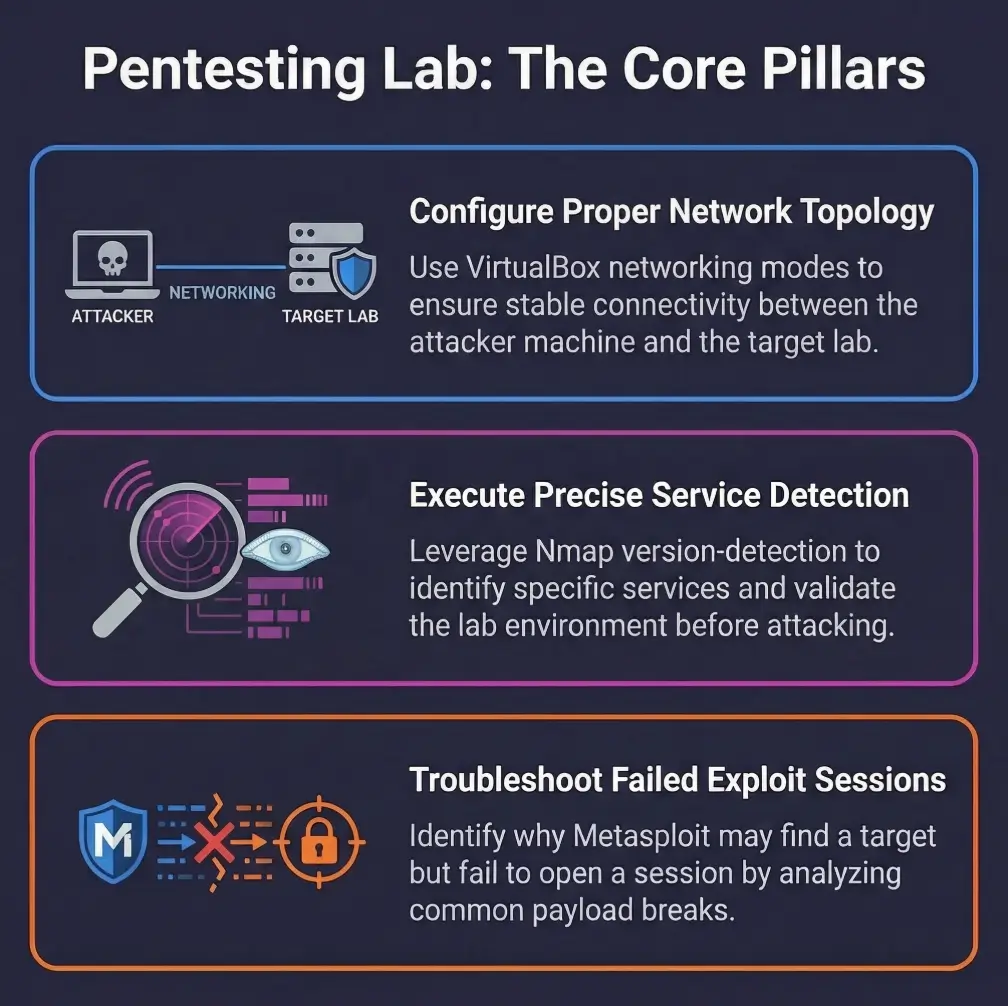
In an authorized home lab, the problem is rarely that Metasploit is simply broken. It is usually a mismatch in the chain: service identification, exploit fit, payload choice, listener setup, or callback reachability across your VM network.
“Target found” is not the finish line. It is barely the first breadcrumb.
Stop the noisy trial and error. By separating discovery from exploitation and payload delivery from session creation, the silence stops feeling mysterious and starts looking diagnosable. Narrow your fault cleanly from LHOST/LPORT issues to VirtualBox networking, and turn that quiet failure into a successful shell.
Table of Contents
Start here: why “target found” is not the same as “shell incoming”
Discovery is not exploitation, and exploitation is not session creation
The first mental reset is simple and oddly freeing: a scanner finding a service and an exploit attempting delivery are two separate events, and session creation is a third. Nmap’s own documentation is blunt about this in spirit. Version detection helps identify what is actually running, but it warns against trusting port assumptions alone. A service on a familiar port can still be a different implementation, a different build, or a different configuration than the exploit expects. That is one reason a disciplined Kioptrix recon routine matters more than excitement.
I once watched a learner celebrate an open SMB service like it was the final exam result. Ten minutes later, they were staring at “no session was created” and muttering at the ceiling fan. The problem was not bad luck. It was skipped reasoning.
What “the target responded” actually proves, and what it does not
A target response usually proves one narrow thing: some traffic path exists between your machine and the target service. It does not prove the chosen module is correct, the vulnerable code path is reachable, the payload is supported, the callback route is open, or your listener can accept that return traffic. Reverse shells, by definition, still need the target to connect back to the listener after the initial exploit path succeeds. Rapid7’s documentation spells out that reverse shells require a listener first and a reachable LHOST/LPORT path second.
Why old lab writeups can quietly mislead modern VM setups
Kioptrix-style walkthroughs were often written for a different era of hypervisors, different default NIC choices, different payload expectations, and sometimes different package states. Oracle’s VirtualBox manual notes that NAT, bridged, and host-only networking behave differently by design. “It works in the walkthrough” may simply mean “their network geometry was not your network geometry.” If your setup already feels strange before exploitation, a Kioptrix Kali setup checklist can save you from diagnosing a ghost.
A green line in Metasploit can be honest and still incomplete. It may only be reporting one successful stage in a chain of three.
- Scanning proves presence, not exploit fit
- Exploit launch proves attempt, not callback success
- Reverse session creation depends on a separate return path
Apply in 60 seconds: Rewrite the problem on paper as three stages: service, exploit, callback.
First checkpoint: where the chain usually snaps
Service found, but wrong version assumptions drive the wrong exploit
Nmap version detection exists for a reason. It does more than label a port with a common service name. It actively interrogates services to infer application name, version, device type, and sometimes CPE details. That matters because a rough banner guess can be enough to send you down the wrong hallway with great confidence and terrible results.
A practical lab habit is to treat every exploit title as a hypothesis, not a verdict. “Samba” is not a version. “Apache” is not a code path. “RPC available” is not a guarantee that the relevant weakness is exposed in the way the module expects. Many session failures are just version optimism wearing a toolbelt. When service clues feel fuzzy, articles on Nmap service detection false positives and wrong OS version reporting during SMB recon become surprisingly relevant.
Exploit runs, but the payload never calls back
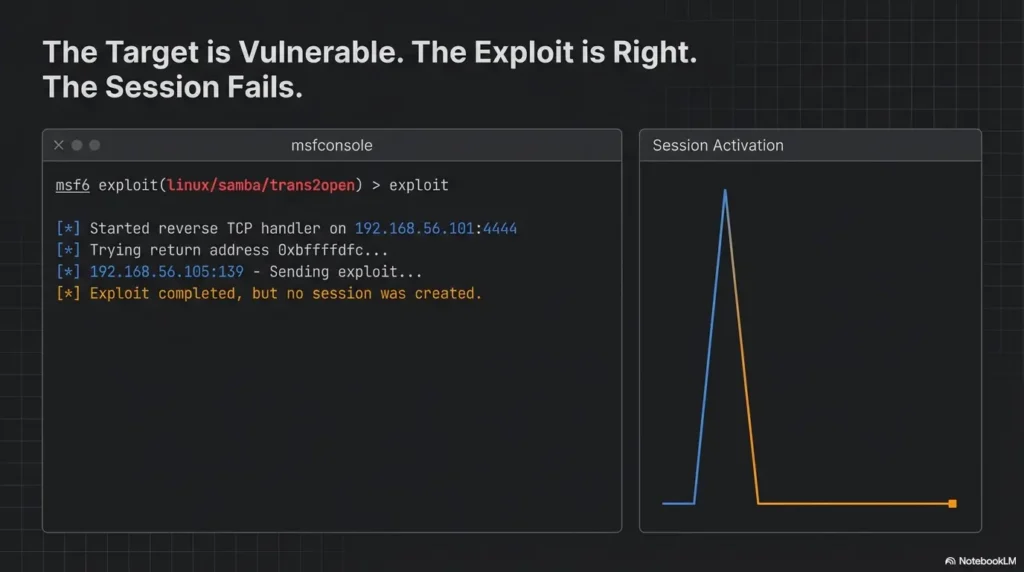
This is common enough to deserve its own brass plaque. Rapid7 explains that reverse shells require the target to connect back to the listener, and it specifically warns that LHOST should not be localhost or 127.0.0.1 for this job. In plain language: if the target cannot reach the address you told the payload to use, the exploit may appear to run while the session stage dies in a side alley.
Callback fires, but your listener cannot receive it
Sometimes the target does its part and the receiving end is the problem. The listener may be bound to the wrong interface, the host firewall may block the port, or a nested VM path may send the traffic to an interface you were not watching. One of the more comic lab tragedies is a perfectly reasonable listener waiting on the wrong doorstep.
| Signal you see | Most likely category | Neutral next move |
|---|---|---|
| Service open, exploit attempt completes, no session | Payload route or listener mismatch | Validate callback path before swapping modules |
| Banner looks vague or generic | Exploit fit uncertainty | Re-run version detection and corroborate service clues |
| Lab walkthrough works for others but not you | Environment drift | Check VM NIC mode, imports, and snapshots |
Neutral action: Pick one category and test it cleanly before changing anything else.
Here’s what no one tells you: one green line in Metasploit can hide three separate failures
The exploit can be right while the payload is wrong. The payload can be right while the return path is wrong. The return path can be right while the listener is bound incorrectly. This is why frantic module hopping so often makes the lab feel cursed. The curse is usually bookkeeping.
Payload first: the part people trust too quickly
Reverse vs bind payloads in small home labs
Rapid7’s documentation distinguishes bind shells from reverse shells clearly: bind opens a service on the target and requires you to connect in, while reverse shells have the target connect back to you. In home labs, reverse payloads are often easier when inbound connections to the target are limited, but they are also more fragile when your network mode, firewall, or chosen address is wrong.
There is a psychological trap here. Reverse payloads feel more “automatic,” so beginners trust them too much. I have done it too. You set the listener, hit run, and briefly believe the machine will do the rest like a dishwasher cycle. It will not. It requires the target to navigate back to a specific address on a specific port, through whatever NAT or host-only maze you built at midnight.
LHOST, LPORT, and interface selection errors that look harmless
LHOST specifies the callback destination embedded in a reverse payload. The handler’s bind address is related but may be overridden by ReverseListenerBindAddress, with behavior depending on the handler. Check the actual listener address separately from the address the target can route to. A dormant adapter or unreachable callback address can prevent session creation.
That is why advice like “just set LHOST tun0” ages badly. If the target and your listener are not actually meeting through that interface, the advice is not advanced. It is decorative.
Why NAT, host-only, and bridged networking change the outcome
VirtualBox’s manual describes NAT as the simplest way for a VM to access an external network, usually with little configuration. That simplicity cuts both ways. Host-only networks are useful for direct host-to-guest lab isolation, while bridged networking places the VM more like a peer on the physical network. These modes are not aesthetic choices. They change who can reach whom, and that changes whether reverse callbacks survive the trip. For a more focused comparison, it helps to review VirtualBox NAT, host-only, and bridged networking in lab terms.
Show me the nerdy details
Staged payloads can be especially revealing in lab troubleshooting. Rapid7 explains that a staged payload sends a small loader first, which then requests the larger final stage from the handler. A single or stageless session payload carries the session code without a separate stage download, but still needs its transport and a compatible handler. In plain lab terms, that means a route problem or handler problem may hurt staged payloads earlier and more obviously, because there is simply more conversation required between target and listener.
- Reverse payloads need callback reachability
- Listener readiness matters before execution
- Wrong interface selection can mimic exploit failure
Apply in 60 seconds: Write down the exact IP address the target should use to reach your listener, then verify it belongs to the right path.
Network path check: can the target actually reach you back?
Ping working does not prove reverse-shell reachability
This is one of the most durable lab myths. ICMP reachability is useful, but it is not proof that the target can initiate the specific TCP connection your payload needs. Reverse sessions need the right destination address, the right listener state, the right port exposure, and the right network mode. A successful ping is a postcard. A callback is a parcel delivery with a fussy address label.
Firewalls, local OS rules, and hypervisor networking quirks
VirtualBox networking modes define broad paths, but your host OS still has the last word on what reaches your listener. A local firewall rule on Kali, Ubuntu, Windows, or macOS can block the traffic even when the VM itself is fine. I once spent nearly forty minutes blaming a lab image for what turned out to be the host machine politely throwing packets into a ravine.
Rapid7 also advises that the listener should be started before the reverse shell is executed. That guidance sounds obvious, but in troubleshooting it means timing matters too. In a brittle lab, even a correct target callback may fail if the receiving service is not ready when the connection attempt happens.
How to test the callback path before blaming the exploit
In an authorized lab, it is usually smarter to validate the return path with a simple, non-heroic connectivity check than to keep rerunning an exploit. You are not trying to be cinematic. You are trying to eliminate uncertainty. The fastest win is often proving whether the target can reach the chosen address and port at all. And if your wider lab already has name resolution problems, fix those first with Kali Linux DNS troubleshooting before you start accusing the exploit chain.
Inputs: number of blind reruns × average minutes per rerun
Example: 6 reruns × 8 minutes = 48 minutes lost before any real evidence appeared.
Neutral action: Spend the next 5 minutes validating the return path once.
The quiet villain: your host machine is blocking what the VM never gets to send
This problem hides in plain sight because the user interface looks innocent. The VM boots. The target responds. Your scan looks good. Then the host firewall, security stack, or adapter binding makes the callback evaporate. When that happens, the vulnerable VM gets blamed for a crime committed by the host machine. Computers have a talent for letting the wrong suspect look guilty.
Oracle’s documentation on networking modes is useful here because it reminds you that the path differs by design. NAT, bridged, and host-only do not merely rename the same road. They redraw the map. If your host-only segment is already acting strange, check whether you are dealing with the classic VirtualBox host-only no-IP problem.
Exploit fit check: matching the module to the actual weakness
Why banner grabbing is not enough for confident exploit selection
Nmap explains that version detection actively probes services because port-based assumptions are not enough. That same logic should govern exploit selection in a Kioptrix-style lab. A banner may hint at a family of software, but exploit success often depends on finer details such as minor versions, platform architecture, enabled modules, compilation quirks, and reachable code paths.
In other words, “the target looks old” is not a diagnostic sentence. It is a mood.
When SMB, Samba, Apache, or RPC clues point to a different path
Lab writeups often compress uncertainty into a neat story. In reality, your scan results may indicate multiple plausible avenues. RPC details can matter. Web server behavior can matter. Samba clues can matter. The goal is not to try everything at random. The goal is to narrow which clue actually aligns with the weakness the module was built for. In practice, that may mean stepping back into Apache enumeration, HTTP enumeration, or even careful SMB validation before you touch the exploit again.
Multi-step validation before you rerun the same failing module
Before repeating a failing exploit attempt, validate three things: the service identity is strong enough, the module’s assumptions fit that identity, and the payload family is supported for that context. Rapid7’s payload docs even show that supported payloads differ by exploit. That alone is a good reminder that payload choice is constrained by reality, not by hope.
- Use version clues, not port myths
- Check exploit assumptions against your evidence
- Confirm the payload is actually supported
Apply in 60 seconds: List the exact evidence you have for service identity, then remove every exploit assumption that is not supported by it.
Curiosity gap: what changes when the target is “vulnerable” but not vulnerable in the way your module expects?
This is where many learners mature quickly. The vulnerability may be real in the broad sense, but your module may depend on a path, architecture, or service behavior that your exact target does not expose. That is not failure. That is narrowing. In serious troubleshooting, narrowing is gold.
Environment drift: old Kioptrix logic in a newer lab reality
VM imports, NIC changes, and patched packages that shift expected behavior
Older vulnerable VM labs are famous for behaving like old stage plays performed on new equipment. The script is familiar, but the lighting rig has changed. Imported appliances may pick up different virtual NIC models, different adapter orders, or different network defaults from your hypervisor. If the image was modified, partially updated, or repaired at any point, package behavior may drift away from the walkthrough’s assumptions.
Why your target may not be the same as the walkthrough’s target anymore
This is not paranoia. It is version drift with a human face. I have seen learners compare their scan results to a decade-old article line by line, as though archaeology should obey deadlines. It does not. Even when the VM image is nominally the same, the host, hypervisor version, imported settings, and surrounding network can produce a different experience.
Snapshot history, corrupted states, and partial boot weirdness
Sometimes the target is simply unhealthy. Services may start in a different order, fail silently, or behave inconsistently after a bad snapshot restore. That is especially maddening because it creates the illusion of progress. One run shows a port. Another run does not. The box becomes a weather system.
When that happens, treat the VM like a lab instrument that may need recalibration. A walkthrough written for a clean, predictable snapshot is not necessarily wrong. It may just be describing a machine that no longer exists on your desk.
- Tier 1: Fresh import, matching NIC mode, clean snapshot
- Tier 2: Fresh import, but different hypervisor defaults
- Tier 3: Old import with changed adapter settings
- Tier 4: Snapshot churn, intermittent services, inconsistent boots
- Tier 5: Unknown image history and mystery edits by past-you
Neutral action: If you are at Tier 4 or 5, rebuild confidence in the lab image before blaming the exploit chain.
Short Story: A few years ago, I kept notes on a fragile training VM that only failed when I was in a hurry. The target seemed alive, the service banners looked familiar, and the exploit output was just plausible enough to keep me trying. After an embarrassingly long loop, I noticed the imported appliance had inherited a different adapter mode than the original walkthrough used, and an old snapshot had left one service coming up inconsistently.
Nothing about the failure was dramatic. It was just three small mismatches stacked like crooked books. Once the NIC mode matched the intended topology and the VM was reset to a clean state, the entire problem shrank from “Metasploit mystery” to “lab hygiene.” That was the day I stopped treating walkthroughs like scripture and started treating them like weather reports: useful, but only if you look out the window too.
Don’t do this: the retry spiral that wastes an hour
Re-running the same exploit with cosmetic changes
Changing a port by one digit, renaming a session, or swapping a payload family without validating prerequisites is the troubleshooting equivalent of shaking a vending machine because it insulted you. Occasionally something falls out. Usually you just look tired.
Swapping payloads blindly without validating prerequisites
Rapid7’s material is useful here because it distinguishes staged and single payloads, reverse and bind payloads, and supported payload lists per exploit. That means not all payload changes are equal, and not all are valid. Random substitution is not adaptability. It is noise with good branding.
Assuming “no session” always means bad payload choice
Sometimes it does. Very often it does not. The exploit may be mismatched. The callback path may be broken. The listener may be unreachable. The host firewall may be the villain in a clean shirt. If you change only payloads, you are only testing one branch of the problem tree.
Mistake pattern: speed creates noise, and noise hides the evidence
One variable at a time is slower emotionally and faster operationally. The first time I learned this, I hated it. The second time, I wrote it on a sticky note. By the third time, it had saved me enough hours to become a principle.
Who this is for / not for
This is for students, blue-team learners, certification candidates, and authorized home-lab users
If you are troubleshooting in a legal training environment you own or control, this guide is for you. It is especially useful if you are working through older vulnerable VM exercises and need a disciplined way to separate service evidence, exploit fit, payload fit, and callback path.
This is for people diagnosing Metasploit session failures in legal practice environments
The focus here is not on breaking into new things. It is on understanding why a familiar training target does not behave as expected, and on building habits you can reuse across sanctioned labs, exam prep, or defensive validation exercises.
This is not for unauthorized access, internet-facing targets, or live systems you do not own or control
That boundary matters. Tools like Metasploit and Nmap have legitimate educational and defensive uses, but the article is intentionally framed around authorized labs only. If your situation is outside that boundary, stop there.
This is not for readers looking for copy-paste exploitation without understanding the chain
You can find noisier corners of the internet for that. The value here is that it helps you become less fragile as an operator. A good lab habit is a quiet investment. It keeps paying rent.
Evidence over guesswork: a cleaner troubleshooting sequence
Confirm the target service, version clues, and reachable ports
Begin by making sure your service identity is stronger than “something responded.” Nmap’s version-detection guide exists because deeper probing produces better confidence than port-number folklore. Use that principle. Record what you know, what you suspect, and what you only borrowed from a walkthrough. If you need a clean baseline, reviewing the usual Kioptrix open-port patterns can help you spot when your box is behaving unlike itself.
Confirm exploit requirements instead of trusting titles
Exploit names are helpful, but they are not contracts. Read the module requirements and match them to your evidence. If the evidence is thin, improve the evidence before repeating the attempt.
Confirm payload compatibility and callback route
Rapid7 explicitly notes that you can view supported payloads for an exploit. That is not trivia. It is one of the fastest ways to stop trying combinations that were never meant to work together in the first place. Then validate that the chosen callback address belongs to an interface the target can actually reach.
Confirm listener readiness before the attempt
Listeners should be ready before the target tries to connect back. That advice sounds almost insultingly obvious until you lose twenty minutes to timing and interface confusion. Ask any tired learner at 1:13 a.m. The machine always chooses that moment to become philosophical.
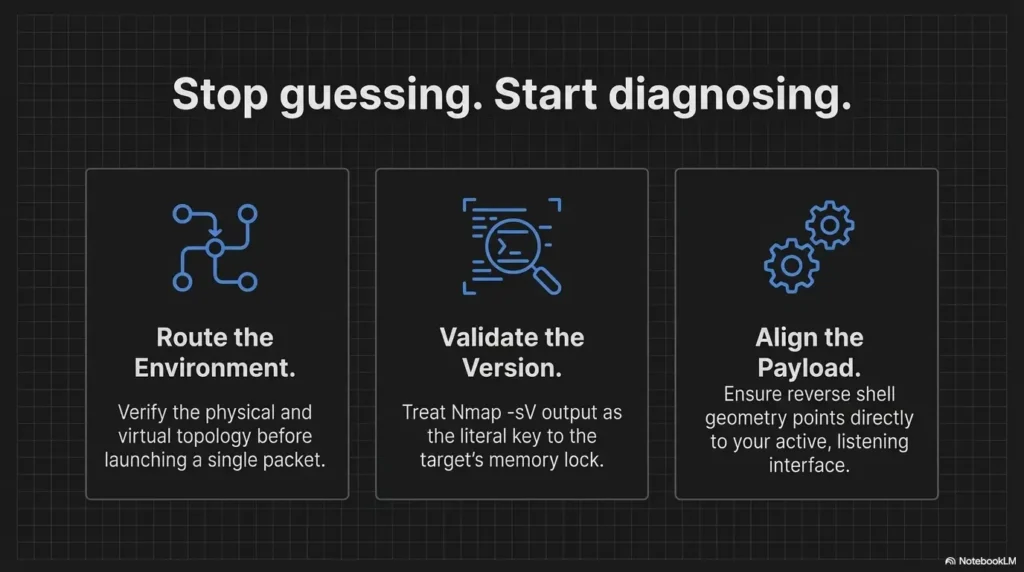
Rule of thumb: move left to right. Do not change stage 4 guesses before stages 1 and 2 make sense.
Open loop: which single check eliminates the most false assumptions fastest?
Usually, it is the callback path. Why? Because learners often treat it as automatic, when it is actually conditional on networking mode, interface choice, listener state, and host rules. One honest connectivity check there can eliminate a remarkable number of false stories at once.
- Strengthen service identity first
- Match exploit assumptions second
- Validate callback and listener third
Apply in 60 seconds: Put your current issue into one of the four infographic stages before making another attempt.
Common mistakes
Mistaking scanner success for exploit success
Finding the service is not landing the exploit. This sounds obvious on paper and vanishes in real life the moment a tool prints something encouraging.
Using the wrong LHOST because of multiple adapters
Wi-Fi, Ethernet, VPN, host-only, Docker, and virtual adapters can make a machine look like a small city map. The correct address is the one on the path the target can reach, not the one that feels most technical.
Ignoring host firewall or security controls on the attacker side
This is the elegant little sabotage almost no one wants to suspect at first. Yet it is common, especially on hosts running multiple security tools or strict defaults.
Choosing a payload unsupported by the exploit context
Rapid7’s payload documentation includes a supported-payload workflow for a reason. Not every exploit supports every payload family.
Following decade-old forum advice without comparing lab topology
Advice travels badly through time. A 2012 network assumption can arrive in 2026 looking confident and being completely wrong for your setup.
Not capturing console output, packet hints, or module errors before changing variables
If you change three things and keep no notes, the lab stops being a lesson and becomes performance art. Moody performance art, at that. This is exactly where a Kali lab logging habit earns its keep.
- Yes / No: I can state the target service and likely version clues
- Yes / No: I know why this exploit matches those clues
- Yes / No: I know the target can reach my listener address and port
- Yes / No: I verified the listener is bound where I think it is
- Yes / No: I recorded the last error output before changing variables
Neutral action: If any answer is “No,” fix that gap before another rerun.
Sessionless success? yes, that strange middle zone exists
When the exploit partially works but the payload dies
This middle zone confuses people because it feels contradictory. Something may have executed, but the session layer never stabilized. That does not mean the exploit was wholly wrong. It means one later stage failed. In troubleshooting, this distinction matters because it points your attention forward in the chain, not backward.
When command execution lands, but Meterpreter does not
Rapid7’s older documentation notes that single payloads and simpler shells can behave differently from staged or feature-rich payloads. In lab terms, that means the most ambitious session type is not always the best first diagnostic choice. More moving parts create more places to trip.
Why unstable shells can look like “no session” in rushed testing
An unstable shell can die so fast that it feels like nothing happened. If you are moving quickly, you may flatten “brief session,” “partial callback,” and “no session” into one memory. That is why logs and timestamps matter. Human recall is a charming liar when adrenaline enters the room.
Curiosity gap: what if the vulnerability is real, but your session type is the wrong ambition?
That is not a downgrade in dignity. It is a diagnostic step. In learning labs, reducing session complexity can help determine whether the real failure is exploit fit, session stability, or route reliability. Think less “heroic tooling,” more “small wrench that actually fits the bolt.”
Safer debugging habits: how to keep your notes report-friendly
Record one variable change at a time
If you only adopt one habit from this article, choose this one. Single-variable changes preserve meaning. They also make your notes usable later, whether for a report, a study journal, or future-you trying to remember why Tuesday became so weird.
Save service evidence before exploit attempts
Take the service inventory first. Preserve version clues, open ports, and relevant banners. Nmap’s approach rewards this discipline because it treats identification as an evidence task, not a vibe.
Separate network issues from exploit issues from payload issues
These categories overlap emotionally, but not logically. Separating them lets you say, with real confidence, “the target is reachable, the service identity is plausible, the exploit fit is uncertain,” instead of “the box hates me.” The latter may feel truer in the moment. It is not more useful.
Build a lab worksheet you can reuse across old vulnerable VMs
A reusable worksheet is not glamorous, which is exactly why it works. A few fields for service clues, exploit assumptions, payload choice, callback path, listener state, and result notes can save more time than a dozen clever forum tabs.
There is a quiet dignity in boring notes. They keep you from being ruled by whichever output line looked brightest five minutes ago.
FAQ
Why does Metasploit say the target is vulnerable but no session opens?
Because those are different stages. A module may identify a plausible condition or execute part of a chain, while the payload or callback stage fails later. Reverse payloads still require a reachable listener path and correct listener setup.
What does “Exploit completed, but no session was created” usually mean?
In authorized labs, it usually means you need to inspect the gap between exploit execution and session establishment. Common suspects are payload support, wrong callback address, unreachable listener port, host firewall interference, or a mismatch between the module and the target’s actual service state.
How do I know whether LHOST is wrong in a home lab?
If the target cannot route to that address in your chosen network mode, it is wrong for that scenario. Rapid7’s documentation is explicit that LHOST in a reverse-shell setup must be an address the target can reach, not localhost or a decorative adapter.
Can NAT networking prevent a reverse shell from opening?
Yes, depending on who needs to reach whom and how the lab is arranged. VirtualBox documents that NAT, bridged, and host-only modes behave differently, so callback success depends on the actual topology, not just the fact that the VM has network access.
Why does Nmap find the service but the exploit still fail?
Because service discovery and exploitability are different claims. Nmap’s version-detection guide explains that it actively probes for better identification, precisely because port assumptions are limited. Even a correctly identified service can still be configured or patched in a way that breaks your exploit path.
Should I switch from Meterpreter to a simpler shell payload first?
In an authorized lab, that can be a useful diagnostic move when you suspect staging or session complexity is part of the problem. Rapid7 distinguishes staged and single payload behavior, which is one reason simpler payloads can sometimes help isolate where the failure sits.
Does a host firewall on Kali or the host OS block callbacks?
Absolutely. That is one of the most under-checked causes of callback failure in home labs. The target can be fine and the exploit can be fine while the host quietly blocks the incoming connection.
Are old Kioptrix walkthroughs still reliable on modern hypervisors?
Often useful, not always reliable. The logic can still help, but networking defaults, adapter behavior, imported settings, and image drift can make your environment materially different from the one the walkthrough author used.
Next step
Let us close the loop from the opening frustration. The silence after “target found” does not usually mean you are incapable or that Metasploit is broken. More often, it means the chain was never fully validated. Service identity, exploit fit, payload fit, and callback path each get a vote, and the missing session is simply the place where one of them finally spoke up.
In the next 15 minutes, run one controlled test in your authorized lab: validate the callback path first, then re-check exploit-to-service fit before changing anything else. That one move removes a surprising amount of fog. It is not glamorous. Neither is turning on a concert hall light so you can see the score. But the music improves immediately.
Original review: 2026-03.
Technical guidance updated: 2026-10-13. Separated reverse callback destinations from handler binding and clarified stageless payload requirements.