Sources, review date and section shortcuts
Reviewed: October 19, 2026. A TCP listener on 3306 is a port observation; identify the protocol and permission context separately.

Primary documentation · Related practical guide
Go straight to: Decision check · Main workflow · Further detail
Open the Database-listener evidence card for this guide’s task-specific fields and next action.
Keep the database relationship as a hypothesis
Preserve the service greeting or other permitted protocol evidence and distinguish it from a port-name label. A nearby web application does not prove which database it uses or that any discovered credential is valid there. Authentication attempts need their own explicit account and attempt budget. Owner-assisted deployment inventory can resolve a backend relationship without guessing credentials. Reference and scope.
Port 3306: The Signal, The Noise, and the Silent Relationship
A TCP listener on 3306 is a port observation; identify the protocol and permission context separately.
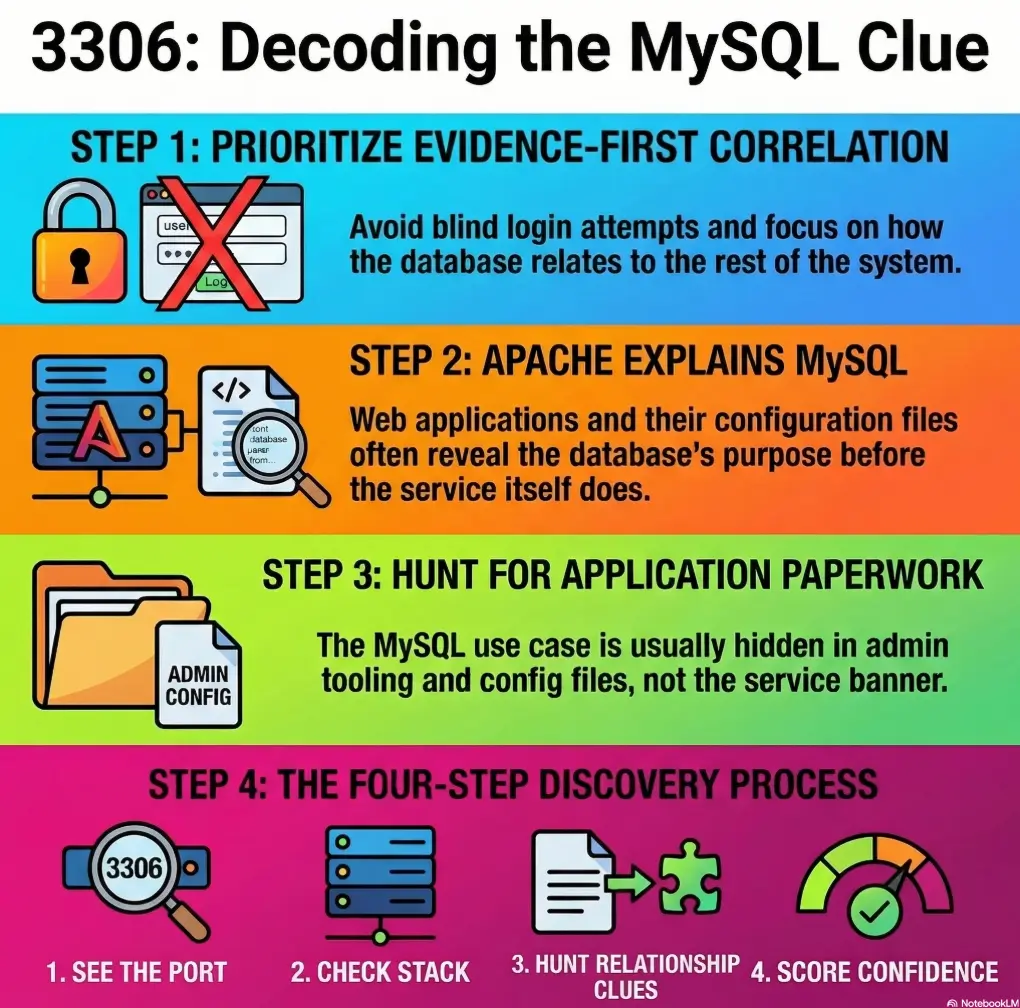
That is where learners get stuck. The homepage looks bland, Apache feels ordinary, and MySQL looks important enough to deserve obsession. So the notes get noisy, the theory gets dramatic, and the real relationship hiding in the LAMP stack slips quietly past. Keep guessing, and you do not just lose time, you weaken the logic you will later need for a clean write-up.
“A confirmed database service may support an application on the host or elsewhere. Record that relationship as unresolved until relevant application evidence or an authorized deployment review supports it.”
This guide helps you read that signal properly. Not louder. Sharper. You will see how to connect MySQL to Apache, naming clues, config files, and service age without turning one open port into a full-blown hallucination.
Because on old lab machines, the best clue is rarely the one making the most noise.
Before you chase port 3306: scope, lab boundaries, and what this guide is not
Who this is for
This is for learners working inside a private lab, an intentionally vulnerable VM, or a clearly authorized practice range. It is also for the reader who has already felt the strange gravity of an exposed database service and is trying to decide whether it is signal, noise, or the cybersecurity equivalent of a cardboard prop.
Who this is not for
This is not a shortcut sheet for accessing systems without permission, and it is not a one-command answer for a multi-clue problem. If the environment is not yours to assess, stop there. In a lab, though, the value of this question is enormous because it trains a habit that transfers well: do not confuse visibility with importance.
Why this topic fools people
An open database port feels important because it looks specialized. Apache on 80 or 443 can feel ordinary. MySQL on 3306 looks like a vault. The beginner brain, mine included, tends to hear dramatic music. Then the lab answers back with silence.
- Visible does not mean first priority
- Database services often explain architecture, not entry
- Old lab boxes reward correlation more than speed
Apply in 60 seconds: Write “What likely uses this?” next to port 3306 before you do anything else.
- Yes: You are in a private lab or authorized training VM.
- Yes: Your goal is to interpret service relationships, not force a result.
- No: You are touching a third-party system without permission.
- No: You want a direct-login shortcut instead of evidence.
Neutral next step: if you checked “yes” twice, build a service map before choosing priorities.
Open port, hidden story: why MySQL matters even when the website looks ordinary
The service may support a web app you have not mapped yet
A static-looking page does not prove the stack is static. Old PHP applications are masters of understatement. The front page can look like a half-empty waiting room while the real story lives in a login path, an admin directory, an installer remnant, or a hostname-specific virtual host that never appears unless the request arrives wearing the right name badge.
That is one reason the MySQL clue keeps surviving even when the website seems dull. In legacy environments, the database is often backstage crew. You do not see it when the curtain is closed, but the whole production still depends on it.
The port may reflect architecture, not exposure intent
Port 3306 is the default for the classic MySQL protocol, but the port number alone does not identify MySQL or prove access. Record the scan method and state, then corroborate with a protocol response or service detection. A confirmed listener may support an application without being the best first testing priority.
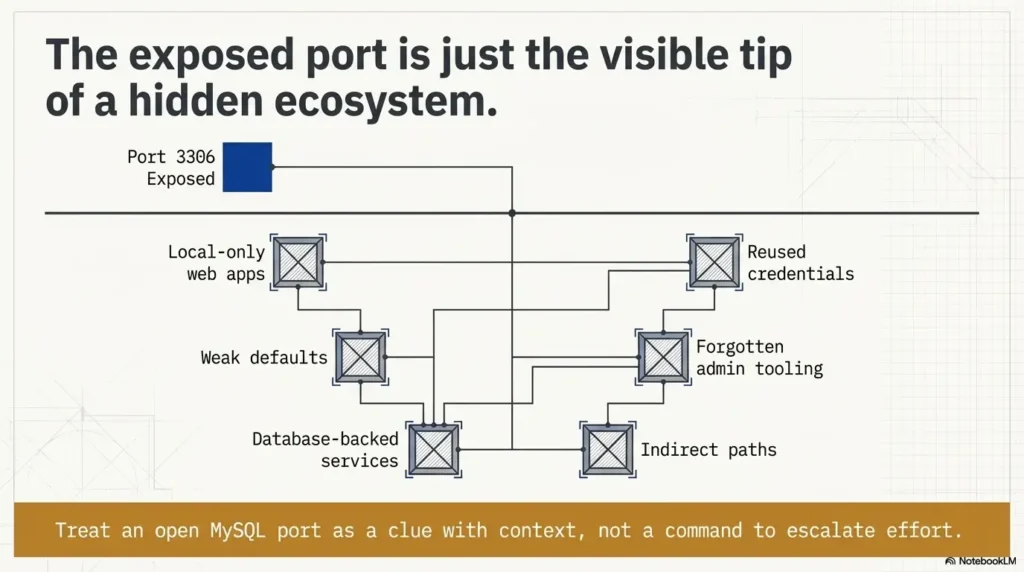
In other words, an exposed port may say, “This box was built with MySQL in mind,” not, “Please interact with me first.” Legacy lab images often preserve exactly that sort of loose exposure because it teaches you to read architecture from fragments rather than from polished diagrams.
Here’s the quiet part…
The database may not be the doorway. It may be the witness. It may validate something you discover in a config file, a page error, a hostname mismatch, or an app directory that suddenly turns a generic port into a very specific relationship. That shift from “service” to “relationship” is where a lot of beginners level up.
Show me the nerdy details
In old LAMP-style stacks, the presence of Apache, PHP indicators, and MySQL often tells you more as a bundle than any single service tells you alone. The more “era-consistent” the components look, the more likely the database belongs to an intended application layer somewhere on the host.
No obvious app? Start with correlation, not obsession
Match MySQL against the web stack
The first useful question is not “Can I do something with MySQL?” It is “What on this host would reasonably need MySQL?” That sounds almost embarrassingly plain. It is also the move that saves time.
Look for dynamic behavior in the web layer. Does the server leak PHP fingerprints through file conventions, headers, default documents, or errors? Does the directory structure hint at an app family? Does the page title sound human-curated rather than default-generated? Small clues accumulate fast when you stop forcing them into separate boxes. A disciplined Kioptrix HTTP enumeration workflow is often more revealing here than staring at the database port in isolation.
Match MySQL against service age
A very old Apache stack and an old MySQL service often travel as a pair in training boxes modeled on legacy Linux web environments. That does not prove a path. It does suggest that the open database is part of the host’s intended story, especially if the surrounding services feel like they belong to the same technological decade. Some boxes are less “castle” and more “garage after three software eras have collided.” Those are often the most educational.
Match MySQL against naming clues
Hostnames, page comments, directory labels, test paths, and admin-ish words matter more than they seem. “Dev,” “test,” “old,” “backup,” and application-flavored names often reveal why the database exists even before you know what the app does. One honest naming clue is worth more than ten imagined attack paths.
| When | Better first move | Why |
|---|---|---|
| Homepage looks bland, no app identified | Web correlation | You need the consumer of the database, not the database in isolation |
| App name or config pattern is emerging | Relationship mapping | Now the database clue can validate your theory |
| Only port number looks interesting | Do not elevate it yet | A lonely clue can become a time sink |
Neutral next step: rank services by the quality of their surrounding evidence, not by how dramatic they look.
The missing link is often Apache: where web clues explain the database
Virtual hosts can make MySQL look “unused”
The Apache HTTP Server Project explains that name-based virtual hosting allows multiple site names to run on one machine, which is exactly why the default page can mislead you into thinking the web layer is empty when the real application is simply tied to a different host context.
That matters here because a MySQL-backed application may not appear under the obvious request path. You can get a plain default page, shrug, and assume the stack is shallow, when the truth is more like this: you knocked on the building’s loading dock and concluded there was no theater inside.
Let’s be honest…
A surprising number of learners stop at the default page because it feels like a conclusion. In practice, it is often just a curtain. The real question is whether the rest of the stack is behaving as though something more lives behind it. If MySQL is open and the host smells like old LAMP, the odds are good that Apache knows more than it is saying. That is why Apache enumeration on Kioptrix-style boxes tends to pay off before you promote 3306 to lead actor.
- Default pages can hide hostname-dependent apps
- Old directory structure tells stories the homepage will not
- Web clues usually create better priorities than raw port visibility
Apply in 60 seconds: Ask whether the web response looks like a complete application or just the wrong front door.
Local app, remote port: the legacy configuration pattern people miss
MySQL may be remotely reachable even if the app is local-only
One of the oldest configuration mismatches in the room is this: an application is built to use a local database connection, but the service ends up listening more broadly than necessary. The result is a port that is visible from your scan but not truly meant as the box’s first interaction surface. It is exposed by configuration habit, not by narrative intent.
This is why “reachable” and “useful” need to stay separate in your notes. A port can be reachable because defaults were left alone, because the builder did not restrict the bind behavior, or because the lab intentionally preserves that sloppiness as a teaching device. The service is still meaningful. It just may be meaningful as a symptom.
Old defaults create noisy signals
OWASP’s database security guidance warns that default configurations often start with unencrypted or weakly protected network behavior, which is useful here as a general reminder that service exposure does not equal good design. In legacy-style training environments, bad defaults are often part of the educational wallpaper.
Misconfiguration is itself a clue
If the database is exposed more broadly than it should be, it is reasonable to suspect the same discipline gap elsewhere: weak file protections, reused credentials, verbose errors, forgotten copies, or administrative leftovers. One untidy layer does not prove another. But in old boxes, sloppiness travels in packs like raccoons around an unlocked trash bin.
Give yourself 1 point for each “yes.”
- Do you have at least one web clue that suggests dynamic content?
- Do service versions or tech stack hints look era-consistent?
- Do naming clues suggest a likely application or admin area?
0-1: Keep MySQL in view, but do not center your workflow around it yet.
2-3: The port is probably signal, but as part of a wider relationship map.
Neutral next step: update your notes with a score before choosing where to spend the next 10 minutes.
Credential gravity: why database clues often connect to reused secrets
The web app may hold the real value
When MySQL matters on an old lab box, it often matters because the application around it stores the assumptions: database name, username, password pattern, localhost dependency, install path, and environment choices. In other words, the database clue becomes valuable once the app gives it language.
This is one of those truths that feels anticlimactic until it saves you an hour. The treasure is not always in the chest. Sometimes it is in the map key.
Reuse is the real theme
Legacy systems, especially deliberately vulnerable training images, often teach credential correlation more than they teach direct service interaction. The same strings echo across usernames, schema names, application labels, and local account naming. The lesson is not “guess more aggressively.” It is “compare more intelligently.”
Here’s what no one tells you…
The open port is sometimes less useful than the fragments orbiting it. A config filename. A backup suffix. A schema label. A comment block. An oddly human app name. Those scraps are the lint in the pocket that tells you which jacket this clue belongs to.
Show me the nerdy details
In write-ups, the strongest reasoning chain is often: observed service → surrounding application evidence → plausible dependency → corroborating artifact. That order reads better, teaches better, and avoids the common beginner mistake of treating a single port as a complete theory.
Don’t do this first: the brute-force trap that wastes lab time
Mistaking visibility for priority
Just because you can see a service does not mean it deserves first place in your workflow. This is one of those maddeningly adult principles that feels unfair when you are excited and very fair when you are writing up why your first hour vanished into smoke.
Port 3306 looks actionable. Sometimes it is. But without context, it can become a glittering distraction. Not treasure. Just glitter. Cyber glitter is particularly expensive because it burns both time and confidence.
Confusing “possible” with “probable”
You can invent a dozen ways an exposed database might matter. Most of them will be theoretically plausible. The lab does not grade you on imagination alone. It rewards the path that fits the visible evidence best. That means preferring a narrow, well-supported theory over five dramatic maybes.
Why this mistake costs an hour
Because aggressive effort feels productive. Correlation feels slow. But in legacy lab analysis, the slower-looking move usually reaches the cleaner conclusion faster. The database is not offended if you make it wait. In fact, it is often relieved.
- “Open” is not the same as “best first move”
- Theories need supporting artifacts
- Evidence density should control your time, not adrenaline
Apply in 60 seconds: Write one sentence explaining why MySQL likely matters before you give it more attention.
Common mistakes
Treating MySQL as a standalone puzzle
This is the biggest one. People isolate port 3306 as though it were a mini-lab inside the lab. But old boxes often teach chain thinking. HTTP, hostnames, file structure, service age, and credential hints all talk to each other. The moment you isolate one clue, you muffle the rest of the choir.
Over-reading the homepage
A plain page does not prove a plain host. It proves that one request produced a plain response. That is much smaller. Beginners often grant the homepage authority it has not earned, like trusting a receptionist to know every locked room in the building.
Under-reading legacy clues
Version age, naming conventions, old software pairings, and application-era patterns are not trivia. They are architecture fingerprints. If Apache, PHP, and MySQL all look like they arrived at the same awkward family reunion, that matters.
Chasing noise instead of narrative
Some notes pages end up as a junk drawer: banners, ports, theories, half-formed guesses, and three arrows pointing nowhere. The better question is always, “What story explains the most clues with the least strain?” If your theory needs acrobatics, it is probably wrong. Or at least wearing someone else’s shoes.
- One web clue that suggests dynamic behavior
- One naming clue tied to an app, host, or admin path
- One service-era clue that supports a LAMP-style relationship
- One artifact that might link credentials or configuration assumptions
Neutral next step: reject any theory that cannot explain at least two of the four.
Don’t skip the boring files: where the use case usually reveals itself
Config files often answer the entire question
This is the least glamorous truth in the room and one of the most profitable, in learning terms. Old application configs, backup copies, installer leftovers, and framework defaults often reveal the database relationship more clearly than the database service itself. That is why mature operators read boring files with more respect than beginners usually grant them.
OWASP’s guidance on secrets management exists for a reason: credentials and sensitive configuration details become dangerous when they are left where they should not be. In training boxes, that same reality often becomes the clue that explains why the MySQL service exists at all.
Error messages can expose relationships
A page that complains badly may still be telling the truth. Connection failures, missing includes, schema references, and installation remnants can reveal application families, database names, and local assumptions. Failure output is still output. Sometimes it is more honest than success. A careful curl-only recon habit can be surprisingly good at catching these low-drama but high-value clues.
The database name itself can be a breadcrumb
Names matter. Schema names often mirror CMS families, project labels, test environments, or developer habits. Even a partial naming clue can transform “mysterious open MySQL” into “database probably tied to this app family or admin layer.” That shift is small on paper and huge in practice.
When MySQL is a decoy, not a doorway
Some services exist mainly to support the intended path elsewhere
On training boxes, a service can be central without being first. That sounds contradictory until you have seen it a few times. The database may support the intended application, validate a credential theory, or confirm a stack relationship, yet still be a terrible place to spend your opening energy. Think of it as structural steel. Essential, yes. Also not the front entrance.
The learning objective may be correlation
Kioptrix-style environments often reward you for seeing one weak clue validate another. That is part of their charm. They teach you to make meaning from partial evidence instead of waiting for a flashing arrow labeled “right answer.” An exposed database port may function as architectural foreshadowing, not as the headline act.
So what are you really looking for?
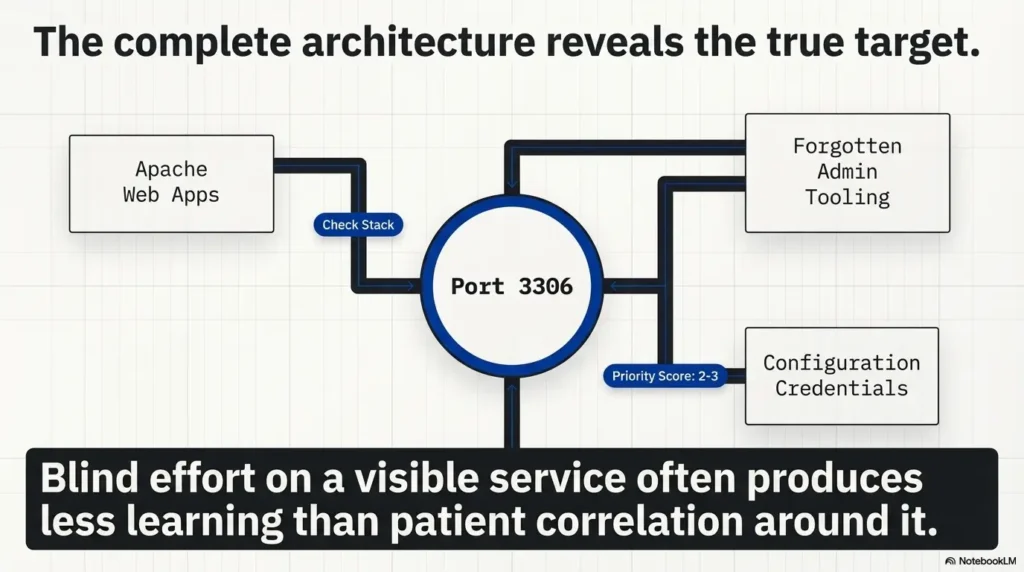
You are looking for proof of relationship. Evidence that Apache, PHP-like behavior, files, names, and MySQL belong to the same story. Once you have that, the box stops feeling like a junk drawer and starts feeling like a design, even a deliberately shabby one.
| Tier | What you have | Meaning |
|---|---|---|
| 1 | Open port only | Interesting, but weak |
| 2 | Port plus app-era consistency | Plausible relationship |
| 3 | Port plus naming or path clues | Actionable theory forming |
| 4 | Config, error, or artifact confirms dependency | Strong evidence |
| 5 | Multiple services now fit one coherent stack story | Excellent write-up quality |
Neutral next step: do not spend Tier-1 effort like you already have Tier-4 certainty.
Who this is for / not for
Best fit readers
This article best fits lab learners documenting enumeration logic, readers practicing evidence-first analysis, and beginners who want to understand why a port matters before deciding how much mental rent it deserves. If you care about clean reasoning, this topic pays back generously.
Poor fit readers
Use the guide for explicitly authorized lab reasoning about service identity, deployment relationships and evidence. It does not establish a credential path or demonstrate a new database access result.
What experienced readers already know, but still need to remember
Even seasoned operators can overvalue a visible database service when they are tired, rushed, or a little too pleased with themselves. I say that with affection because I have absolutely done it. Good notes and disciplined prioritization are the antidote to cleverness running off with the car keys.
Next step
Build a one-page service map before touching priorities
Here is the honest next move, and it closes the curiosity loop from the beginning: the reason port 3306 feels mysterious is usually that your clues are still living in separate mental boxes. Put them on one page.
Write down the visible web behavior, any hostname hints, application-flavored names, signs of dynamic content, legacy software cues, file-path clues, and the MySQL presence. Then draw lines between them. Not ten lines. Just the ones you can defend. When you do that, the missing “use case” often appears on its own, almost with the sheepish energy of a person who was in the room the whole time but standing behind a coat rack. If you need a steadier framework, start with a repeatable Kioptrix recon routine or compare your notes against a broader guide to interpreting open ports on Kioptrix targets.
Notice 3306, but do not crown it king.
Ask what web or app layer would reasonably need MySQL.
Names, paths, errors, and virtual-host clues matter more than drama.
Only elevate MySQL when several clues tell the same story.
Within 15 minutes, you can produce a cleaner answer than many learners reach in an hour: not “MySQL is open,” but “MySQL likely supports a legacy web application or admin layer suggested by these specific clues.” That sentence is calmer, truer, and far more useful. If your setup is fighting you before the analysis even begins, a Kali setup checklist for Kioptrix labs can keep environment friction from muddying the logic.
FAQ
Why is MySQL open on Kioptrix if the website looks static?
A static-looking homepage does not rule out a deeper PHP or admin application. On legacy lab boxes, MySQL often supports functionality hidden behind alternate paths, virtual hosts, or leftover application files.
Does an open MySQL port always mean it is meant for remote use?
No. A service can be remotely reachable because of loose configuration while still existing mainly to support a local application. Exposure and practical priority are not the same thing.
Should I prioritize Apache before MySQL on a legacy lab target?
Usually yes, if the application using MySQL has not been identified yet. Web clues often provide the context that makes the database meaningful.
What is the most common reason MySQL seems to have no use case?
The application that depends on it has not been mapped yet. Missing directories, hostname-based routing, admin tooling, or config artifacts often explain the gap.
Can an old PHP app explain an otherwise mysterious MySQL service?
Absolutely. Legacy PHP applications often rely on MySQL even when the visible web surface reveals very little at first glance.
What clues usually connect MySQL to the rest of the box?
Virtual host hints, dynamic-content signs, config filenames, path names, error messages, schema labels, and credential reuse patterns are the usual connectors.
Is it normal for training boxes to expose MySQL unnecessarily?
Yes. Deliberately vulnerable labs often preserve weak defaults or overly broad service exposure to teach interpretation, prioritization, and cross-service reasoning.
What should I avoid when I see 3306 open?
Avoid assuming the most visible specialized service deserves your first burst of energy. That mindset often converts one useful clue into a stubborn time sink.
If MySQL is not the entry point, why does it matter?
Because it helps explain the architecture, validate service relationships, and support stronger theories about the application or credentials that actually matter.
How do I know whether the port is signal or noise?
It becomes signal when you can tie it to believable web behavior, names, files, software-era consistency, or other evidence that shows the database belongs to a wider chain.
The big mystery was never really “Why is MySQL open?” It was “What else on this box gives that port meaning?” Once you ask the second question, the first one usually stops being foggy. The port quits trying to be the protagonist. It becomes what it often was all along: a supporting character with excellent timing.
Your best next step is small and concrete. In the next 15 minutes, make a one-page service map and force yourself to justify every line you draw between Apache, names, files, application hints, and MySQL. That one habit will teach you more than another hour of staring at 3306 like it owes you rent. And if you are still building your fundamentals, a curated Kioptrix Level 1 beginner reading path can make this kind of service correlation feel much less fog-bound.
Original review: 2026-03.
Technical guidance updated: 2026-10-13. Separated the default port label from confirmed MySQL identity and database access.
Database-listener evidence card
Use this record for the specific question in this guide. Complete it with the actual scope, conditions, evidence and assistance used in your own work.
On a small screen, scroll the table sideways to read all columns.
| Field | What to record | Your evidence / next check |
|---|---|---|
| Port observation | Record the TCP listener without assuming product identity. | To complete |
| Protocol evidence | Preserve the permitted greeting or service exchange. | To complete |
| Application relationship | Keep the proposed database dependency as a hypothesis. | To complete |
| Access boundary | Record any separately permitted account and attempt limits. | To complete |
Next action: Establish service identity before drawing a conclusion about application data access. Keep the supporting evidence and its conditions beside the decision.
Related task: Use LAMP Recon: Link Services Without Assuming the Stack for that separate part of the workflow.
Worksheet change record — October 20, 2026
Added four task-specific fields, a next action and a related guide. This is a blank editorial working aid, not a completed test or validated assessment. Existing source-review dates retain their own scope; this addition is not a new verification of every statement.