
Practical case: Read a walkthrough as a comparison experiment · Editable working note
Open the practical working record for this guide’s task-specific fields and next action.
Separate a worked example from your result
Record release, configuration and exact input/output before applying a published conclusion. Cross-service clues can strengthen a deployment hypothesis without verifying a product build or absent backport. Preserve alternative explanations and stop conditions. This page does not document a fresh exploit execution or guarantee that another imported image follows the same path. Reference and scope.
Mastering the Kioptrix Workflow: Evidence Over Motion
Use the walkthrough to organize observations, hypotheses and prerequisites in the actual lab image.
That is the real friction behind enumeration before exploitation. In a lab like Kioptrix, the first trap is rarely technical. It is cognitive. You see an open port, a login page, or a familiar service banner, and the brain starts writing fiction faster than the evidence can keep up.
Keep working that way, and you do not just lose time. You lose the one thing that actually makes a walkthrough useful later: a defensible chain of reasoning.
This post helps you build a cleaner Kioptrix Level workflow by treating Nmap results, SMB enumeration, web fingerprinting, and version clues as evidence to rank, not decorations to admire. The goal is not more scans. It is fewer wrong turns, stronger notes, and a path you can actually explain.
Start with the map. • Test the story. • Cut what the evidence cannot support.
In this lab, the fastest route is usually the one that pauses long enough to see clearly.
Table of Contents
Start Here First: Who This Is For / Not For
This is for you if you want a method, not just a flag
If you have ever finished a lab and felt oddly unsatisfied, you probably know why this section exists. Getting “root” without understanding why a path worked is like arriving at the right station after falling asleep on the train. Technically successful. Spiritually suspicious.
This article is for readers who want a repeatable method. Not because repetition sounds noble, but because it saves time. When you learn to identify patterns in SMB behavior, service banners, version drift, and web clues, a box stops feeling like a magic trick and starts feeling like a puzzle with decent lighting.
This is for you if you are practicing in a legal lab environment
Kioptrix belongs in a training box, classroom, home lab, or other explicitly authorized environment. That is the frame throughout this piece. We are talking about disciplined observation, evidence handling, and defensive skill-building. No chest-thumping. No production targets. No “just try this on a random subnet” nonsense.
This is not for production networks, client environments, or unauthorized testing
Keep the habits, lose the temptation. A sound workflow travels well. Unauthorized testing does not. That ethical line is not decorative. It is the floor under the whole room.
- Use this only in an authorized lab.
- Prefer evidence over excitement.
- Treat every clue as something to verify, not worship.
Apply in 60 seconds: Open a fresh note and create three columns: confirmed, probable, unknown.
Kioptrix Level Walkthrough: Why Enumeration Wins Before Exploitation
The real bottleneck is usually bad assumptions, not missing exploits
Most wasted time in beginner labs does not come from missing a famous vulnerability. It comes from trusting a flimsy story too early. “That port is open, so this must be the path.” “That banner looks old, so the exploit will fit.” “That login page exists, so the web app must matter most.” Labs are full of these little seductions.
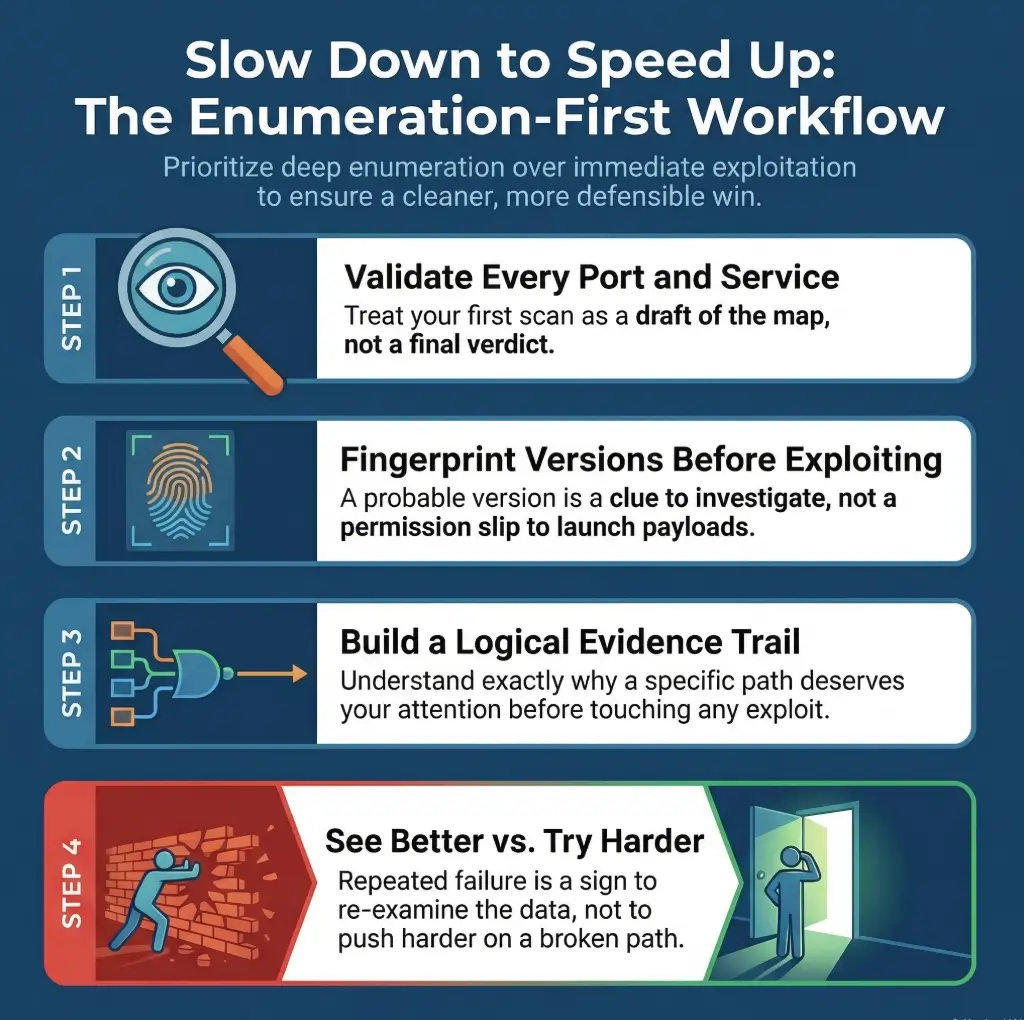
The better question is not “What can I attack first?” It is “What do I know with enough confidence to test next?” That tiny wording change turns chaos into triage.
How evidence-first enumeration reduces dead ends and rabbit holes
Evidence-first work does something deeply unglamorous and incredibly profitable: it lowers your error rate. Nmap documentation emphasizes host discovery, service detection, and environmental understanding, not just raw port counting, and that is a useful mindset for Kioptrix too. A port list is not the conclusion. It is the invitation.
When you collect evidence in layers, you get options. SMB names can hint at users or machine roles. Web headers can narrow technology guesses. Banner details can separate “interesting” from “merely open.” Suddenly you are no longer wandering. You are ranking possibilities.
Why “quick wins” often create longer labs
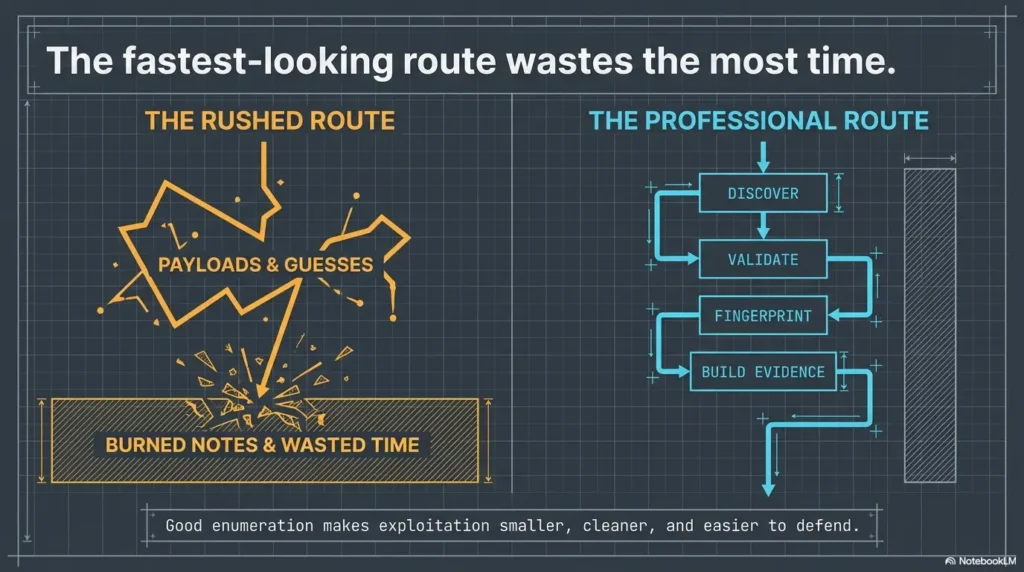
The quiet truth is that a ten-minute enumeration pause can save thirty minutes of false confidence. And false confidence in labs has a special smell. It smells like copy-pasting from a forum post written for a slightly different service version in 2011.
| If you do this | You usually trade away | Better next move |
|---|---|---|
| Jump to exploit references after first scan | Version confidence | Validate service details first |
| Chase the most visible web page | Lower-noise clues elsewhere | Fingerprint the stack first |
| Treat every open port equally | Prioritization | Rank by information yield |
Neutral next action: Pick the service most likely to reveal identity, version, or naming clues before anything interactive.
First Contact Matters: Build Your Lab Notes Before You Touch a Service
Capture target IP, scan times, and tool versions from the beginning
Your first note should feel almost boring. Target IP. Date. Time. Host-only or NAT. Tool version. Command used. Why? Because the moment a result surprises you, context becomes expensive. If your scan behavior changes, or a VM gets reset, or a service responds differently on a second pass, these plain facts become your anchor rope.
Separate facts from guesses in your notes
This single habit upgrades a beginner faster than people expect. Write facts in one style and guesses in another. For example:
- Fact: Port 139 responds and identifies SMB-related behavior.
- Fact: Web service returns specific headers.
- Guess: Legacy stack may align with older public references.
- Unknown: Whether null session access yields useful identity data.
That separation matters because the brain loves to varnish guesses until they look like furniture. Notes are where you stop that process.
Create a mini decision log you can reuse later
Every time you choose a next step, capture the reason in one sentence. Not a novel. Just one sentence. “Checking SMB first because it may reveal names, shares, or environment details that sharpen web hypotheses.” That one sentence will rescue you later when a path fails and you need to pivot without losing the thread.
Let’s be honest… most lost time starts with messy note-taking
People love to mock documentation as if it were the tax season of cybersecurity. In reality, clean notes are the difference between learning and reenacting your own confusion. A good lab notebook is less diary, more black box recorder. If you want a reusable structure, borrow from a note-taking system built for pentesting rather than improvising under pressure.
- Yes / No: Did you record the target IP and network mode?
- Yes / No: Did you save the exact first-pass scan command?
- Yes / No: Did you label what is fact versus assumption?
- Yes / No: Did you write one reason for your first pivot?
Neutral next action: If two or more answers are “No,” repair the notebook before deepening the scan.
Port Scan Triage: What the First Nmap Results Really Mean
Read the scan like a map, not a trophy
Beginners often treat the first Nmap output like a treasure chest: open ports equal progress, more lines equal better work. But the real value of the first scan is not volume. It is direction. Nmap’s reference guide frames version detection and service discovery as ways to understand what a host is offering, not as an excuse to stop interpreting.
A good first pass asks three questions. Which services look identity-rich? Which ones are likely to produce environment clues? Which ones are loud enough to distract me from quieter, more valuable evidence?
Which open ports deserve second-pass validation first
In a Kioptrix-style environment, you are rarely choosing between “important” and “unimportant.” You are choosing between high-yield and medium-yield. SMB often deserves early love because it can expose names, policies, shares, and hints about the surrounding stack. Web services deserve attention too, but a pretty login page is sometimes just the lab’s way of jangling keys in front of a tired analyst.
The second pass should deepen understanding, not just increase packet volume. Validate service behavior. Confirm banners. Compare response patterns. Resist the urge to turn every scanner knob like you are piloting a submarine in a panic. If your first scan is already messy, this is where a guide on how to interpret Kioptrix open ports or a breakdown of Nmap service-detection false positives can keep you from promoting guesswork into doctrine.
How service banners change your next move
Banner details are not decorative. They shift your probabilities. A service banner can narrow likely software, suggest an era of deployment, and tell you whether a public reference is worth even reading. Not trusting banners blindly is important too, but ignoring them is like refusing to read road signs because maps can be outdated. Done poorly, this is how people stumble into classic banner grabbing mistakes and start arguing with the evidence instead of learning from it.
Why one open port can be louder than five others
Show me the nerdy details
For disciplined second-pass validation, think in layers: basic port state, service identification, version confidence, naming clues, protocol behavior, and cross-service consistency. If web headers suggest one ecosystem while SMB naming suggests another, that mismatch itself becomes evidence. The goal is not “run every scan.” It is “reduce uncertainty with the fewest justified checks.”
- Rank ports by information yield.
- Use second-pass checks to validate, not impress yourself.
- Let banners influence hypotheses, not dominate them.
Apply in 60 seconds: Circle one service that can reveal names or versions, and one that can confirm the software stack.
SMB Is Talking: What Enumeration Clues People Miss Too Early
SMB shares, null sessions, and naming clues worth capturing
Samba’s own documentation makes clear that smbclient is for talking to SMB/CIFS servers and retrieving directory information, while rpcclient exists to interact with MS-RPC functionality in the Samba suite. In a lab context, that means SMB is not just “a port that exists.” It is a possible source of names, shares, and structural clues that can reshape the whole walkthrough.
That does not mean you charge in recklessly. It means you treat SMB as a conversation partner with a tendency to reveal personality in small slips. Share names, workgroup naming, exposed browse information, and access behavior can all help narrow your next move. In older labs, even the difference between null-session behavior on port 139 versus 445 can quietly change your expectations.
How user, group, and machine details can reshape the whole path
Few things sharpen a lab faster than identity. If you learn something about users, groups, host naming, or machine role, your web hypotheses change. Your local privilege thoughts change. Even your note structure changes. Suddenly you are no longer describing “the target.” You are describing a system with shape.
When SMB data suggests web, RPC, or local privilege angles
Good enumeration is cross-pollination. SMB might not give you the answer, but it often tells you where to ask the next question. A hostname can line up with a web artifact. A share name can imply application behavior. An RPC response can suggest where identity and permissions might matter later. Even a failure can be useful if it narrows what is likely not available. When it does fail, the pattern of failure matters too, whether that looks like enumdomusers refusing to cooperate or a frustrating NT_STATUS_ACCESS_DENIED from rpcclient.
Here’s what no one tells you… the “small” SMB clue is often the whole story
The glamorous fantasy is that success arrives in a dramatic leak. More often, it arrives in a small naming clue you nearly ignored because it did not look cinematic. Labs reward readers, not just runners.
Practical capture list:
- Share names and access behavior
- Workgroup or domain hints
- User or machine naming patterns
- Anything that cross-references web content or banners
Web Service Clues: Don’t Chase the Login Page Too Soon
What to fingerprint before you test anything interactive
OWASP’s testing guidance describes web server fingerprinting as the task of identifying the type and version of the web server, and it emphasizes understanding how that identification happens rather than relying blindly on automation. That is exactly the right posture for Kioptrix: fingerprint first, fantasize later.
Before touching forms, look at headers, server behavior, response patterns, default files, and directory hints. You are trying to answer a modest but powerful question: what stack am I likely standing in front of? If you want to stretch that question properly, it helps to compare basic HTTP enumeration with a more focused pass on Apache-specific enumeration clues.
How headers, server versions, and default files narrow the field
A header can suggest a family of technologies. A default page can reveal configuration habits. A slightly neglected error page can whisper the era of the box. None of these alone deserve worship. Together, they can turn a vague exploit fantasy into a narrower, testable theory.
Directory hints that matter more than flashy forms
Forms create emotional gravity. Directories create investigative gravity. One invites interaction. The other reveals structure. If you have to choose where to spend your early attention, choose the place more likely to tell you how the system is assembled. Sometimes that means a deliberate, low-drama pass with wget mirroring for recon or a minimal curl-only workflow before you reach for heavier tools.
Why the quietest web artifact sometimes beats the obvious entry point
The obvious page is obvious to everyone. The quieter artifact is where systems accidentally become legible. This is not an anti-web stance. It is a sequencing rule. Fingerprint, infer, then interact. That order also saves you from overreacting to scanner noise, including the kind of chatter that leads to Nikto false positives in older labs.
Read a walkthrough as a comparison experiment
Practice guidance / illustrative examples. No new VM execution or measured outcome is claimed for this section.
Do not rank a web path by adding points for banners and directories. Those clues can come from the same default page and may not be independent. Write the exact conclusion the next permitted observation could change.
Illustrative comparison: a walkthrough identifies an old web application, but your page redirects elsewhere. Record the release, hostname, requested path and redirect before assuming the application matches. Check whether the guide used a hostname mapping or another virtual network. Do not follow an unexpected redirect outside the lab.
Use the walkthrough to resolve one named gap, then return to your own record. Keep a column for ‘source result’ and another for ‘my observation.’ A disagreement is useful evidence; it is not something to edit away to make the narrative match. Disclose hints and distinguish steps merely read from steps actually performed.
Version Drift and False Confidence: The Exploit Match Problem
Why service version guesses can betray you
The phrase “looks vulnerable” has ruined many perfectly good afternoons. A likely version is not a confirmed version. A confirmed version is not guaranteed exploit applicability. Applicability is where labs separate pattern recognition from wishful thinking.
This is one reason version drift matters so much. A banner may point you toward a likely family or era of software, but your job is to keep the word likely alive until the evidence gets stronger. Kill that word too early, and the walkthrough starts lying to you.
How to confirm likely software stacks before mapping an exploit path
You do this by cross-checking. Validate each service’s own protocol behavior. Neighboring services can corroborate the host context, but cannot verify another service’s exact version or patch status. Compare web fingerprints with network banners. Compare what a tool reports with what a manual check suggests. Nmap’s documentation and OWASP’s guidance both reinforce the idea that automated identification is useful but not magical. Use tools as witnesses, not prophets. That witness-versus-prophet distinction matters whenever a tool reports the wrong OS version or your scan starts looking a little too certain for the evidence it actually has.
Read exploit references like a skeptic, not a gambler
A good skeptic asks three questions:
- Does the environment match closely enough to deserve testing in this lab?
- What exact evidence supports the match?
- What evidence would falsify the match quickly?
That last question is especially beautiful. It protects you from romance. Every lab needs less romance and more receipts.
One version string, three wrong assumptions
A version string can trick you into assuming platform details, patch status, module behavior, or deployment context that are not actually confirmed. That is how a seemingly “obvious” path turns into a swamp. Good operators do not just accumulate possibilities. They prune them.
- Corroborate each service separately; neighboring services provide context, not exact-version proof.
- Ask what would quickly disprove your match.
- Keep “likely” in your notes until evidence earns promotion.
Apply in 60 seconds: Rewrite your strongest exploit hypothesis using the phrase “if this version match is correct.”
Don’t Do This: Common Mistakes That Burn 30 Minutes Fast
Treating the first scan as final truth
The first scan is a sketch. If you treat it as scripture, the lab will eventually mock you for it. Services can be misread, confidence can be low, and the meaning of a port depends on context. The scan is your first witness, not the judge.
Skipping manual validation because the port list “looks enough”
“Looks enough” is one of those phrases that sneaks into a lab right before the wheels come off. When a service may decide the whole route, manual validation is not bureaucracy. It is cheap insurance.
Chasing public exploits before confirming applicability
This is the classic beginner trap because it feels productive. Tabs are open. References are piling up. Keyboard noise is happening. But nothing has become more true. The lab has simply become louder. It is the same psychology behind many recon mistakes in Kioptrix and the broader pattern of enumeration errors that waste otherwise good sessions.
Ignoring naming conventions, banners, and tiny environmental clues
The clues people skip are often the clues that give structure. A machine name. A share label. A default page title. A response quirk. These details look small only until you need them.
The shortest path in a lab is often the one that requires the fewest fantasies.
Evidence Chain First: Turn Enumeration Into an Exploitation Decision Tree
How to sort findings by reliability, impact, and effort
Once you have raw findings, sort them. Reliability asks how sure you are the clue is real. Impact asks how much it changes the field if true. Effort asks how costly the next check will be. This is how you stop being a collector of facts and become an editor of them.
For example, a confirmed service banner with a strong version hint may be medium effort, high impact, and medium-to-high reliability. A vague web clue might be low effort but lower reliability. SMB naming information might be modest effort with surprising downstream value. Your job is to place each clue where it belongs.
Build “if true, then next” branches from each confirmed clue
This format keeps your notes honest. If SMB reveals naming clues, then verify whether those clues align with web artifacts. If web fingerprinting suggests a stack, then compare it against service behavior. If a supposed version match looks tempting, then write the specific check that would confirm or weaken it.
The phrase “if true, then next” is ridiculously useful because it turns guessing into conditional thinking. Conditional thinking is the adult supervision your lab deserves.
When to pause and rescan instead of pushing forward
Pause when the same hypothesis survives only because you have not tested it properly. Pause when two services tell slightly different stories. Pause when your notes contain more adjectives than observations. “Interesting,” “probably,” and “maybe vulnerable” are fine as placeholders, but they should not become the house you live in.
The goal is not more data, it is better decisions
This is the line many people need printed on a sticky note. More data can help. Better decisions help more. A lab is not won by maximum output. It is won by reducing uncertainty with some dignity. A structured Kioptrix recon routine can help if your default style tends to wander.
- One confirmed service fact
- One naming or identity clue
- One cross-service consistency check
- One falsifier for your favorite hypothesis
Neutral next action: Do not advance a path until you can fill at least three of the four items above.
Dead-End Detection: How to Know You’re Forcing the Wrong Path
Signs your current hypothesis is collapsing
A collapsing hypothesis usually shows its cracks in patterns. Repeated checks produce weak alignment. A version guess keeps needing excuses. One service points east while another points west. Your notes start sounding like a courtroom drama where every witness is “hostile.”
I have learned to distrust any path that requires three consecutive sentences beginning with “maybe.” One “maybe” is curiosity. Three is a fog machine.
When repeated failures mean your enumeration is incomplete
Failure itself is not the signal. Uninformative failure is. If checks fail in a way that teaches you nothing, your enumeration may be shallow. Go back and ask what environmental detail you still lack. A role hint. A service confirmation. A stack clue. A naming pattern. Labs rarely fail because you are cursed. They fail because one earlier question was left too blurry.
How to pivot without restarting from zero
This is where your decision log pays rent. You do not restart from zero. You return to the last reliable clue, then branch sideways. Preserve disproved paths in your notes so you do not accidentally revive them later like bad television writers bringing back a character no one asked for. If you need a rule for that moment, the rabbit-hole rule exists for a reason.
Let’s call it what it is… sometimes the exploit is not the problem
Sometimes the exploit reference is fine. The workflow around it is not. The lab was trying to tell you something, and you were busy refreshing the wrong tab.
- Look for cross-service contradictions.
- Prefer informative failure over noisy repetition.
- Pivot from your last reliable clue, not from frustration.
Apply in 60 seconds: Mark one current hypothesis as “weakening” and write the missing clue that would revive it.
Report-Friendly Enumeration: What to Capture for a Clean Walkthrough
Screenshots, command output, and note structure that actually help
A walkthrough becomes report-friendly when another analyst could retrace your logic without reading your mind. Save screenshots sparingly but meaningfully. Preserve command output that supports a conclusion. Keep timestamps where they matter. Capture enough structure that someone else can tell what you observed, what you inferred, and what you ruled out.
How to distinguish observed evidence from inferred risk
Observed evidence is what the box actually told you. Inferred risk is what that evidence may imply. Mixing the two makes the walkthrough harder to trust. Keep the distinction visible. “Observed: service presents version hint.” “Inferred: legacy software path may deserve validation.” That format is clean, fair, and reusable.
Writing findings so another analyst could reproduce your path
Use short sentences and stable labels. Write what you checked, what it returned, and why it changed your next move. Good lab writing is not ornate. It is legible under pressure. If you want the end product to read well beyond the lab itself, study how a Kioptrix pentest report or a more general Kali pentest report template organizes evidence.
Why clean reporting sharpens your technical thinking
Reporting is not something you do after the real work. Reporting is the thing that exposes whether your real work made sense. The cleaner the narrative, the sharper the logic usually becomes.
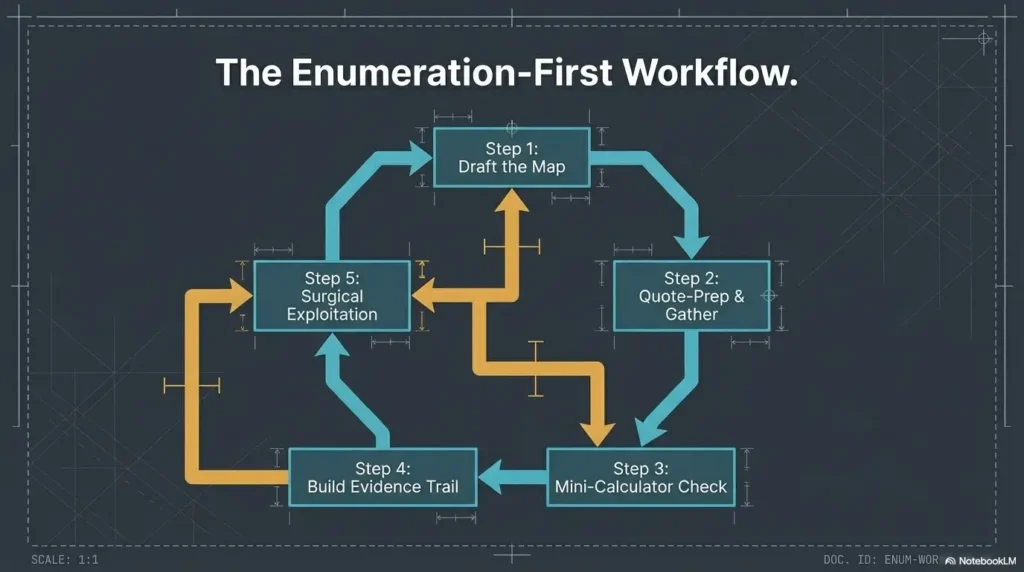
host, ports, timing
service, banner, behavior
SMB, web, naming clues
reliability, impact, effort
only after evidence fits
Common Mistakes: The Subtle Habits That Make Beginners Look “Busy”
Confusing activity with progress
A lab can feel productive while going nowhere. Tabs multiply. Tools hum. Notes expand sideways. But progress is not measured in motion. It is measured in reduced uncertainty. If you cannot explain what became clearer in the last fifteen minutes, the answer may be “not much.”
Over-scanning without interpretation
There is a kind of comfort in launching more scans because interpretation is harder than collection. Interpretation asks you to choose. Collection lets you procrastinate in a socially acceptable outfit.
Trusting tool defaults more than target behavior
Defaults are useful beginnings, not permanent parents. The target’s behavior should have the louder voice. If a tool suggests one thing and the service behaves another way, that tension deserves attention. Not tantrums. Attention.
Forgetting that unanswered questions are part of the workflow
A mature walkthrough is not one without unknowns. It is one where the unknowns are named, ranked, and handled honestly. “Unknown” is not an embarrassment. It is one of the most respectable words in any notebook.
Three habits that make you look calmer and more competent:
- Write down what changed your mind.
- Save one representative output instead of ten nearly identical ones.
- Stop a path when the evidence gets thinner, not when your ego gets louder.
The Ethical Line: Keep Kioptrix in the Lab Where It Belongs
Why walkthrough habits must stay tied to authorized practice
Technique without boundaries ages badly. Enumeration skill is valuable for defense, verification, training, and communication inside authorized environments. Outside that frame, the same habits become something else entirely. So keep the box where it belongs: in the lab, in the classroom, in the practice range.
How to frame your learning around defense, validation, and documentation
The most future-proof way to learn on Kioptrix is to treat every step as practice for defensive reasoning. What did the service reveal? What should an admin have hidden? What naming conventions leaked useful context? What would you document if this were a post-lab review? That mindset develops the part of you employers and teams actually trust.
What “safe lab-only” means in practical terms
It means explicit permission. It means isolated environments. It means no testing on systems you do not own or have authorization to assess. It means writing notes that would still look responsible if someone else had to read them tomorrow morning. If you are still building that environment, a guide to creating a safe hacking lab at home is a better investment than another impatient shortcut.
There is a quiet relief in staying on the right side of the line. You get to learn cleanly. You get to sleep cleanly too.
Next Step: Run One Pass, Then Rewrite Your Assumptions
Perform one clean enumeration cycle and label every finding as confirmed, probable, or unknown
This is the practical close to the hook we opened with. The reason busy labs feel hollow is that they blur observations and stories. Your next step is to separate them. Run one clean pass. Label every clue as confirmed, probable, or unknown. That one act turns noise into shape.
Choose only one path to validate next based on evidence, not excitement
Not two paths. Not five. One. The strongest path is the one with the best blend of reliability, impact, and affordable effort. This is where the walkthrough becomes smaller and better. It stops trying to be heroic and starts trying to be correct. If you want a companion piece for that moment, deciding which service to investigate first is exactly the kind of question worth answering before your attention wanders off wearing sequins.
Save your notes as if you will have to explain every decision tomorrow
Because someday you probably will. Even if the audience is just you, one sleep cycle later.
- Label findings by confidence.
- Advance only one branch at a time.
- Write notes fit for tomorrow’s scrutiny.
Apply in 60 seconds: Pick your top clue and write one sentence explaining why it deserves the next check.
FAQ
What does “enumeration before exploitation” actually mean in Kioptrix?
It means you spend your early time discovering and validating what is present before attempting to force a path. In practice, that means identifying services, checking banners and versions carefully, correlating SMB and web clues, and building a short evidence chain before considering whether an exploit hypothesis is even justified.
How much time should I spend enumerating before testing an exploit path?
There is no holy number, but a useful rule is this: enumerate until your next move has a written reason and a written falsifier. If you cannot explain both, you probably need another pass. For many learners, 10 to 20 focused minutes of disciplined enumeration saves much more time than it costs.
Which services in Kioptrix usually deserve the deepest second-pass review?
The ones most likely to reveal identity, naming, version, or structural clues. SMB and web services often earn deeper review because they can expose cross-service context. The exact order depends on what your first-pass scan and validations actually show.
Do I need multiple tools, or can one solid scanner be enough to start?
One strong scanner is enough to start, but not enough to think for you. The goal is not collecting a giant tool belt. It is using a small set of checks well, then validating the meaning of what they return. Good interpretation beats tool sprawl almost every time.
How do I know whether an SMB clue is actionable or just noise?
An SMB clue becomes actionable when it changes another decision. If a share name, machine label, or RPC detail narrows your web hypothesis, affects your version confidence, or changes what you validate next, it is not noise. If it does none of those things, keep it noted but lower its priority.
What should I write down during enumeration so I do not lose the thread?
Record the target IP, scan times, commands used, service findings, banner details, naming clues, and one-sentence reasons for each major pivot. Separate facts from guesses. That one habit keeps the walkthrough from turning into a blur.
Why do exploit references fail even when the service looks similar?
Because “similar” is not the same as “applicable.” Version strings can mislead, banners can be incomplete, environments vary, and public references often assume conditions your lab may not match exactly. This is why confirmation and cross-checking matter so much before any exploit testing.
Should I focus on web enumeration or network services first?
Focus first on whichever service is most likely to reduce uncertainty fastest. Many analysts over-prioritize the most visible web page, but quieter network services can sometimes reveal the naming and version clues that make web findings more meaningful. Let information yield decide, not visual drama.
What is the biggest beginner mistake in Kioptrix-style labs?
Confusing motion with progress. People rush into an attractive path before they have enough evidence, then keep pushing because they have already invested time. The better habit is to stop earlier, rewrite assumptions, and choose one evidence-backed branch.
How do I turn raw scan output into a real attack hypothesis?
Sort each finding by reliability, impact, and effort. Then write it as a conditional statement: “If this clue is accurate, the next best validation is X.” That format keeps your reasoning honest and prevents the lab from becoming a pile of unranked possibilities.
The curiosity loop from the beginning closes here: the hollow feeling in a lab usually does not come from lacking courage. It comes from lacking shape. Enumeration gives the work shape. It turns “I did a lot” into “I know why this branch deserves to exist.”
So your next fifteen minutes are simple. Run one clean pass. Rewrite your assumptions. Rank your clues. Choose one branch. Save notes that Future You will thank you for instead of prosecuting. That is how Kioptrix stops being a scramble and becomes a craft.
Original review: 2026-03.
Technical guidance updated: 2026-10-13. Separated cross-service context from verification of exact versions and patch status.
Working note: Read a walkthrough as a comparison experiment
Replace the prompts with your own authorized lab evidence. Select the completed text and copy it to a local note before leaving. This field is not submitted or saved; reload clears edits. Do not enter passwords, tokens or personal data.
Related task: Continue with the related practical guide.